
Açıklama
Coldstash archives old WooCommerce orders without deleting them. Completed orders from years ago move out of the live order tables into archive tables in the same database. You can still search them, open them read-only, and restore any of them with its original order number.
Orders are the fastest-growing data in a WooCommerce store. Every sale adds order rows, line items, item meta and order notes, and years of history make the live order tables large, which is what every order query, order screen and migration has to work through. Deleting old orders is the usual cleanup advice, but it loses history your accounting, customers and support may still need. Coldstash is the middle ground: a smaller set of live orders, and the old ones safely kept. If you came here looking for a way to bulk delete old WooCommerce orders, archiving gets you the cleanup without the risk.
Who it is for
- Established WooCommerce stores with years of order history and large order tables.
- Agencies and developers who look after those stores and want a reversible cleanup.
- Merchants who need to keep old orders for accounting or legal reasons, but not in the live tables.
What makes it safe
- Your reports do not change. WooCommerce Analytics reads its own lookup tables, and this plugin never touches them. Archive 2019 and your 2019 revenue is still there.
- Verify before delete. An order’s live rows are only removed after its archived copy has been read back out of MySQL and its checksum confirmed. A failed archive costs you nothing.
- Original order numbers. Restored orders come back with the same ID they had, because order numbers appear in your accounting and shipping history.
- Nothing is deleted, ever. Not on archive, not on deactivation, not on uninstall: the archive tables can only be removed once they are empty and you opt in.
What it skips, on purpose
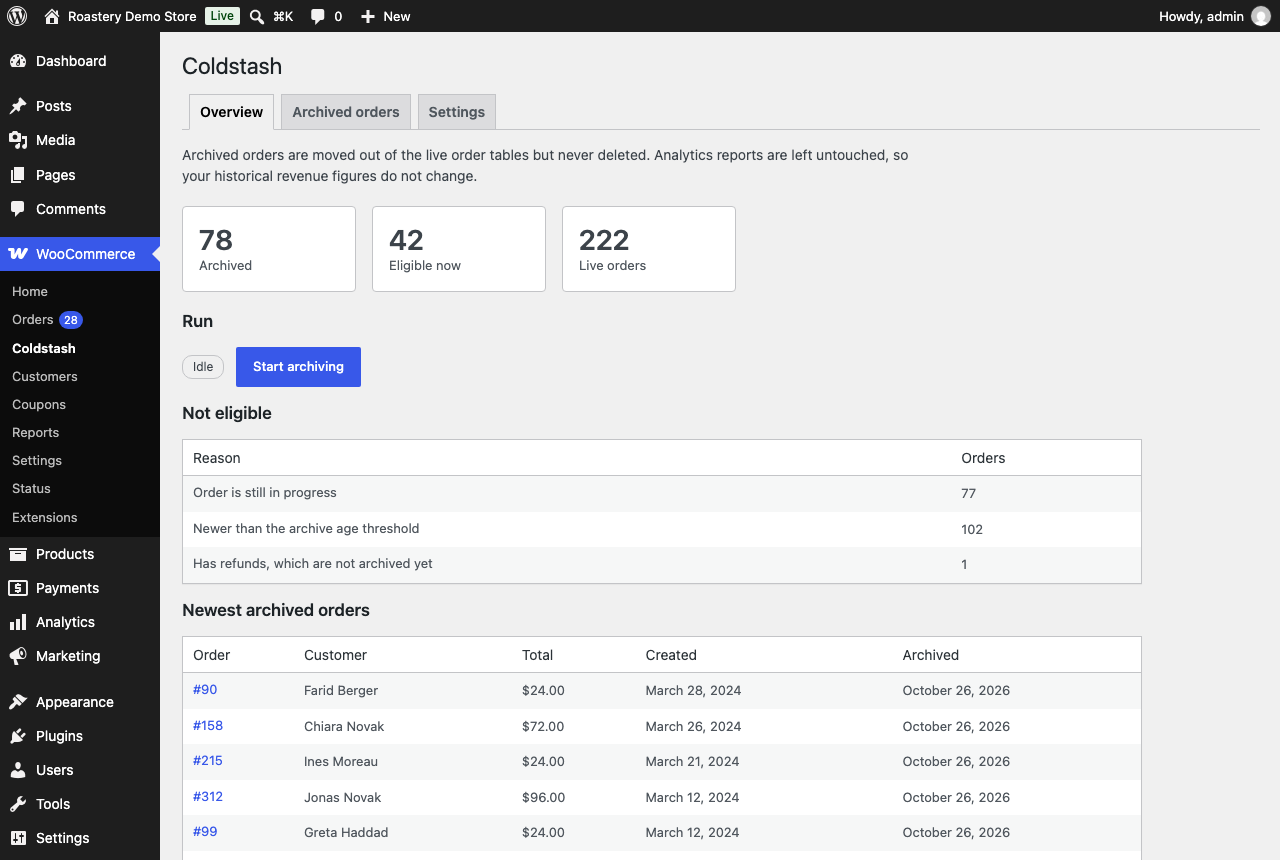
Orders that are still in progress, orders newer than your age threshold (24 months by default, at least 12), orders with refunds, orders with active download permissions, and anything attached to WooCommerce Subscriptions, Bookings or Memberships. Every exclusion is shown with its reason before you run anything.
WP-CLI
wp coldstash preview, `run`, `status`, `restore <id>` / `restore --all` and `verify` give you full control from the command line.
Requirements
Requires High-Performance Order Storage (HPOS) with compatibility-mode sync turned off. Stores on legacy post-based order storage are not supported; the plugin stays idle and tells you why.
Privacy
Coldstash stores archived orders, including the customer’s personal data in them (name, email, addresses, phone, IP address), in your site’s own database. It sends no data to any external service and contains no tracking or analytics.
Ekran Görüntüleri


Yükleme
- Install and activate WooCommerce, and make sure High-Performance Order Storage is enabled under WooCommerce Settings Advanced Features, with compatibility mode off.
- Install Coldstash – Archive Old Orders for WooCommerce from Plugins Add New, or upload the zip, and activate it.
- Go to WooCommerce Coldstash. Check the Settings tab (24 months, completed and cancelled orders by default), review which orders are eligible and why others are excluded, then click “Start archiving”.
Archiving runs in the background with Action Scheduler, in small batches, and can be stopped at any time.
SSS
-
How do I clean up old WooCommerce orders without deleting them?
-
Install Coldstash, choose how old an order must be (24 months by default, at least 12) and which statuses to archive, then click “Start archiving”. Old orders move into archive tables in the same database, and you can restore any of them at any time.
-
Should I delete old WooCommerce orders or archive them?
-
Archive them. Deleting shrinks the order tables too, but it is permanent: the order history your accounting, tax records, customer support and repeat customers rely on is gone. Archiving moves old orders out of the live tables just as effectively, and any of them can come back with its original order number.
-
Will it make WooCommerce faster?
-
It depends on what is slow. With HPOS, WooCommerce’s order screens are already fast at large sizes. What grows without limit is the order meta, line item and order note tables, and that is what anything joining order data has to work through: exports, custom reports and integrations. Archiving keeps those live tables at the size of your recent orders. It does not speed up the storefront, and it does not shrink the database as a whole.
-
Does this delete my orders?
-
No. Orders are moved to archive tables in the same database and can be restored at any time, individually, in bulk or all at once. Nothing is deleted on archive, on deactivation, or on uninstall.
-
Does it make my database smaller?
-
It makes the live order tables smaller, which is where WooCommerce reads and writes orders. The archive lives in the same database, so the database as a whole stays about the same size. If you want a smaller database overall, Coldstash is not a deletion tool and will not do that.
-
Will my WooCommerce Analytics reports change?
-
No. That is the central design decision: WooCommerce Analytics reads its own lookup tables, and Coldstash never touches them, so your revenue history stays the same. One caveat: WooCommerce’s “Regenerate Analytics data” tool rebuilds reports from the live order tables and would drop archived orders. Coldstash warns you on that screen; use “Restore all” first, regenerate, then archive again.
-
Can I restore an archived order?
-
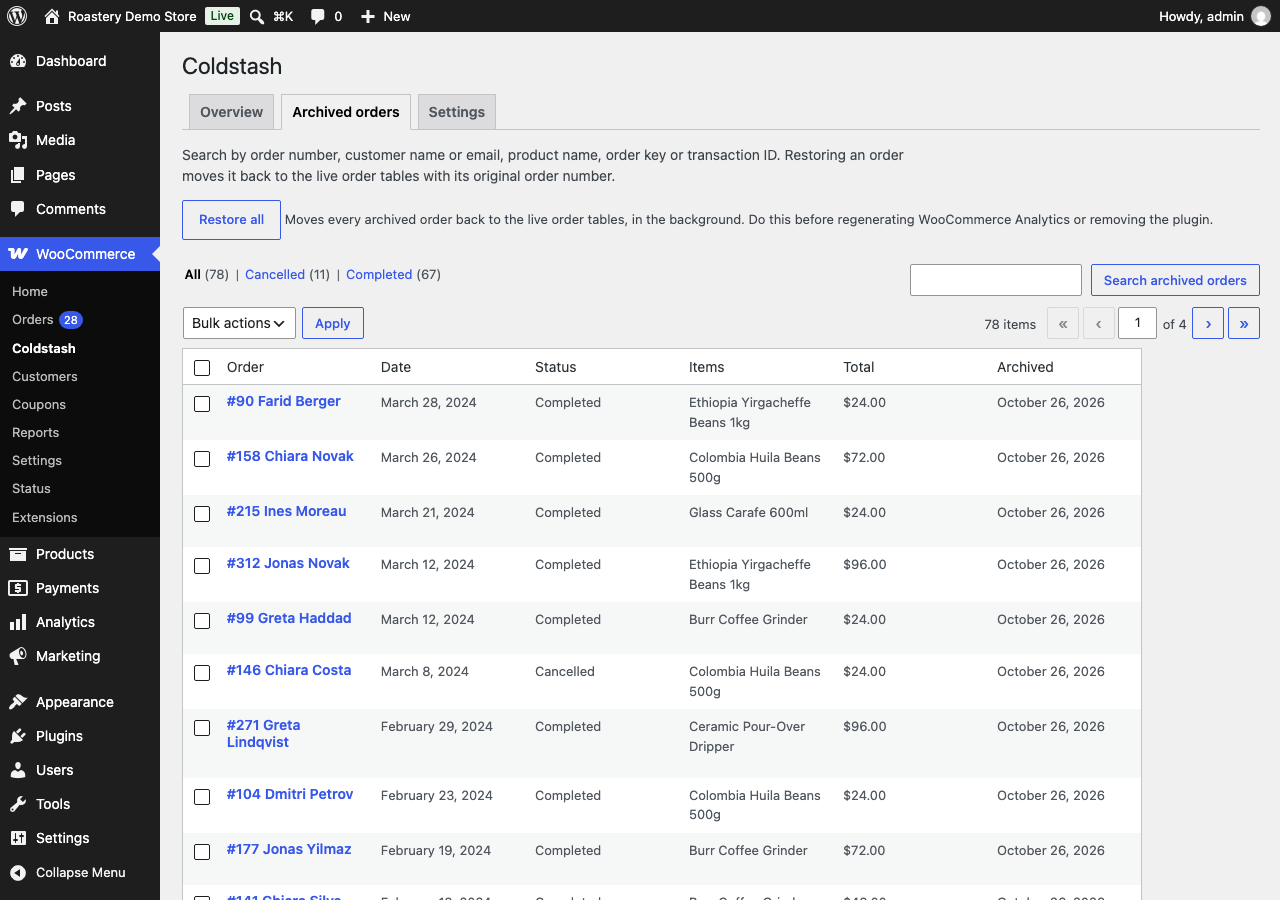
Yes. Open WooCommerce Coldstash Archived orders, find the order by number, customer, email, product or transaction ID, and click Restore. It comes back with the same order number, and you can edit, refund or resend it like any other order. “Restore all” puts every archived order back in the background.
-
If I restore an order, will it be archived again?
-
Not if you restored it on its own: it stays in the live tables and shows up as “Restored from the archive” in the exclusion list. Orders put back with “Restore all” are treated like any other order, so the next archive run can archive them again.
-
Can I choose which orders are archived?
-
Yes, under WooCommerce Coldstash Settings: how old an order must be (at least 12 months), which statuses to archive (completed, cancelled, failed), and whether orders with active downloads stay live. Orders that are pending, processing or on hold are never archived.
-
Does it work with HPOS? Does it work without HPOS?
-
It requires High-Performance Order Storage (HPOS), WooCommerce’s order tables, with compatibility-mode sync turned off. Without HPOS, or while orders are still synced to the posts table, the plugin stays idle and tells you why, because archiving would not reclaim anything.
-
Does it work with WooCommerce Subscriptions, Bookings or Memberships?
-
Orders linked to subscriptions, bookings or memberships are detected and left in the live tables, so renewals and access keep working.
-
What happens if I deactivate or delete the plugin?
-
Deactivating keeps everything. Deleting keeps the archive tables too, so no order is ever lost. To leave cleanly, use “Restore all” on the Archived orders screen first; once the archive is empty you can choose, under Settings, to remove the tables when the plugin is deleted.
-
Does it handle personal data requests (GDPR)?
-
Yes. Archived orders are included in WordPress’s “Export Personal Data” and “Erase Personal Data” tools. Erasure follows WooCommerce’s own “Remove personal data from orders on request” setting, exactly as it does for live orders.
İncelemeler
Bu eklenti için herhangi bir değerlendirme bulunmuyor.
Katkıda Bulunanlar ve Geliştiriciler
“Coldstash – Archive Old Orders for WooCommerce” açık kaynaklı yazılımdır. Aşağıdaki kişiler bu eklentiye katkıda bulunmuşlardır.
Katkıda bulunanlar
“Coldstash – Archive Old Orders for WooCommerce” eklentisini dilinize çevirin.
Geliştirmeyle ilgilenir misiniz?
Kodu görüntüleyin, SVN deposuna göz atın ya da RSS ile geliştirme günlüğüne abone olun.
Değişiklik Kaydı
1.0.0
- Initial release.