Title: Floating CTA – Sticky Product Bar for Affiliate & Review Sites
Author: Polymetric Labs
Published: 21 Mayıs 2026
Last modified: 25 Mayıs 2026
---
Eklentilerde ara

# Floating CTA – Sticky Product Bar for Affiliate & Review Sites
[Polymetric Labs](https://profiles.wordpress.org/polymetric/) tarafından
[İndir](https://downloads.wordpress.org/plugin/floatingcta.2.0.17.zip)
* [Detaylar](https://tr.wordpress.org/plugins/floatingcta/#description)
* [İncelemeler](https://tr.wordpress.org/plugins/floatingcta/#reviews)
* [Kurulum](https://tr.wordpress.org/plugins/floatingcta/#installation)
* [Geliştirme](https://tr.wordpress.org/plugins/floatingcta/#developers)
[Destek](https://wordpress.org/support/plugin/floatingcta/)
## Açıklama
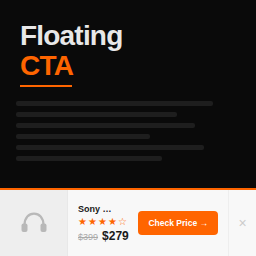
**Floating CTA** adds a clean, conversion-focused sticky CTA bar to the bottom of
your posts. Built specifically for Amazon affiliate publishers and product review
sites.
Unlike generic notification bar plugins, Floating CTA is purpose-built for product
recommendations. No locked controls in the core bar, no demo data, no upsell wall
on essential features.
Each bar includes:
* **Product title** — the name of whatever you’re recommending
* **Star rating** — visual 0–5 star display (supports half stars)
* **Price display** — current price with optional strikethrough old price
* **Buy Now button** — fully customizable text (Check Price, Buy Now, View Deal)
and affiliate URL
* **Product image** — optional thumbnail from your media library
#### What’s included in the free version
* **Five color settings** — bar background, button, button hover, button text,
and title color, configurable from Settings Floating CTA Colors.
* **Product schema** — Schema.org Product + Offer + AggregateRating JSON-LD emitted
automatically, with built-in conflict avoidance so sites running Yoast / Rank
Math / AIOSEO never get duplicate Product schema.
* **Per-post control** — enable, configure, and override every field individually
on each post.
* **Dismissible** — visitors can close the bar for the current page view.
#### Why Floating CTA?
Most “sticky bar” plugins are built for email signups, announcements, and cookie
notices. Floating CTA is built for one thing: getting more clicks on your affiliate
links.
* **Lightweight** — vanilla JavaScript, no jQuery. ~3KB total frontend footprint.
* **Accessible** — proper ARIA labels, keyboard navigable, screen reader friendly.
* **Mobile optimized** — responsive layout that adapts to any screen size.
* **Affiliate-friendly** — built-in `rel="nofollow sponsored"` support.
#### How It Works
1. Install and activate the plugin.
2. Edit any post and find the “Floating CTA” meta box.
3. Check “Enable,” fill in the product details, and publish.
4. A floating bar appears at the bottom of that post.
That’s it. No page builders, no shortcode soup, no 47-step configuration wizard.
#### Floating CTA Pro
Need more control? [Floating CTA Pro](https://floatingcta.com/pro/) adds:
* **Five more colors** — price, old price, subtitle, star rating, dismiss icon
* **Per-post color overrides** — different colors for different posts
* **Button styles and custom CSS** — full styling control
* **Top or bottom bar position** — global default plus per-post override
* **Display rules** — show after scroll %, time delay, device targeting, category
targeting
* **Custom post type support** — works on pages, WooCommerce products, and any
CPT
* **Click tracking** — per-post click counts with an admin dashboard
* **UTM auto-append** — tag outbound affiliate URLs automatically
* **GA4 events** — send click events to Google Analytics
* **Schema controls** — disable schema per-post, or force-emit alongside other
SEO plugins
* **Second CTA button and click-to-copy coupon code** — per-post extras
[Learn more at floatingcta.com ](https://floatingcta.com/?utm_source=wporg&utm_medium=readme)
## Ekran Görüntüleri
* [[
* The floating bar on a product review post (desktop)
* [[
* The floating bar on mobile
* [[
* Per-post configuration in the meta box
* [[
* Global settings page
## Yükleme
1. Upload the `floatingcta` folder to `/wp-content/plugins/`.
2. Activate through the Plugins menu in WordPress.
3. Go to **Settings Floating CTA** to configure defaults.
4. Edit any post and use the Floating CTA meta box to enable per post.
## SSS
### Does it work with my theme?
Yes. Floating CTA uses standard WordPress hooks and minimal CSS that works with
any properly coded theme. The bar is fixed-positioned and doesn’t interfere with
your theme’s layout.
### Does it slow down my site?
No. The total frontend footprint is approximately 3KB (CSS + JS combined). Scripts
only load on posts where the bar is enabled.
### Can I use it on pages or custom post types?
The free version works on posts only. [Floating CTA Pro](https://floatingcta.com/pro/)
supports pages and any custom post type.
### Does it add schema markup?
Yes. The free version automatically emits Schema.org Product, Offer, and AggregateRating
JSON-LD based on the data you enter for each bar. It skips itself when another plugin(
Yoast, Rank Math, AIOSEO) already wrote a Product schema for the page, so you never
get duplicate entities. [Floating CTA Pro](https://floatingcta.com/pro/) adds per-
post disable and force-emit toggles for advanced control.
### Is it compatible with caching plugins?
Yes. The dismiss action only hides the bar for the current page view (no persistent
state is stored), so cached pages always serve the bar consistently.
### Can visitors close the bar?
Yes. There’s a dismiss button that hides the bar for the current page view — refreshing
or navigating to another post brings it back.
## İncelemeler
Bu eklenti için herhangi bir değerlendirme bulunmuyor.
## Katkıda Bulunanlar ve Geliştiriciler
“Floating CTA – Sticky Product Bar for Affiliate & Review Sites” açık kaynaklı yazılımdır.
Aşağıdaki kişiler bu eklentiye katkıda bulunmuşlardır.
Katkıda bulunanlar
* [ Polymetric Labs ](https://profiles.wordpress.org/polymetric/)
[“Floating CTA – Sticky Product Bar for Affiliate & Review Sites” eklentisini dilinize çevirin.](https://translate.wordpress.org/projects/wp-plugins/floatingcta)
### Geliştirmeyle ilgilenir misiniz?
[Kodu görüntüleyin](https://plugins.trac.wordpress.org/browser/floatingcta/), [SVN deposuna](https://plugins.svn.wordpress.org/floatingcta/)
göz atın ya da [RSS](https://plugins.trac.wordpress.org/log/floatingcta/?limit=100&mode=stop_on_copy&format=rss)
ile [geliştirme günlüğüne](https://plugins.trac.wordpress.org/log/floatingcta/)
abone olun.
## Değişiklik Kaydı
#### 2.0.17
* Added: Template hook `fcta_after_cta_button` fires between the primary CTA and
the dismiss button, letting add-ons place secondary buttons next to the primary
CTA.
#### 2.0.16
* Added: Review prompt notice after genuine usage (3+ bars configured, or 14+ days
with at least one bar). Dismissible, never re-nags. Shows on plugin settings,
Plugins, and Dashboard screens only.
* Changed: Tags updated for better WordPress.org directory discoverability.
* Changed: Short description rewritten for broader appeal beyond affiliate-only
use cases.
#### 2.0.15
* Changed: Plugin description rewritten in active voice (“Turn product reviews
into clicks…”) for the WP-admin plugins list and the WordPress.org listing.
* Changed: Removed “Badge labels” from the Pro features comparison and Pro teaser.
The feature is no longer offered in Floating CTA Pro.
#### 2.0.14
* Added: Template extension hook `fcta_settings_page_top` (fires above the tab
nav on Settings Floating CTA). Lets add-ons render compact header toolbars.
* Changed: Plugin description trimmed for clarity.
#### 2.0.13
* Added: Two template extension hooks — `fcta_product_info_top` (inside the product-
info column above the title) and `fcta_before_price_col` (inside the inner flex
row immediately before the price column). Lets Pro position badge/coupon-style
add-ons near the title and price without DOM manipulation. No user-facing changes
in free.
#### 2.0.12
* Fixed: Block editor “Save” / “Update” button did nothing when the plugin was
active. The validation subscriber dispatched lock/unlock unconditionally on every
save attempt, which re-entered itself via Gutenberg’s synchronous subscriber
emit and overflowed the call stack. Validation is now driven by a re-entry-guarded
reconcile that only dispatches on real state transitions, so saves go through
immediately when the bar is disabled and unlock cleanly the moment a previously-
flagged field is fixed.
#### 2.0.11
* Added: Five global color settings (bar background, button, button hover, button
text, title) configurable from Settings Floating CTA Colors with hex inputs
sanitized via sanitize_hex_color()
* Added: Schema.org Product + Offer + AggregateRating JSON-LD output, hooked into`
fcta_after_render_bar` with built-in conflict avoidance (skipped automatically
when another plugin already emitted a Product schema)
* Added: Three-tab settings layout (General, Colors, Pro features). Add-ons can
register additional tabs via the `fcta_settings_tabs` filter
* Changed: Default button color refreshed to #e85b00 (was #F3961D); default title
color to #0a0a0a
* Removed: All inline grayed-out Pro teaser sections. Pro features are now described
in a single feature-comparison table on the Pro features tab
* New filters: `fcta_settings_tabs`, `fcta_schema_enabled`, `fcta_schema_avoid_conflicts`
#### 2.0.10
* Fixed: Inline CSS injected via the `fcta_bar_inline_css` filter is now rendered
correctly inside the `` breakout
still defended via string replacement.
#### 2.0.9
* Added: Extension hooks API (`fcta_meta_fields`, `fcta_supported_post_types`, `
fcta_should_show_bar`, `fcta_should_render`, `fcta_render_data`, `fcta_bar_classes`,`
fcta_bar_inline_css`, `fcta_settings_defaults`, `fcta_register_settings`, `fcta_show_pro_section`)
and action hooks (`fcta_before_render_bar`, `fcta_after_render_bar`, `fcta_bar_inside`,`
fcta_after_settings_form`, `fcta_meta_box_after_fields`) to let companion plugins
extend behavior cleanly
* No user-facing changes
#### 2.0.8
* Tested with WordPress 7.0
* Improved: Listing copy and tags refined for clearer positioning (sticky CTA bar
for Amazon affiliate and product review publishers)
* No functional changes
#### 2.0.7
* Compliance: Replaced all disabled form controls in the Pro section of the settings
page with informational feature cards, so the free plugin contains no locked
or restricted UI (WordPress.org Guideline 5)
* Compliance: Reworded settings-page copy to describe Floating CTA Pro as a separate
plugin available from floatingcta.com rather than an in-plugin unlock
* Compliance: Removed “Unlock” language from the upgrade CTA
#### 2.0.6
* Compliance: Plugin header name matches readme title (Plugin Check)
* Compliance: Trimmed short description to under 150 characters
* Compliance: Removed manual load_plugin_textdomain() — WordPress auto-loads translations
for .org-hosted plugins since 4.6
* Compliance: Annotated necessary $wpdb queries in uninstall and migration with
phpcs:ignore + rationale
* Compliance: Prefixed template-scope variables ($fcta_is_enabled, $fcta_pro_url)
* Cleanup: Removed unused duplicate uninstall function in main plugin file (uninstall.
php is canonical)
#### 2.0.5
* Security: All template output now uses wp_kses_post() for pre-built HTML (image,
stars, price)
* Security: All $wpdb queries now use $wpdb->prepare() throughout (migration, uninstall)
* Fixed: Template rel attribute uses proper if/endif instead of ternary echo
* Improved: PCP Plugin Repo compliance pass
#### 2.0.4
* Fixed: $_POST handling now uses wp_unslash() and sanitize_text_field() per WordPress
coding standards
* Fixed: Nonce verification uses sanitized input (PCP compliance)
* Improved: Meta save uses map_deep() for bulk sanitization before field-specific
sanitizers
#### 2.0.3
* Changed: Dismiss now hides bar for current page view only (refresh brings it
back)
* Changed: Session/timed dismiss persistence moved to Pro as part of Display Rules
* Simplified: Frontend JS reduced to minimal dismiss handler (~35 lines)
#### 2.0.2
* Fixed: Dismiss button no longer overlaps CTA button — now part of flex flow
* Fixed: Settings page pro teaser sections now render with proper backgrounds,
borders, and badges in WordPress admin
* Fixed: Admin CSS specificity increased to override WordPress admin defaults
* Fixed: Feature card grid displays correctly as 3-column layout
#### 2.0.1
* Added: Pro feature teasers on settings page (greyed-out Appearance, Display Rules,
Conversion & Tracking, Schema & SEO, Per-Post Extras sections)
* Added: Bottom CTA banner for pro upgrade
* Added: Admin CSS loads on settings page (previously only loaded on post editor)
#### 2.0.0
* Complete rewrite with modern architecture
* Vanilla JavaScript (no jQuery dependency)
* Proper output escaping and sanitization throughout
* Accessible: ARIA labels, keyboard navigation, focus management
* Responsive mobile layout
* Dismiss button with session persistence
* Global default settings (button text, currency, link rel)
* Settings API integration
* Block editor (Gutenberg) compatibility
* Migration from v1 meta keys
#### 1.0.1
* Initial public release
## Meta
* Sürüm **2.0.17**
* Son güncelleme **15 saat önce**
* Etkin kurulumlar **10dan fazla**
* WordPress sürümü ** 5.8 veya üstü **
* Test edilen sürüm **7.0**
* PHP sürümü ** 8.0 veya üstü **
* Dil
* [English (US)](https://wordpress.org/plugins/floatingcta/)
* Etiketler
* [affiliate](https://tr.wordpress.org/plugins/tags/affiliate/)[call to action](https://tr.wordpress.org/plugins/tags/call-to-action/)
[cta](https://tr.wordpress.org/plugins/tags/cta/)[floating bar](https://tr.wordpress.org/plugins/tags/floating-bar/)
[sticky bar](https://tr.wordpress.org/plugins/tags/sticky-bar/)
* [Gelişmiş görünüm](https://tr.wordpress.org/plugins/floatingcta/advanced/)
## Puanlar
No reviews have been submitted yet.
[Your review](https://wordpress.org/support/plugin/floatingcta/reviews/#new-post)
[Tüm değerlendirmeleri görün](https://wordpress.org/support/plugin/floatingcta/reviews/)
## Katkıda bulunanlar
* [ Polymetric Labs ](https://profiles.wordpress.org/polymetric/)
## Destek
Söyleyeceğiniz bir şey mi var? Yardım mı lazım?
[Destek forumunu görüntüle](https://wordpress.org/support/plugin/floatingcta/)