
Açıklama
Hero Color Picker adds per-post background and font color controls to the editor sidebar for hero styling via CSS on elements with the hero-colored class.
Features:
– Two color controls: Background Color and Font Color
– On-demand color pickers in compact dropdown popovers
– Live preview of both colors together directly in the sidebar
– Applies selected colors to the editor post summary area for a closer backend preview
– Removes the featured image preview outline while a custom background color is active
– Accessibility check for WCAG AAA Normal Text with PASS / FAILED status
– Panel is shown only while editing posts (post), not in template editing contexts
– Adds a core-like posts list view Hero Background to show only posts with a custom hero background color
– Works on elements that have the CSS class hero-colored
Stored as post meta:
– hero_color_picker_hero_color
– hero_color_picker_font_color
Frontend output (only when values are set):
.hero-colored {
    background-color: $background;
    color: $font;
}
Important template setup:
– Open your block theme template (for example Single) in the Site Editor.
– Select the Group block that should receive the hero styles.
– In block settings, add hero-colored to Additional CSS class(es).
Ekran Görüntüleri

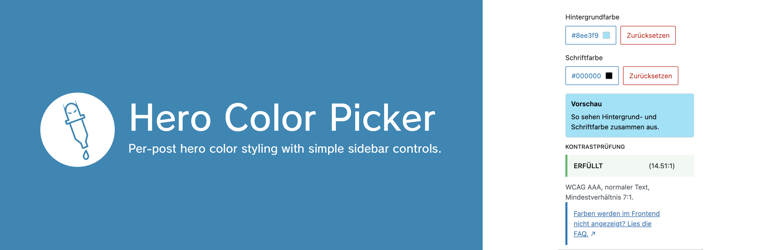
Hero Color Picker sidebar panel with background color, font color, live preview, and WCAG status.
Yükleme
- Place the plugin in
wp-content/plugins/hero-color-picker. - Activate the plugin in WordPress.
- Open
Appearance > Editorand edit your post template (for exampleSingle). - Select the target
Groupblock and add the classhero-coloredinAdditional CSS class(es). - Optional: open
Posts > All Postsand clickHero Backgroundto list posts with a custom hero background.
SSS
-
How do I add the `hero-colored` CSS class in templates?
-
- Go to
Appearance > Editorand open the template you use for posts (for exampleSingle). - Create a
Groupblock that wraps the elements you want to style, for example the title and featured image. - Open the
Groupblock settings, expandAdvanced, and enterhero-coloredinAdditional CSS class(es). - Save the template.
- Go to
İncelemeler
Bu eklenti için herhangi bir değerlendirme bulunmuyor.
Katkıda Bulunanlar ve Geliştiriciler
“Hero Color Picker” açık kaynaklı yazılımdır. Aşağıdaki kişiler bu eklentiye katkıda bulunmuşlardır.
Katkıda bulunanlar
“Hero Color Picker” 1 dile çevrildi. Katkıda bulundukları için çevirmenlere teşekkürler.
“Hero Color Picker” eklentisini dilinize çevirin.
Geliştirmeyle ilgilenir misiniz?
Kodu görüntüleyin, SVN deposuna göz atın ya da RSS ile geliştirme günlüğüne abone olun.
Değişiklik Kaydı
1.0.17
- Updated the WordPress.org icon assets.
- Added refreshed WordPress.org banner assets in
1544x500and772x250.
1.0.16
- Fixed loading of WordPress.org language packs for editor JavaScript strings.
- Marked the editor panel title as translatable.
1.0.15
- Corrected and refined wording in the readme and editor preview text.
1.0.14
- Refined the plugin description across plugin metadata and the WordPress.org readme.
1.0.13
- Updated the editor FAQ link to point directly to the relevant WordPress.org FAQ entry.
1.0.12
- Added an editor FAQ link for frontend setup troubleshooting.
- Expanded the WordPress.org FAQ with template setup instructions.
1.0.11
- Bumped plugin version to
1.0.11. - Removed unused WordPress.org banner assets.
1.0.10
- Bumped plugin version to
1.0.10.
1.0.9
- Bumped plugin version to
1.0.9.
1.0.8
- Bumped plugin version to
1.0.8. - Added release note entry for
1.0.8.
1.0.7
- Added
Hero Backgroundview onPosts > All Poststo list posts with a custom hero background color. - Editor preview now removes the featured image outline while a custom background color is active.
- Expanded documentation with newly added backend/editor features.
1.0.6
- Improved and expanded
DescriptionandInstallationdocumentation. - Added explicit setup steps for applying the
hero-coloredCSS class in block theme templates.
1.0.5
- Added a second sidebar color control for
Font Color. - Frontend output now applies both
background-colorandcolorto.hero-colored. - Sidebar color picker is now shown on demand via dropdown popover.
- Added
WCAG AAA Normal Textstatus withPASS/FAILED. - Improved spacing in the color value button.