
Açıklama
By default in WordPress users can login using one account from unlimited devices/browsers at a time. This is not good for everyone, seriously! With this plugin you can easily set a limit for no. of active logins a user can have.
Loggedin 🔒 Features and Advantages
- Set maximum no. of active logins for a user.
- Block new logins when the login limit is reached.
- Allow new logins while logging out from other devices when the limit is reached.
- Force logout users from admin.
- Prevent users from sharing their account.
- Useful for membership sites (for others too).
- No complex settings. Just one optional field to set the limit.
- Super Light weight.
- Filter to bypass login limit for certain users or roles.
- Completely free to use with lifetime updates.
- Follows best WordPress coding standards.
Please contribute to the plugin development in GitHub.
🔐 Important Notice
Even if the user is closing the browser without logging out, their login session exists for period of time. So this will also considered as an active login.
🐛 Bug Reports
Bug reports are always welcome – report here.
Ekran Görüntüleri
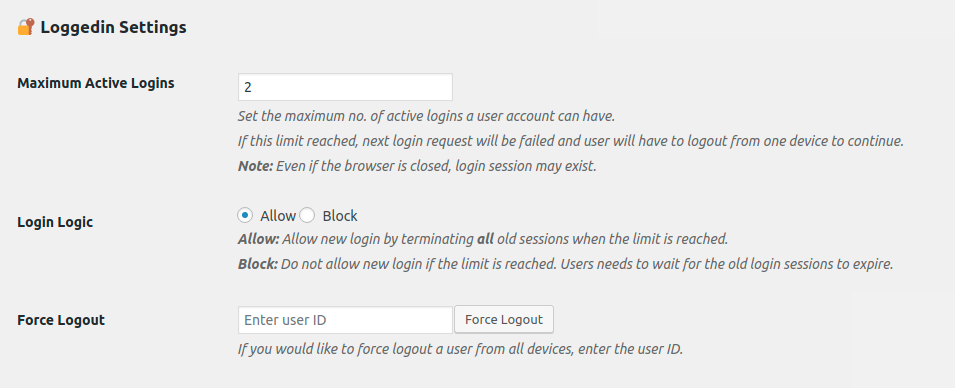
Settings - Set maximum no. of active logins for a user account.
Yükleme
Installing the plugin – Simple
- In your WordPress admin panel, go to Plugins > New Plugin, search for LoggedIn and click “Install now“
- Alternatively, download the plugin and upload the contents of
loggedin.zipto your plugins directory, which usually is/wp-content/plugins/. - Activate the plugin
- Go to General tab under WordPress Settings menu.
- Find the “Maximum Active Logins” option and select the maximum number of active logins for a user account.
Missing something?
If you would like to have an additional feature for this plugin, let me know
SSS
-
How can I set the limit, and where? 🤔
-
This plugin does not have a seperate settings page. But we have one configural settings to let you set the login limit.
- Go to
Settingspage in admin dashboard. - Scroll down to see the section
🔐 Loggedin. - Set the maximum number of active logins a user can have in
Maximum Active Loginsoption.
- Go to
-
Can I somehow allow new logins when the limit is reached? 🤔
-
You can forcefully logout the user from other devices and allow new login.
- Go to
Settingspage in admin dashboard. - Scroll down to see the section
🔐 Loggedin. - Select the
Login LogicasAllow.
- Go to
-
Can I block the new logins when the limit is reached? 🤔
-
You block the new logins when the user is logged in from maximum no. of devices according to the limit you set.
- Go to
Settingspage in admin dashboard. - Scroll down to see the section
🔐 Loggedin. - Select the
Login LogicasBlock. - Now user will have to wait for the other login sessions to expire before login from new device.
- Go to
-
How long a login session exist? How long the user needs to wait for new login? 🤔
-
That depends. If the “Remember Me” box is checked while login, WordPress will keep the user logged in for 14 days by default. If “Remember Me” is not checked, 2 days will be the active login session time.
You can change that period using, auth_cookie_expiration filter.
function loggedin_auth_cookie_expiration( $expire ) { // Allow for a month. return MONTH_IN_SECONDS; } add_filter( 'auth_cookie_expiration', 'loggedin_auth_cookie_expiration' ); -
How can I forcefully logout a user from all devices? 🤔
-
You can forcefully logout a user from all the devices he has logged into. Get his WordPress user ID and,
- Go to
Settingspage in admin dashboard. - Scroll down to see the section
🔐 Loggedin. - Enter user ID of the user you would like to logout.
- Click
Force Logout.
- Go to
-
Can I bypass this limit for certain users or roles? 🤔
-
Yes, of course. But this time you are going to add few lines of code. Don’t worry. Just copy+paste this code in your theme’s
functions.phpfile or in custom plugin:function loggedin_bypass_users( $bypass, $user_id ) { // Enter the user IDs to bypass. $allowed_users = array( 1, 2, 3, 4, 5 ); return in_array( $user_id, $allowed_users ); } add_filter( 'loggedin_bypass', 'loggedin_bypass_users', 10, 2 );Or if you want to bypass this for certain roles:
function loggedin_bypass_roles( $prevent, $user_id ) {
    // Array of roles to bypass.
    $allowed_roles = array( 'administrator', 'editor' );

    $user = get_user_by( 'id', $user_id );

    $roles = ! empty( $user->roles ) ? $user->roles : array();

    $bypassed = array_intersect( $roles, $allowed_roles );

    return ! empty( $bypassed );
}

add_filter( 'loggedin_bypass', 'loggedin_bypass_roles', 10, 2 );
İncelemeler


Katkıda Bulunanlar ve Geliştiriciler
“Loggedin – Limit Active Logins” açık kaynaklı yazılımdır. Aşağıdaki kişiler bu eklentiye katkıda bulunmuşlardır.
Katkıda bulunanlar

“Loggedin – Limit Active Logins” 5 dile çevrildi. Katkıda bulundukları için çevirmenlere teşekkürler.
“Loggedin – Limit Active Logins” eklentisini dilinize çevirin.
Geliştirmeyle ilgilenir misiniz?
Kodu görüntüle, SVN deposuna göz at veya RSS ile geliştirme günlüğüne abone ol.
Değişiklik Kaydı
1.3.1 (19/09/2020)
👌 Improvements
- Support ajax logins – Thanks Carlos Faria.
1.3.0 (28/08/2020)
👌 Improvements
- Improved “Allow” logic to check only after password check.
1.2.0 (07/06/2019)
📦 New
- Added ability to choose login logic.
1.1.0 (06/06/2019)
📦 New
- Added ability to force logout users.
- Added cleanup on plugin uninstall.
- Added review notice.
👌 Improvements
- Code improvement
1.0.1 (02/07/2016)
🐛 Bug Fixes
- Fixing misspelled variable.
1.0.0 (16/06/2016)
📦 New
- Initial version release.