
Açıklama
MasterStudy is a free WordPress LMS plugin for online learning business. The WordPress plugin turns any regular WP website into an online school with all the necessary eLearning & LMS features.
MasterStudy is the best free Learning Management System WordPress plugin for online coaching, instructors, trainers, tutors, schools, colleges, marketplaces and any type of learning website.
⭐ MasterStudy Free version
⭐ MasterStudy PRO version
⭐ MasterStudy Theme
⭐ MasterStudy iOS/Android App
⭐ Documentation
⭐ Join Facebook Community
Who is it for?
Masterstudy LMS plugin for WordPress is targeted to:
- Single instructor (coach or tutor);
- Education institutions (learning centers, schools, universities);
- Marketplace (with online courses).
How Does It Work?
With MasterStudy, you can create and sell online courses without needing to be a tech expert. It’s like building your website with easy and ready tools.
For Individual Instructors (Tutors, Coaches):
MasterStudy is a perfect LMS WordPress plugin for tutors, coaches, or anyone who wants to teach online. You can make interactive lessons with videos, images, and slides, and organize them for your students.
For Educational Institutions:
MasterStudy helps schools and colleges handle students, grades, and lessons smoothly. Teachers can add materials, edit lessons, and talk to students with message boards. Students can ask questions and talk to their teachers through comments and messages. They can pay per course or sign up for monthly/yearly subscriptions.
For Online Course Marketplaces:
With MasterStudy, you can set up online course marketplaces like Udemy or Coursera in WordPress. It takes care of subscriptions, quizzes, payments, and student management. You can also make certificates for students. Each user gets their own profile where they can track progress, continue lessons, see quiz scores, and buy courses or memberships.
There is a step-by-step video tutorial on how to use the MasterStudy WordPress Plugin
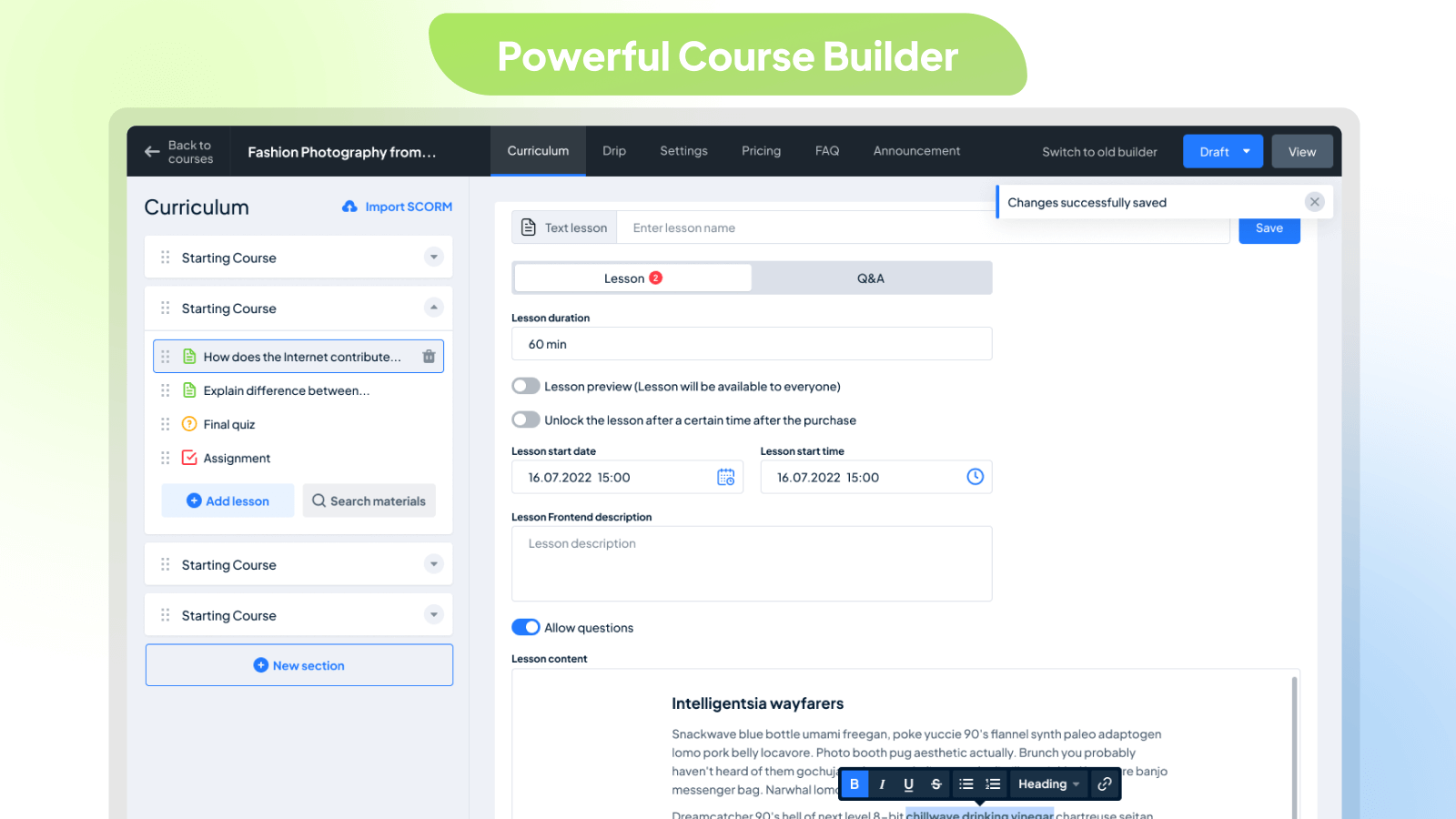
Create a Course Easily with Our Powerful Builder:
Creating courses is simple with the MasterStudy WordPress LMS plugin. Our builder is user-friendly and beautifully designed, divided into easy-to-follow sections. Once you’ve created a course, you can add lessons, quizzes, and assignments. You can also customize the sequence of lessons, preview specific ones, set pricing options, and add FAQs.
Easily include all the details you need in one place, such as the title, descriptions, curriculum, duration, price, skill level, and the number of active students. Plus, you can add videos, attachments, teachers, and rewards.
With our Course builder, you have unlimited options for managing your courses:
- Featuring Courses
- Previewing Courses
- Describing Courses for Users
- Announcing Course Updates
- Adding FAQ Sections
- Reviewing and Rating Courses
- Setting Expiry Dates for Courses
- Temporarily Pausing Courses
- Sorting Courses into Categories
- Attaching Files to Courses
- Tracking Course Progress
- Managing Enrolled Students
- Specifying Course Durations and Video Lengths
- Determining the Number of Lessons
- Assigning Difficulty Levels
- Managing Students’ Progress
- Adding Students Manually
- Viewing Students’ Progress Details
- Resetting Students’ Progress
ADDING LESSONS
Once your course and sections are set up, it’s time to add lessons. You have the flexibility to create four types of lessons: text, video, online streams, and slideshows. Plus, you can easily incorporate previously created content with our library of lessons and quizzes.
Here’s what you can manage with lessons:
- Duration
- Preview (accessible to everyone)
- Description visible on the frontend
- Type of video lesson
- Discussions for students with the instructor
- Lesson materials (any media type)
Seven Types of Video Sources to Add for Video Lessons
With our MasterStudy LMS WordPress plugin, adding videos is simple. It’s fully compatible with Presto Player, a cutting-edge WordPress video player plugin. You can use up to seven video sources:
- HTML(MP4)
- YouTube
- Vimeo
- External Links
- Embedded Video
- Shortcodes
- Presto Player
QUIZZES
You can add questions to quizzes manually or select from the preset questions library. Then, simply input your first question. We offer eight question types to suit your needs: single-choice, multi-choice, true or false, item match, image match, image choice, keywords, and fill-in-the-gap.
Here are the features of our quizzes:
- Advanced quiz builder
- Various quiz styles
- Categorization of quizzes
- Setting quiz duration
- Limiting quiz attempts
- Deducting points on resubmission
- Defining passing grades
- Randomizing questions
- Displaying correct answers
- Describing the quiz visible on the frontend
Course Player: Better Learning Experience
Improve your students’ learning journey with our Course Player. It’s distraction-free, sleek, and user-friendly. Students can easily navigate through course content, switch between light and dark modes, and take part in discussions. Progressing through lessons is effortless—students can just click “Complete” to move to the next one.
Key Features of MasterStudy Free Plugin:
- Modern design
- Powerful Course Builder
- Course Player
- Dark Mode in courses
- Unlimited courses and lessons
- Course preview
- Frontend student dashboard
- Teacher’s profile
- Video lessons
- Many video sources (self-hosted, YouTube, Vimeo, Presto Player, HTML, Embeded, Shortcode)
- Separate teacher profiles
- Lesson management
- Dynamic drag and drop certificate builder
- Advanced quiz builder (8 quiz types)
- Earning & commission allocation
- Many withdrawal options
- Purchase history
- Styling options
- Course widget
- Teacher registration form
- Course review and rating system
- Q&A for students with the course teacher
- Video poster (trailer/teaser)
- Tracking course progress
- Course difficulty level
- Define course duration
- Course marketplace
- Add course requirements and instruction
- Quiz timer
- Quiz attempts
- Centralized monetization settings
- Spotlight mode
- RTL ready
- Page builder support
- Gutenberg compatible
- Content security
- Advanced analytics
For more details, please visit our website.
MasterStudy Premium Plugin Features
- Certificate Builder: Make custom certificates easily.
- Udemy Course Importer: Bring in Udemy courses and earn commissions.
- Prerequisites: Set required courses before new enrollments.
- Quizzes: Add different types of questions to tests.
- Sequential Drip Content: Plan lessons step by step.
- Gradebook: See and export class results.
- Live Streaming: Conduct live lessons.
- Group Courses: Sell to companies and manage members.
- Assignments: Students submit work and get grades.
- Question Media: Add videos, audio, and images to quizzes.
- Point system: Reward learners for achievements.
- Statistics and Payouts: Analyze data and manage payments for instructors.
- Online Testing: Embed quizzes anywhere and conduct tests online.
- Trial Courses: Offer courses as trials or demos for new users.
- Co-instructors: Assign multiple instructors to a course.
- Gradebook: Monitor students’ progress and performance.
- Email Manager: Personalize email templates.
- Course Bundles: Bundle courses together and offer discounts.
- Google Classrooms: Import classes from Google Classrooms.
- Zoom Conference: Conduct Zoom lessons, meetings, and webinars on your site.
- Google Meet: Schedule and host Google Meet meetings.
- SCORM: Import pre-built e-learning content using SCORM standards.
- LMS Forms Editor: Customize website forms with an easy-to-use editor.
- File Upload Manager: Manage various file types in courses and lessons.
- Upcoming Course Status: Promote courses that are not yet open for enrollment.
Ekran Görüntüleri
Powerful Course Builder 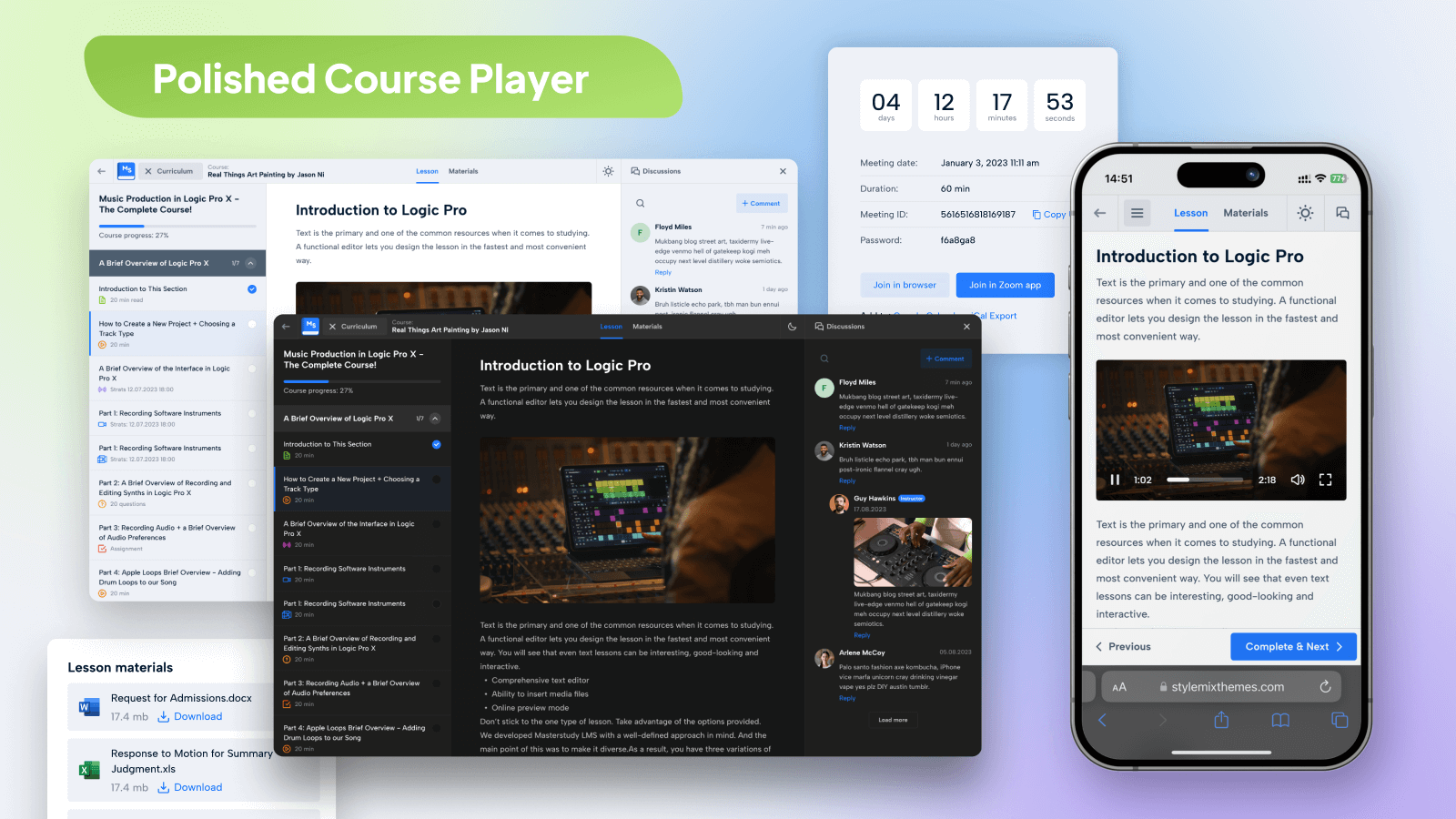
Polished Course Player 
Onpage List of Courses 
Single Course Page 
Live Streams, Webinars & Classes 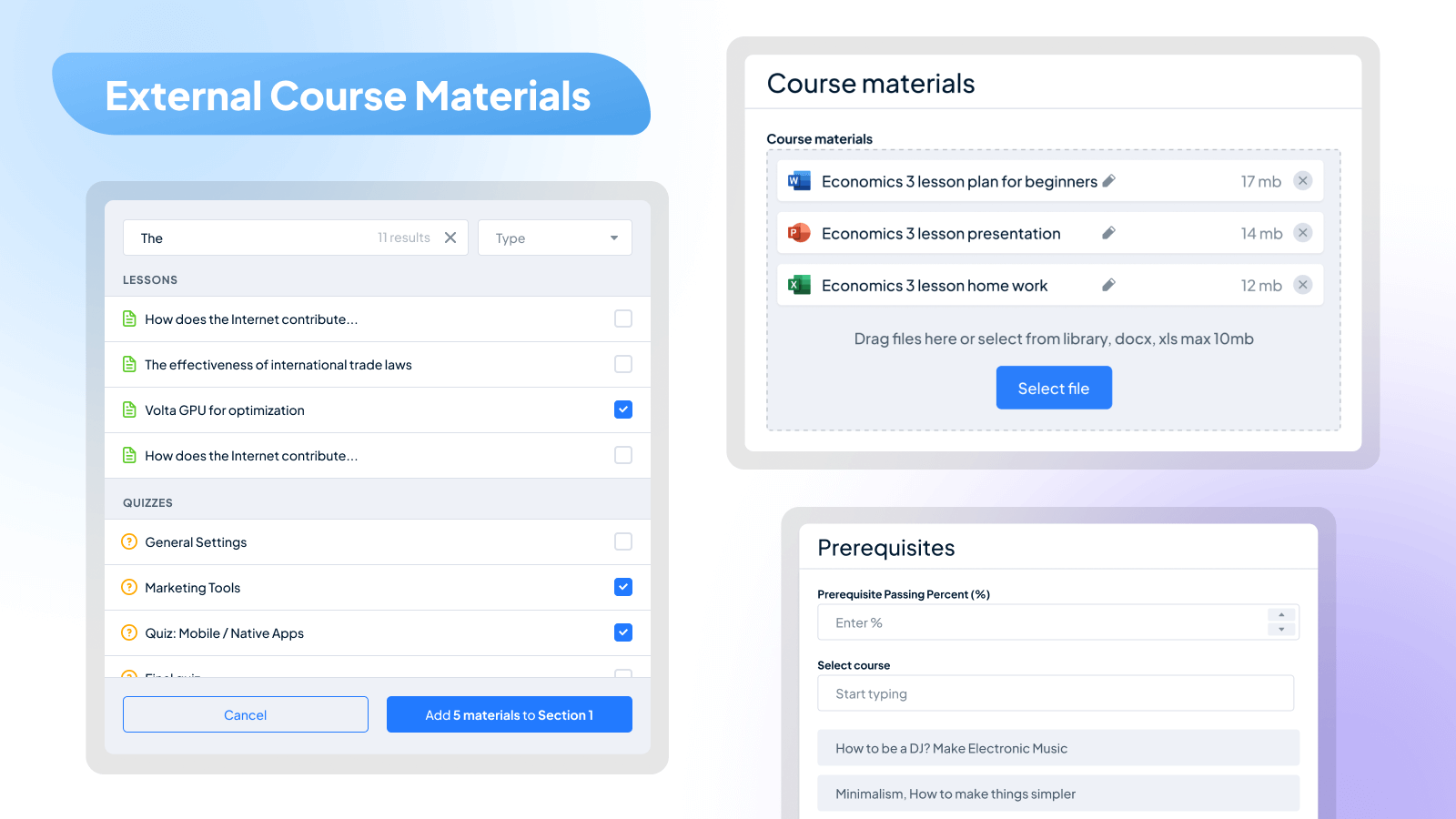
External Course Materials 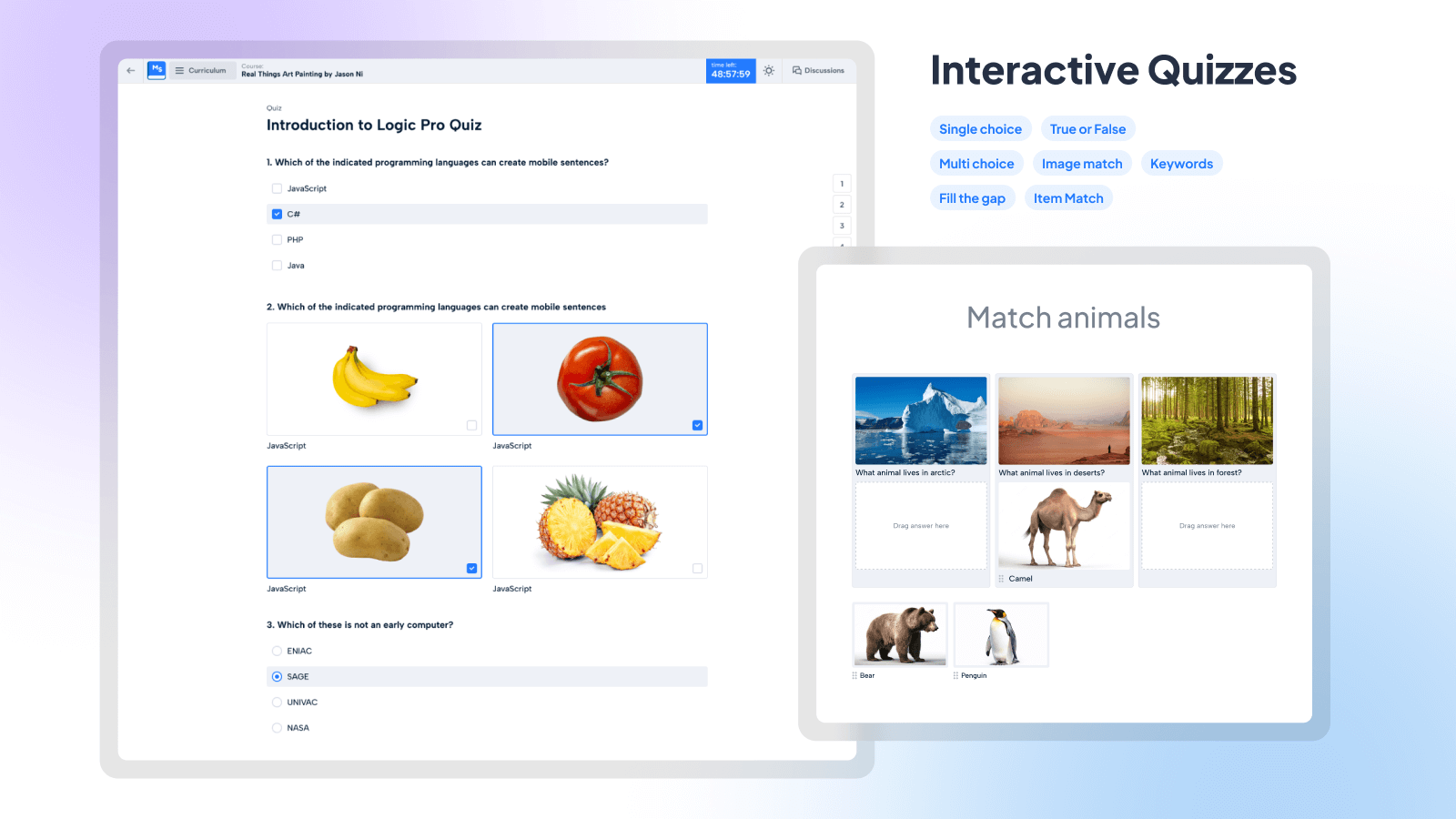
Interactive Quizzes 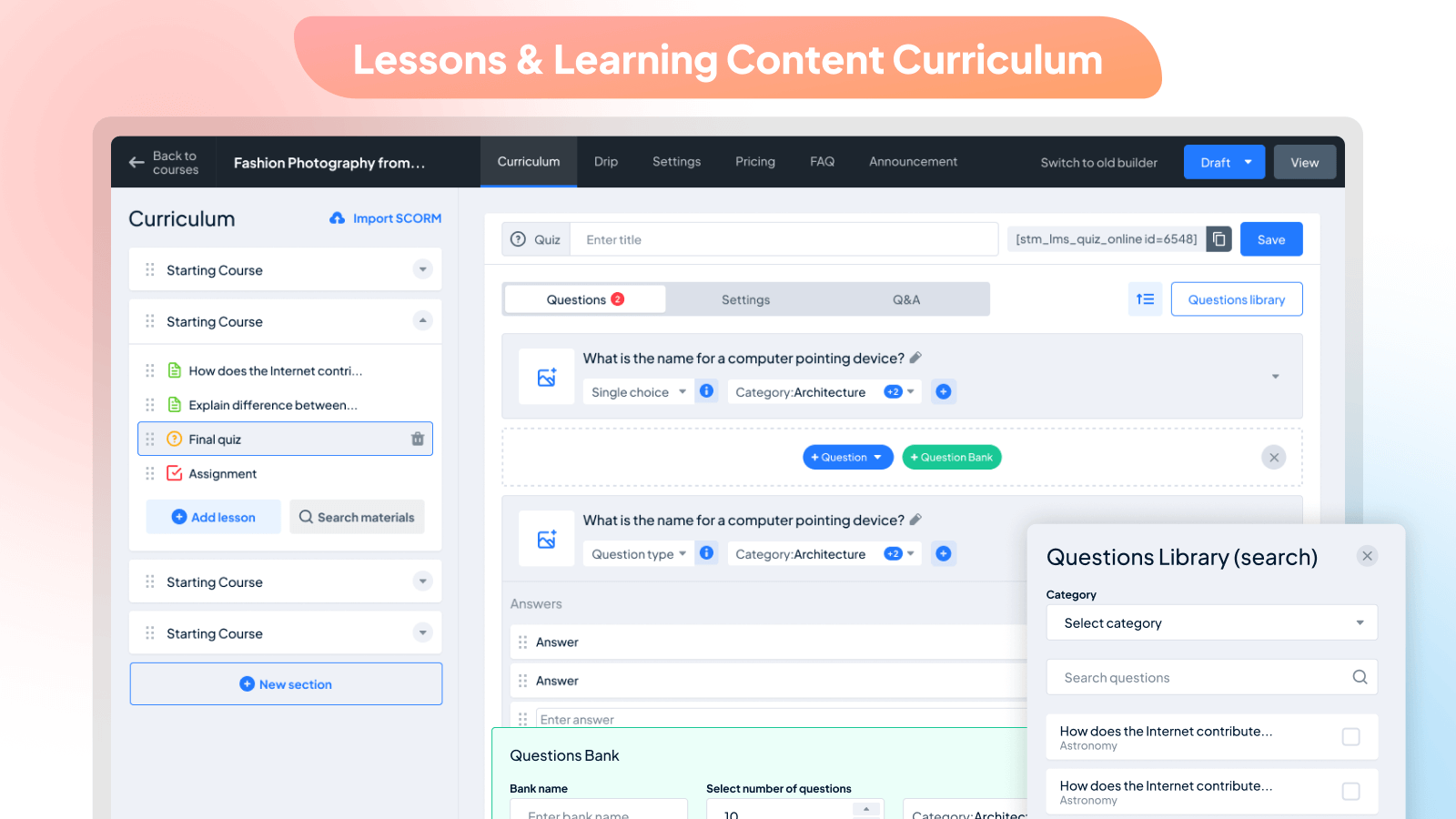
Lessons & Learning Content Curriculum 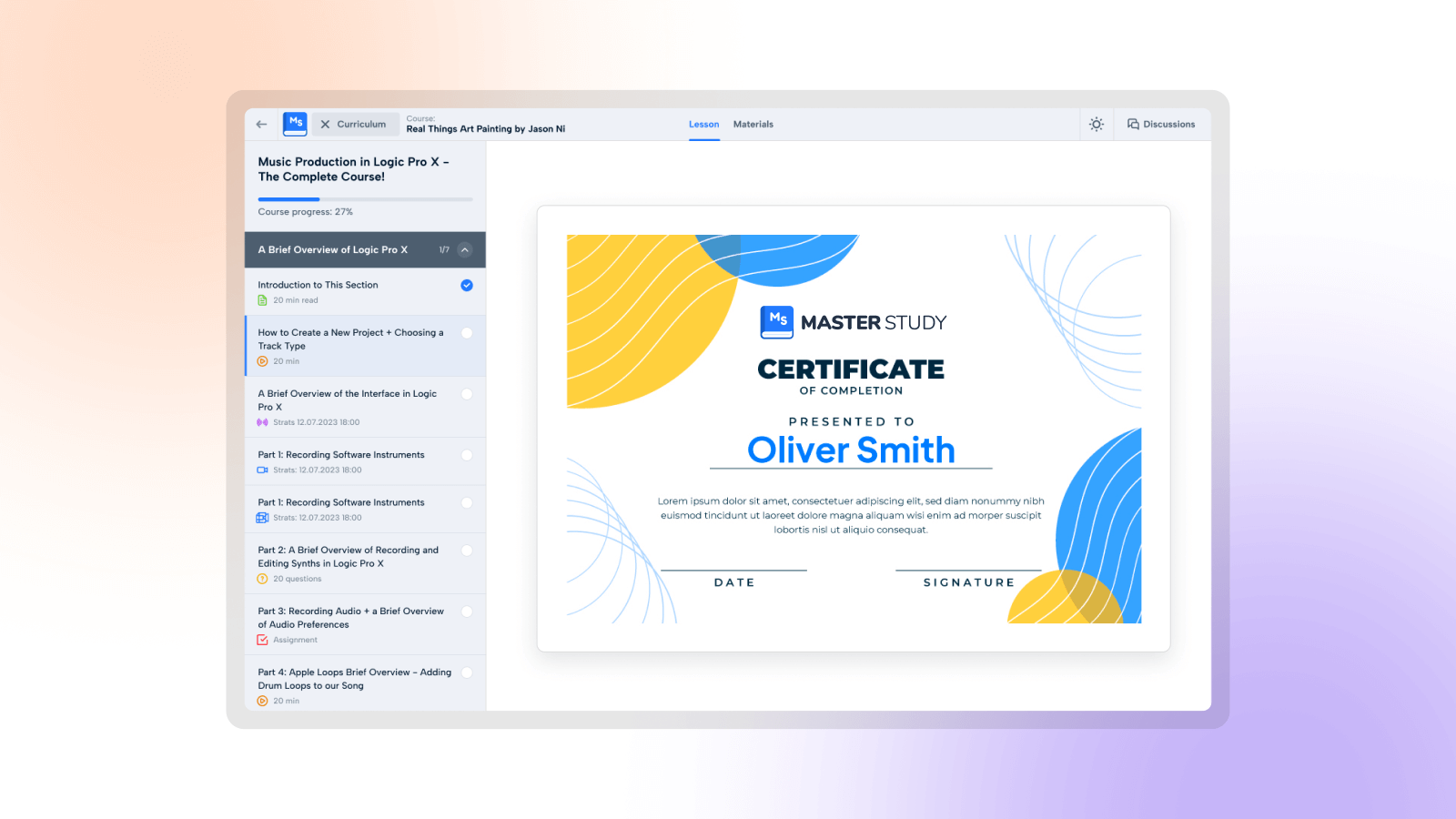
Custom Course Completion Certificates
Bloklar
Bu eklenti 18 blok sağlar.
- MasterStudy Adaptive Container Add an adaptive section with MasterStudy blocks
- MasterStudy Button Convince readers to take action with a button
- MasterStudy Call to Action Make your offer clear and convince readers to take action
- MasterStudy Iconbox Add bullet points with an icon box to show off your products and services
- MasterStudy Text Add and customize texts with MasterStudy Text
- MasterStudy Test block Test block for settings
- MasterStudy Courses Container Courses container
- MasterStudy Featured Teacher Displays information about the instructor
- MasterStudy Testimonial Build customer trust by adding testimonials
- MasterStudy Icon Add an icon to the page as a block
- MasterStudy Courses Tab Sorts courses
- MasterStudy Courses Load More Courses load more and Pagination
- MasterStudy Courses Preset Choose courses preset
- MasterStudy Courses Tab Category Filters courses
- MasterStudy Courses Grid Classic Displays Courses Grid Classic
- MasterStudy Courses Price button Displays Courses Price Button
- MasterStudy Featured Teacher Button Displays button
- MasterStudy Featured Teacher About Displays information about the instructor
Yükleme
This section describes how to install the plugin and get it working.
- Upload the plugin files to the
/wp-content/plugins/directory, or install the plugin through the WordPress plugins screen directly. - Activate the plugin through the ‘Plugins’ screen in WordPress
- Please find more details about Installation in documentation
- Set Up Courses Archive Page in Menu -> STM LMS Settings Area.
Shortcodes
- [stm_lms_courses_grid_display per_row=”4″ posts_per_page=”4″ load_more=”true”]
Accepts all WP_Query params for sorting, order by etc - [stm_courses_searchbox]
Shows courses search box - [stm_lms_courses_carousel]
Enables the courses carousel - [stm_lms_courses_categories]
Shows categories of the courses - [stm_lms_courses_grid]
Enables the courses grid - [stm_lms_featured_teacher]
Shows Featured Teacher - [stm_lms_instructors_carousel]
shows the Instructors carousel - [stm_lms_recent_courses]
Displays Recent courses - [stm_lms_single_course_carousel]
Shows the carousel with single course
Template System
- Easily copy any template from stm-lms-templates folder and move it in your theme for future customization. Try not to edit plugin files, they will be replaced after plugin update.
LMS Hard-coded Pages
- /lms-login – Login/Register Page
- /courses/{course}/{lesson} – Lesson Page (must be logged in with Purchased course or lesson is Preview)
- /lms-user/{user_id} – User Private Page (must be logged in)
- /lms-user_profile/{user_id} – User Public Page
- /lms-chats – User Chat (must be logged in)
- /lms-wishlist – My Wishlist Page
- /lms-checkout – Checkout Page (must be logged in)
SSS
-
Can I use the plugin with different WordPress Themes?
-
Yes, MasterStudy WordPress LMS Plugin is compatible with free and premium WordPress themes, so you can use it with the one you choose. If you have difficulties selecting the theme for your educational website, you can consider the option of getting MasterStudy LMS Theme, which has the Pro version of the plugin built in the bundle.
-
Do I need a Membership Plugin?
-
This only depends on the purpose you follow. If you are planning to implement membership plans on the platform, then you have to install the Membership Plugin. But, you do not need to search for the options.
MasterStudy WordPress LMS plugin already integrates with WooCommerce and Paid Membership PRO. These are the best items that will help you to establish a great membership system and create smart plans.
-
Does MasterStudy WordPress LMS plugin support webinars and live stream sessions?
-
MasterStudy support Zoom meetings and webinars. The integration with the service is available through the eRoom plugin which is free. It connects your website with the Zoom account and allows you to create and manage video conferences from your dashboard.
You can also use the MasterStudy Pro addon to conduct live stream lessons.
-
Is this WordPress LMS plugin free?
-
This plugin has two versions: free and a paid one. The paid Pro version has more features that are not able to use in the free plugin, which extends the functionality and provides more opportunities.
Still, the main function of building and managing online courses and selling them is available equally in both versions.
-
Where can I find MasterStudy WordPress LMS plugin documentation?
-
There is a detailed text guide describing every feature and option of the plugin. You can also find the video library with video tutorials on our YouTube channel.
-
How can I get support or talk to someone from the team?
-
Our support team is available 24/7. To submit about the problem please follow to your account to submit a support ticket. If you have some pre-sale questions you can always use live-chat on our website: stylemixthemes.com
-
Can I translate the plugin to a different language?
-
Yes, however MasterStudy WordPress LMS plugin already translated into 8 languages: English, Portuguese, Spanish, Dutch, German, French, Italian, and Russian.
-
What kind of media can be used in courses?
-
The plugin allows uploading absolutely different formats of files. There are three types of lessons available, where you can present various types of content such as text, video, slides. Besides this, we have an option of course/lesson attachments, where you can upload different files including images, audio files, zip folders, and more.
-
Is it a one-time fee for the Pro version or do I need to extend my license?
-
No, you don’t have to extend your license, the core features will be available. In case you want to receive further updates and support you need to renew your license. The MasterStudy WordPress LMS plugin Pro is available at $62.99.
İncelemeler


Katkıda Bulunanlar ve Geliştiriciler
“MasterStudy LMS WordPress Plugin – for Online Courses and Education” açık kaynaklı yazılımdır. Aşağıdaki kişiler bu eklentiye katkıda bulunmuşlardır.
Katkıda bulunanlar
“MasterStudy LMS WordPress Plugin – for Online Courses and Education” 19 dile çevrildi. Katkıda bulundukları için çevirmenlere teşekkürler.
“MasterStudy LMS WordPress Plugin – for Online Courses and Education” eklentisini dilinize çevirin.
Geliştirmeyle ilgilenir misiniz?
Kodu görüntüle, SVN deposuna göz at veya RSS ile geliştirme günlüğüne abone ol.
Değişiklik Kaydı
3.3.7 – 2024-04-18
- New: Added a new Featured Teacher block for Gutenberg.
- Fix: Course styles in the course card and popup are not applied on the page and in the editor.
- Fix: On pages in a single course modern course styles are not displayed correctly.
- Fix: In multi-choice quiz type answer explanation does not work.
- Fix: When clicking on Start Course in a SCORM course, the page refreshes and the course does not open.
3.3.6 – 2024-04-15
- Enhancements: When a course is in draft or pending review, the Start Course button for both instructor and admin opens the course in preview (Pro).
- Enhancements: Changed the logic of URLs in courses (Pro).
- Enhancements: If a student adds answers with gaps at the beginning and end on Fill the Gap questions, the gaps are cut off and the answers are considered correct.
- Fix: Video with hidden branding YouTube or Vimeo crops the frame in PHP 8.1+.
3.3.5 – 2024-04-08
- Enhancements: Replaced Google+ with Linkedin in Social Network for User Account.
- Enhancements: Removed the character limit in the password field when registering.
- Enhancements: Added additional validation for assigning a plan to a user through the admin to avoid errors.
- Fix: Changed error text if unacceptable characters are added to login when registering on multisite.
- Fix: If there are no popups or signup forms on the page when a guest tries to sign up using a referral link, the referral link option does not work (Pro).
- Fix: The certificate tab is not displayed for a student (Pro).
- Fix: Small bug fixes.
3.3.4 – 2024-04-04
- Enhancements: Updated the Guest checkout view.
- Enhancements: Added settings to show MasterStudy player for YouTube and Vimeo videos.
- Enhancements: Added filter on instructor names in Certificate builder for admin (Pro).
- Enhancements: Added ability for instructors to create certificates (Pro).
- Enhancements: Added a separate page with certificates that instructors have created themselves (Pro).
- Enhancements: Added certificate list in the admin panel, where admin manages all certificates and instructor can see and edit/delete only certificates created by him (Pro).
- Enhancements: Added filter for changing custom field in certificate builder (Pro).
- Fix: Available in the premium version for memberships for students is not working.
- Fix: When Query Monitor is enabled, a certificate error is highlighted in Course Player.
- Fix: Have a Question form for enterprise is not being submitted.
- Fix: Internal user account pages are displayed as blog pages when using the Yoast SEO plugin.
- Fix: Container on pages compresses content and breaks blocks.
3.3.3 – 2024-04-01
- Update: Checked for compatibility with Paid Membership Pro 3.0.
- Enhancements: Added additional filter to remove unwanted script load.
- Enhancements: Added improved and updated Russian & Ukrainian translations.
- Enhancements: Added ability to add students to courses via CSV files.
- Fix: Reset Course Progress resets the course start date and adds the wrong time to the database.
- Fix: Students who have purchased a pre-ordered upcoming course can take the course via Curriculum (Pro).
3.3.2 – 2024-03-27
- Enhancements: Improved protection for user registration forms.
3.3.1 – 2024-03-20
- Enhancements: Added an option to display coowned courses in the instructor’s public profile.
- Enhancements: Updated the view on the page of quizzes created with the Online Testing addon (Pro).
- Enhancements: Database tables are now indexed to increase speed during query processing.
- Fix: The new page where the shortcode from the Online Testing addon is added is not published.
- Fix: Registration form is incorrectly displayed when a guest tries to enroll in a course twice.
- Fix: The login form opens when clicking on Registration via the side profile menu.
- Fix: Email shortcodes sent from “Become instructor” and “Have a question” forms are not working.
- Fix: Student progress is not displayed for the group creator (Pro).
- Fix: Student files from Assignments are displayed in the admin’s media library (Pro).
- Dev: File path checks have been added to the Modal Loader for better protection.
- Dev: Form Fields additional checks have been added to Authorization Forms for better protection.
3.3.0 – 2024-03-14
- Enhancements: Added a new Certificate builder (Pro).
- Enhancements: Added sidebar for selecting certificate templates (Pro).
- Enhancements: Added ability to insert different elements such as course time, description, progress, etc (Pro).
- Enhancements: It is possible to add a certificate separately to a course or to a category of courses (Pro).
- Dev: Added a patch for importing new certificates.
- Dev: Capability condition added for Settings Autocomplete Search field.
- Fix: Small bug fixes.
3.2.13 – 2024-03-09
- Enhancements: Authorization checks have been added to User Order Requests for better data protection.
3.2.12 – 2024-03-06
- Fix: Small bug fixes.
3.2.11 – 2024-03-05
- Enhancements: Capability checks have been added to Statistics Requests for better data protection.
- Enhancements: The Instructor Statistics page has become better in performance.
- Fix: Course price does not change to the new price in the cart if the price has been changed or after the discount has expired.
3.2.10 – 2024-02-29
- New: Added a new Social Login addon (Pro).
- Enhancements: Added Loader to show audio and video saving process in percentage (Pro).
- Enhancements: All tabs from the user account page via WPML are now translated.
- Enhancements: Optimization of the speed of the loader was performed.
- Fix: Add Enrolled Students as Attendees option is not available when creating a Google Meet lesson from Course Builder (Pro).
- Fix: Small bug fixes.
3.2.9 – 2024-02-29
- Fix: Minor improvements
3.2.8 – 2024-02-23
- Enhancements: Improved performance and speed of Course Player by conducting query optimization.
- Fix: Icons for social networks are not displayed.
- Fix: If you select one correct answer in a Multi Choice quiz question, the second answer is automatically selected.
3.2.7 – 2024-02-20
- Update: Updated FontAwesome to version 6.4.2.
- Enhancements: Added the ability for students to save draft assignments (Pro).
- Enhancements: Audio/video question playback now stops when a user makes a second audio/video playback (Pro).
- Enhancements: Simplified the activation of the Question Media addon (Pro).
- Dev: Added an option that resets current_lesson_id, start_time and end_time after resetting or deleting a student.
- Fix: The discounted course price is not displayed correctly in the Course Bundle (Pro).
- Fix: Single Course Co-Instructors undefined key avatar error is fixed (Pro).
- Fix: Course pictures are displayed in poor quality on the instructor’s public page.
- Fix: A profile with a username with non-English letters is not registered.
- Fix: The correct answers in a quiz are not counted if there are two spaces in a line. or if the text is enclosed in quotes at the beginning of a line.
- Fix: Fixed a small PHP warning when going to the Manage Students page.
3.2.6 – 2024-02-16
- Fix: Added protection for the Instructor Account Statistics page function to prevent unauthorized access to data.
3.2.5 – 2024-02-14
- New: Added a new Question Media addon (Pro).
- New: Now it is possible to add video, audio and pictures to questions in a quiz (Pro).
- Dev: Added a new template _core/stm-lms-templates/components/video-media.php.
3.2.4 – 2024-02-09
- New: Added new blocks for Gutenberg: Call to Action, Icon, Button, Testimonial, Iconbox, Adaptive Container and Text.
- New: Added new blocks in the Customize section to customize the header and footer of the MasterSudy Starter theme.
- Enhancements: The MasterStudy tab color in the admin panel changes color according to WordPress admin panel dashboard settings.
- Enhancements: Added a quick Edit with the Course Builder link in the top admin bar when an admin is viewing a course.
- Enhancements: All LMS shortcodes are now copied when clicking on them for easier use.
- Fix: Reviews from students are not displayed in the course after the course is approved by the admin.
- Fix: The FAQ tab is displayed when it is not present in the course settings.
- Fix: The quiz does not open in the Course Builder.
- Fix: Course and empty fields are not filled with default values.
- Dev: Course Builder Settings warnings fixed for course_certificate, current_students or end_time
3.2.3 – 2024-02-01
- SOLVED: If going into the lesson, the lesson and recent blog are displayed.
3.2.2 – 2024-01-29
- Enhancements: Added an option for instructors to view unpublished courses.
- Enhancements: Added Authorization settings section separately in Profiles Settings.
- Enhancements: Added validation for Become Instructor form.
- Enhancements: Added validation for Enterprise form.
- Enhancements: Now if you click a window outside the popup for forms the popup is hidden.
- Enhancements: Added shortcodes for authorization forms and become instructor forms.
- Enhancements: Added a separate form for Sign up as an Instructor in the Authorization form.
- Enhancements: Added Elementor widgets for the Authorization form and Become Instructor form.
- Enhancements: Redesigned the registration form for profile into a single style.
- Enhancements: Added generation of the instructor registration page in LMS Wizard.
- Dev: Changed component templates: _core/stm-lms-templates/components/modals/become-instructor.php, _core/stm-lms-templates/components/modals/enterprise.php
- Dev: Changed “apply_for_instructor” function in _core/lms/classes/user.php file.
- Dev: Changed “enterprise” function in _core/lms/classes/user.php.
- SOLVED: The color of the check mark and inner circle in the Success view after registration does not change.
- SOLVED: The Translation of minutes in Quiz in Course Player is not working.
3.2.1 – 2024-01-24
- SOLVED: Answers in quizzes with special characters are not accepted as correct.
- SOLVED: The “add student” functionality through the admin panel does not work if the plan in Paid Membership Pro is set to the category in which the course is created.
- SOLVED: After translating a course via WPML, a link to a translated course in another language displays a 404 page until the user saves the settings.
- SOLVED: Points cut after retake functionality incorrectly cuts results after the second retake.
- SOLVED: Audio files in Lesson Materials are not played in Course Player.
- SOLVED: Downloading a certificate only works in the courses to which the certificate is linked (Pro).
- SOLVED: Page Title is not working correctly in Course Player.
- Dev: Global $post object set as Lesson in Course Player page.
- Dev: Course Player data functions refactored.
- Dev: Courses post type made public for Sitemaps.
3.2.0 – 2024-01-15
- Enhancements: The upcoming course will have its own badge in the admin panel (Pro).
- Enhancements: If the admin logs into the Manage Course upcoming course, he will see the student’s subscription date (Pro).
- SOLVED: If the images in the video lesson or the course settings are removed, the Save button will not be clickable.
- SOLVED: If a course has a Sale Price, the course card bounces in the hover when the course-card widget Elementor style is selected.
- SOLVED: The order of lessons is not correct when changing the order of sections
- SOLVED: Some words in Course Builder are not translated.
- SOLVED: Removed Explanation to answers after the retake of the quiz.
- SOLVED: The video poster in video lessons is not removed when deleting.
- SOLVED: If sections are swapped when “Lock lessons in order” is enabled in the Drip Content addon, the sections do not open correctly (Pro).
- SOLVED: If the Course expiration in the Access section was set for an upcoming course, the days for expiration were accrued from the date the course was offered to the student (Pro).
- SOLVED: If a student wants to buy a course again after the course has expired, the course is not purchased (Pro).
- SOLVED: The words Earnings and Sales on the Payouts page are not translated (Pro).
3.1.25 – 2024-01-10
- SOLVED: After enrolling in a course, students and instructors are sent the Course added and Course added to User emails several times.
3.1.24 – 2024-01-04
- UPD: Cleaned up nonessential classes in the plugin and theme for optimization.
- UPD: Added dropdown for sections in the Curriculum section.
- DEV: Changed completely the template _core/stm-lms-templates/course/parts/tabs/curriculum.php
- SOLVED: On the Archive page, course filtering does not work and the numerical rating of courses is not displayed.
- SOLVED: The sorting view on mobile phones is displayed incorrectly with spaces.
- SOLVED: The name of the Course Level in the admin panel can not be changed.
- SOLVED: Guest Checkout does not work when purchasing through a course lesson.
- SOLVED: The login button in the header is displayed incorrectly.
- SOLVED: The user account is displayed incorrectly when the Buddypress plugin is enabled.
- SOLVED: Small bug fixes.
3.1.23 – 2023-12-22
- SOLVED: The loader color when loading the lesson in Course Player and in the Buy for Group popup is not changed.
- SOLVED: If there was a special promotion for a course and the end date of the promotion has passed, the price of the promotion is still displayed in the Popular Courses part.
- SOLVED: When using the free MasterStudy plugin, Stackable plugin styles are broken.
- SOLVED: When trying to create a new Loops and Logic template, or edit an existing one, then all the custom HTML gets erased upon updating or saving the template.
- UPD: Added masterstudy_lms_course_player_complete_button_class hook to add classes for the button.
- SOLVED: The Membership popup comes out in dark mode.
- SOLVED: “Favourite course” has been renamed “Wishlist” and should be translated to custom translation via the Loco Translate plugin.
3.1.22 – 2023-12-19
- UPD: Added a Become Instructor form to the login and registration forms after updating the forms.
- SOLVED: “WordPress database error Table ‘.wp_posts’ doesn’t exist…” error.
3.1.21 – 2023-12-18
- SOLVED: Minor bug fixes
3.1.20 – 2023-12-15
- SOLVED: Minor bug fixes
3.1.19 – 2023-12-14
- SOLVED: The Home page doesn’t work when reinserting the Course block.
3.1.18 – 2023-12-07
- SOLVED: If email confirmation is enabled in the Profiles section of the LMS settings, the link sent doesn’t work.
3.1.17 – 2023-12-07
- UPD: Added a setting to apply custom colors for Course Player pages, Authorization pages and popups.
3.1.16 – 2023-12-05
- UPD: Changed the design of the registration, login and password reset forms.
- UPD: Made error validation for all fields in the forms.
- UPD: Made integration with Google Recaptcha in the login & register form.
- UPD: The FAQ section in the course can be translated via WPML.
- SOLVED: If the order of sections and lessons is moved, the wrong order occurs.
- SOLVED: If a quiz is created and you start creating a lesson or switch to another tab, a confirm note appears even though there is no unsaved data in the quiz.
- SOLVED: The Curriculum, FAQ, Announcement, and Review tabs on the Single Course page of the Globalstudy layout for Divi do not work.
3.1.15 – 2023-11-29
- UPD: Redesigned the popup for students with memberships.
- UPD: Redesigned the popup for the “Become an Instructor” form.
- UPD: Redesigned the popup for the “Have a question” form.
3.1.14 – 2023-11-24
- SOLVED: Minor bug fixes
3.1.13 – 2023-11-23
- NEW: Added new Upcoming course status addon.
- SOLVED: Minor bug fixes
3.1.12 – 2023-11-17
- SOLVED: Minor bugs
3.1.11 – 2023-11-16
- UPD: Made the Course Player compatible with WPML
- SOLVED: Question Bank categories are not displayed until the user saves Quiz
3.1.10 – 2023-11-13
- SOLVED: Minor bugs
3.1.9 – 2023-11-08
- SOLVED: Now when the course is free, students are automatically enrolled when they visit the course page.
- SOLVED: The hint field for the question disappears when editing.
- SOLVED: If the Single Choice quiz type is changed, previously deleted questions are returned to the quiz.
- SOLVED: Content size changes when opening Question Bank if it is at the end.
- SOLVED: Fill the gap quiz type finds the correct answer incorrect.
3.1.8 – 2023-11-03
- SOLVED: Minor bugs
3.1.7 – 2023-11-02
- UPD: Added setting to disable Discussions in Course Player.
- SOLVED: The “Load more” button does not appear on the instructor page and not all courses are displayed.
- SOLVED: Quiz does not end and a popup with results does not show up.
- SOLVED: If the Email Manager addon is enabled and a student is added via Manage Students, he receives an email from the Enterprise template.
- SOLVED: The user’s answers are shown incorrectly on the second attempt in Show Correct Answers.
- SOLVED: Unable to send a blank Multichoice answer on the second attempt.
- SOLVED: The Complete button in Course Player does not become active on mobile view.
- SOLVED: After resetting progress, if users log into the course again, they continue the course from the same page.
- SOLVED: Small bug fixes.
3.1.6 – 2023-10-30
- SOLVED: Minor bugs
3.1.5 – 2023-10-20
- UPD: Added blocking of the “Complete lesson” button in text lessons until the user scrolls to the end.
- SOLVED: The currency symbol did not apply in Course Builder.
- SOLVED: Quiz Style is reset after saving and reloading the page.
- SOLVED: Small bug fixes.
3.1.4 – 2023-10-18
- SOLVED: In lesson preview content, when a user is not signed in, after clicking on Login, the login window isn’t shown correctly.
3.1.3 – 2023-10-16
- UPD: New view for the page before starting Quiz
- UPD: Added to the interface Empty state of discussions in the course player for students to view.
- SOLVED: Curriculum icons do not match the course builder icons.
- SOLVED: Pictures attached to questions in quizzes do not display properly.
- SOLVED: Quiz content/instructions are displayed after the end of the quiz along with the results.
- SOLVED: Admin Top Bar is located at the end of the page in the theme.
3.1.2 – 2023-10-12
- SOLVED: The certificate does not download on iOS in Safari.
- SOLVED: Removed Lesson Style settings from Wizard from the Curriculum section.
- SOLVED: Quiz questions do not mix when the Randomize Questions setting is enabled.
- SOLVED: Embedding video lessons does not work in the new course player.
- SOLVED: The loader of the starter theme in the player interferes with the course player’s loader.
3.1.1 – 2023-10-11
- SOLVED: Minor bugs
3.1.0 – 2023-10-10
- UPD: New Course Player.
- UPD: New student view interface.
- UPD: Switch between Light and Dark Themes.
- UPD: Enhanced Mobile-first view for students.
- UPD: New view for Item Match and Image Match.
3.0.29 – 2023-10-06
- SOLVED: The Login snd Register tabs in the authorization/registration popup can not be switched
3.0.28 – 2023-10-03
- SOLVED: When an authorized user clicks on one of the tab links, the first lesson opens with incorrect content.
- SOLVED: Instructors cannot insert iframes into lessons.
3.0.27 – 2023-09-18
- UPD: Automatic generation of LMS pages when installing the free version of the plugin.
- UPD: The course information on the course page is centered on the left edge when viewed on mobile.
- SOLVED: When a user creates a quiz and then immediately creates the next quiz, AutoSave occurs at the time of creation and the current edited question is simply deleted.
- SOLVED: When deleting a large number of questions, sometimes deleted questions are returned because AutoSave is triggered at a random moment.
- SOLVED: When clicking on the “Open Settings” button in the “MS Pages are not generated” notice, the button does not open the desired settings if you are on the settings page.
- SOLVED: Only one-course category is displayed on the Single course page, although several categories and subcategories are specified in the course builder.
- SOLVED: After deleting the generated pages and reloading the page, errors appear.
3.0.26 – 2023-09-11
- UPD: Libraries were updated to the latest version of the plugin
3.0.25 – 2023-09-06
- SOLVED: Minor bug fixes
3.0.24 – 2023-09-05
- UPD: Course card settings added to LMS widget settings in WPBakery and Elementor
- UPD: It is possible to change the height of pictures in course cards on Elementor
- UPD: Course card settings in the admin panel customize settings for the Archive page
- SOLVED: The instructor could not reset the rating and review even after using the LMS Course Rating tool
- SOLVED: The courses widget on Elementor continued to show the discounted price even after the discount date expired
3.0.23 – 2023-08-25
- SOLVED: Minor bug fixes
3.0.22 – 2023-08-24
- SOLVED: Quiz question titles did not display HTML tags as text
3.0.21 – 2023-08-22
- SOLVED: After completing the quiz, the Quiz Complete email should include the result of the quiz
- SOLVED: The lesson creation page gives an error when refreshing
- SOLVED: When the user uploads a picture and puts the cursor there, some text appears
3.0.20 – 2023-08-16
- SOLVED: Minor bug fixes
3.0.19 – 2023-08-14
- SOLVED: There was a conflict with the file manager addon and uploader
- SOLVED: Error fixes with Course Carousel and Course Category
- SOLVED: End Time is not filled in the database automatically when a student completes a course
3.0.18 – 2023-08-10
- UPD: Compatibility with WordPress 6.3
- SOLVED: In the Single Course page, the sidebar drops down when there are not enough tabs
- SOLVED: The wishlist button on the course card does not work after clearing a field in search
- SOLVED: “No Courses Found” icon moves off on default themes
- SOLVED: Icons for Text and Stream Lessons in Manage Students are not displayed on the left
- SOLVED: When adding students, the number of students is not updated on the course page
- SOLVED: Corrected Compatibility issues with PHP
- SOLVED: When resetting a password, an email is sent without a clickable link
- SOLVED: Bug fixes based on WPScan Vulnerability Report
3.0.17 – 2023-08-10
- SOLVED: Minor bug fixes
3.0.16 – 2023-08-04
- SOLVED: An additional scroll appeared on the right if the question was large or if there were too many questions
- SOLVED: Removed the scroll that is closer to the edge of the screen in lessons
- SOLVED: Create button did not become Save and the page did not refresh to edit state after creating Google Meet lessons
- SOLVED: There was a 502 error when creating a large number of tabs with a lot of content
3.0.15 – 2023-07-19
- SOLVED: Notice “This field is required” was not translated in the Course Builder
3.0.14 – 2023-07-18
- UPD: It is possible to duplicate curriculum with Post duplication
- SOLVED: Solved incompatibility with WP Umbrella
- SOLVED: Some texts are not translated in the new Course Builder
- SOLVED: The Required field on the quiz title tag is not working
- SOLVED: Separator goes over words in the instructor’s Google Meet tab
- UPD: Added word “Lesson” when creating a Google Meet lesson via Course Builder
- SOLVED: Solved PHP Deprecated Bugs
- SOLVED: Login buttons didn’t display full width
- SOLVED: Embedded errors when creating a Zoom lesson
3.0.13 – 2023-07-14
- SOLVED: The first section did not redirect the student to the second section if the section order has been changed
- SOLVED: Add new course button in the admin panel did not always work from the first time
3.0.12 – 2023-07-12
- SOLVED: Minor bug fixes
3.0.11 – 2023-07-12
- SOLVED: File size in the empty selector is not working in Course Builder
3.0.10 – 2023-07-11
- UPD: Added new Admin Notifications view
- UPD: New icons and cursor pointers are now made for all date and time pickers
- UPD: Moved all Hooks from the old Course Builder to the new one
- UPD: Added new arguments to hooks
- UPD: New mechanics for transferring lessons between sections in the curriculum
- SOLVED: Side Profile Menu gets under Online Header
- SOLVED: Avatar shrinks when opening Side Profile Menu on lives
- SOLVED: A label in Quiz was in SVG format
- SOLVED: Added Custom fields in Course Builder for Grassblade
- SOLVED: Various bugs in the plugin were solved
- SOLVED: There was a warning when visiting the site as Guest
- SOLVED: Course Builder does not work with Gutenberd plugin
- SOLVED: Removed Unused Undefined $curriculum_item variable
- SOLVED: The mobile header on iOS is hitting buttons in Course Player in lessons
- SOLVED: The created course should be saved as Draft
- SOLVED: Corrected Notification when navigating from section to section in Google Meet
- SOLVED: Part of the text not visible in Course Total
- SOLVED: Lesson Content and Lesson Materials fields for Stream Lesson and Zoom Conference are not working.
- SOLVED: Browser default notification is shown when closing the page
- SOLVED: Settings and Q&A tabs set max-width
3.0.9 – 2023-06-27
- SOLVED: Cross-Site Scripting (XSS) vulnerability issue reported by Patchstack.
- SOLVED: Broken Access Control vulnerability issue.
3.0.8 – 2023-06-21
- UPD: Compatibility Update with the latest version of Elementor Pro.
- UPD: Compatibility Update with the latest version of Elementor Header & Footer Plugin
- SOLVED: Mobile Menu of Elementor Pro was not clickable when MasterStudy LMS was active.
- SOLVED: Courses search bar did not display on the Courses archive page.
- SOLVED: Additional attempts were added when Quiz progress was reset by Admin.
- SOLVED: Previous and Next icons are not displayed in Lesson navigation, when lesson Locked with Drip Content,
3.0.7 – 2023-06-08
- SOLVED: Emails regarding “Course Pre-moderation” were not sent.
- SOLVED: After publishing the course with the price, instructors could not make it free.
- SOLVED: Stream lesson did not save after changing date and time.
- SOLVED: Lesson preview displayed error in Trial Course.
3.0.6 – 2023-06-05
- UPD: Added video poster for External link source type of video lessons.
- SOLVED: Course builder was loaded blank on the translated version of the website with WPML.
- SOLVED: While switching between the lessons changes in the content did not apply at once.
3.0.5 – 2023-06-02
- UPD: The questions category will be displayed in the Questions bank section.
- SOLVED: Favorite Courses page was available for not logged-in users.
- SOLVED: After submitting the TRUE and FALSE, questions both options were displayed as FALSE.
- SOLVED: Course sections and Lessons did not create due to Restricted PUT and DELETE requests on Server-side.
- SOLVED: A “Validation error” was displayed on the console when the Image match question type was created.
3.0.4 – 2023-05-30
- SOLVED: Minor bug fixes.
3.0.3 – 2023-05-29
- SOLVED: The video in 16:9 format was cut off in the lesson.
- SOLVED: Users could submit an empty assignment to review.
- SOLVED: Embed content with “iframe” did not load in the lessons.
- SOLVED: Default QUiz style settings are not imported with demo quizzes.
- SOLVED: SCORM Packages did not upload to the course.
- SOLVED: Validation of Date and Time picker of Zoom Lesson were missed.
- SOLVED: Minor visual bugs in the Import Course materials section.
3.0.2 – 2023-05-18
- NEW: MS Slider widget added for Elementor to create custom Slides.
- UPD: Added an “Add Link” button to all Tiny MCE editors in the Course Builder so that links can be inserted.
- SOLVED: Strip Slashes of MathJax-LaTeX disappeared on lesson content and the formula was not generated in Course Builder.
- SOLVED: Avatars of Co-Instructors did not display while creating a course with Course Builder.
- SOLVED: Course Builder stopped loading when the latest comments were deleted from the Q&A session while editing the lesson.
- SOLVED: The name of the Course in the Prerequisites does not fit into the tab in Course Builder.
- SOLVED: Multi-choice question type didn’t display the correct answer if there was a comma in the answer.
- SOLVED: Image Match question type were not working when included in Question Bank.
- SOLVED: The quiz did not load for students when all questions were deleted and replaced with Question Bank
- SOLVED: Special characters in Course titles such as ( – ) were displayed as code ( – ).
- SOLVED: Video preview did not generate and displayed as a broken file at first seconds after uploading.
3.0.1 – 2023-05-16
- UPD: Horizontal Scroll added for Courses widget sorting options in mobile view.
- SOLVED: Some course grid items did not appear in the slider view while sorting them.
- SOLVED: New questions did not add to the quiz by clicking plus icon.
- SOLVED: The questions library did not return results while editing the quiz in the Course Builder.
- SOLVED: In Item Match questions, the second answer did not count as correct.
- SOLVED: Course Builder did not load and displayed a blank page when WordPress was located in Subdirectory.
3.0.0 – 2023-05-08
- NEW: Course Builder with new design and a range of enhancements released.
- UPD: The slider lesson type is converted to the text lesson type. Previously created lessons with Slider type will be displayed as text lessons.
- SOLVED: Testimonials widget avatars …