Title: SmartUsername – Secure Admin Login Renamer & Username Editor Tool
Author: Pritam Sonone
Published: 6 Ağustos 2025
Last modified: 21 Ekim 2026
---
Eklentilerde ara
# SmartUsername – Secure Admin Login Renamer & Username Editor Tool
[Pritam Sonone](https://profiles.wordpress.org/digitalpritam/) tarafından
[İndir](https://downloads.wordpress.org/plugin/smartusername.1.4.0.zip)
* [Detaylar](https://tr.wordpress.org/plugins/smartusername/#description)
* [Değerlendirmeler](https://tr.wordpress.org/plugins/smartusername/#reviews)
* [Kurulum](https://tr.wordpress.org/plugins/smartusername/#installation)
* [Geliştirme](https://tr.wordpress.org/plugins/smartusername/#developers)
[Destek](https://wordpress.org/support/plugin/smartusername/)
## Açıklama
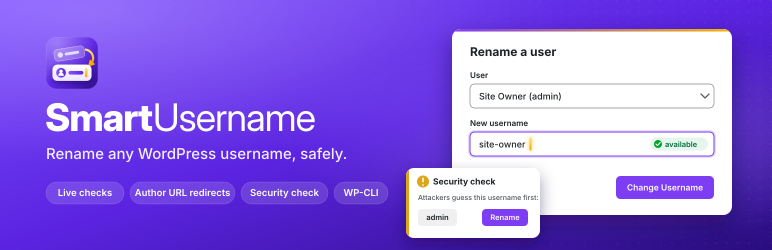
WordPress does not let you edit a username after an account is created. SmartUsername
adds a screen under **Users > Change Username** that renames an existing account
in place, so posts, comments, roles, passwords and user meta stay attached to the
same user.
#### Features
* **Exposure check**: one card shows every place your login names are visible (
REST API users list, ?author=1 lookups, users sitemap, embeds, author URLs, login
error messages, display names) with a Hidden or Exposed verdict, and a button
for each fix.
* **Login name protection**: one switch closes those places to visitors. Logged-
in authors and editors keep the block editor tools. An optional switch turns
off author archives for sites that do not need them.
* **Trap usernames**: names nobody uses, like admin, and old names you keep after
a rename become traps. Login attempts with them are refused and counted on a
Dashboard widget, “Login attacks caught”. No IP addresses are stored.
* **Fix author slugs**: one click gives every author whose public URL shows the
login a new slug based on the display name.
* **Rename any user**: pick the account from a list, or use the “Change username”
link on the Users screen or next to the Username field on the profile screen.
* **Security check**: warns on the Dashboard and Users screens when an account
uses a username that login attacks guess first (admin, administrator, root, your
site name and similar), with a one-click Rename button. The notice can be dismissed
and only returns if something new is found.
* **Email the user**: optionally send the renamed user a short email with the old
and new username and the login link.
* **Self-service (optional, off by default)**: let chosen roles change their own
username from Profile > Change Username, with a waiting period between changes.
* **WP-CLI**: `wp smartusername rename`, `wp smartusername check` and `wp smartusername
log` for agencies and scripts.
* **Live validation**: as you type, the plugin checks length, allowed characters
and whether the name is taken.
* **Same rules as WordPress core**: at most 60 characters; letters, numbers, spaces
and . – _ @ only; names blocked by the `illegal_user_logins` filter are refused.
* **Optional new author slug**: the new slug comes from the display name, never
the login. The old author URL redirects to the new one with a 301.
* **Safe sign out**: renaming your own account asks you to confirm first. A renamed
user’s open sessions are ended so they log in again with the new name. Email
login keeps working.
* **Rename log**: the latest 50 changes are listed on the screen, with who made
each change (administrator, the user themselves or WP-CLI) and whether the email
was sent. You can clear it at any time.
* **Clear errors**: anything that cannot be saved is reported in an admin notice
and nothing is changed.
* **Clean admin screen**: built from core admin styles, accessible labels and live
regions. Works without JavaScript. Styles and scripts load on this screen only.
#### Security
* Only users with the `manage_options` capability (`manage_network_users` on multisite)
can rename other users, and only users they are allowed to edit.
* Self-service is off until an administrator turns it on and picks the roles.
* Every form and the live check are protected by nonces.
* Input is validated with `sanitize_user()` in strict mode and `validate_username()`;
output is escaped.
* Network super admin usernames are not changed on multisite.
#### External services
The Exposure check card has a link, “Check from outside with the free Username Exposure
Checker”. It opens a free tool on digitalpritam.in in a new tab with your site address
filled in. Nothing is sent until you click the link. The tool then reads only public
pages of your site (such as the REST API users list and author URLs) and shows what
it found. The plugin itself never contacts this service. Tool: https://www.digitalpritam.
in/tools/wordpress-username-checker/ Privacy policy: https://www.digitalpritam.in/
privacy-policy/
#### Privacy
SmartUsername does not send any data off your site and does not track anything.
The rename log (old and new usernames, author slugs, user IDs and the time) is stored
in your own database and is removed when you delete the plugin. The optional notification
email is sent by your own site through `wp_mail()` to the renamed user only.
#### For developers
* Action `smartusername_username_changed( $user_id, $old_username, $new_username,
$change )` fires after each rename.
* Filter `smartusername_log_limit` changes how many log entries are kept (default
50).
* Filter `smartusername_notification_email` changes the email (to, subject, message,
headers).
* Filter `smartusername_risky_usernames` changes the list used by the security
check.
* WP-CLI: `wp smartusername rename [--slug] [--notify]`, `
wp smartusername check `, `wp smartusername exposure`, `
wp smartusername log [--format=]`.
#### SmartUsername Pro
An optional paid add-on for agencies and busy sites adds a weekly exposure monitor,
bulk renames, undo, full history, lockouts, reports and white label. Every feature
in this free plugin stays free and complete. See https://smartusername.com/pro/
## Ekran Görüntüleri
[⌊Rename a user with the live check and keep the old name as a trap. The Exposure
check shows where login names leak, with a fix for each.⌉⌊Rename a user with the
live check and keep the old name as a trap. The Exposure check shows where login
names leak, with a fix for each.⌉[
Rename a user with the live check and keep the old name as a trap. The Exposure
check shows where login names leak, with a fix for each.
[⌊Login name protection switched on: every check is green and the verdict is Hidden.⌉⌊
Login name protection switched on: every check is green and the verdict is Hidden
.⌉[
Login name protection switched on: every check is green and the verdict is Hidden.
[⌊The "Login attacks caught" Dashboard widget and the security check notice.⌉⌊The"
Login attacks caught" Dashboard widget and the security check notice.⌉[
The “Login attacks caught” Dashboard widget and the security check notice.
[⌊The rename log and self-service settings.⌉⌊The rename log and self-service settings
.⌉[
The rename log and self-service settings.
## Yükleme
1. Upload the `smartusername` folder to `/wp-content/plugins/`, or install it from
Plugins > Add New.
2. Activate the plugin through the Plugins screen.
3. Go to Users > Change Username.
## SSS
### Who can change usernames?
Administrators with the `manage_options` capability. On multisite, usernames are
shared by the whole network, so the `manage_network_users` capability is required.
### Can I change another user’s username?
Yes. Choose the user in the list, click “Change username” under their name on the
Users screen, or use the button next to the Username field on their profile.
### Can users change their own username?
Only if you allow it. Go to Users > Change Username, tick “Allow users to change
their own username” in Self-service renames, choose the roles and set the number
of days between changes. Those users then see Profile > Change Username.
### Will the user be told about the change?
Tick “Email the user their new username” and they get a short email from your site
with the old and new username and the login link. If your site cannot send email,
the screen tells you so.
### Why does it warn me about the username admin?
Automated login attacks try usernames like admin first. Renaming that account means
an attacker has to guess the username as well as the password. You can dismiss the
warning.
### Can I change my own username?
Yes. Tick the confirmation box. You are signed out and log in again with the new
username or your email address.
### What characters are allowed?
The same as WordPress core: up to 60 characters, using letters, numbers, spaces
and . – _ @. Anything else is rejected with a message and nothing is changed.
### What happens to posts, comments and other data?
Nothing. They are linked to the user ID, which does not change.
### Does the author URL change?
Only if you tick “Also update the author URL slug”. The old author URL then redirects
to the new one with a 301. If you leave it unticked, public URLs stay exactly as
they were.
### Is the display name changed?
No. Edit the display name on the user’s profile if needed.
### Can users still log in with their email address?
Yes. WordPress accepts the email address on the login screen, and renaming does
not change it.
### Does it work on multisite?
Yes, for users who are not network super admins. Activate it on each site where
you need it, or network activate it.
### The outside checker says Partly hidden. Why?
Your theme probably links to author pages, so author slugs are public. After “Fix
author slugs” they are based on display names, not logins, which is why the plugin
says Hidden. To keep author slugs out of public pages too, turn off author archives,
if your site does not need author pages.
### Will hiding login names break my site?
Visitors can no longer read the REST API users list, and ?author=1 lookups go to
the home page. Logged-in users who can write posts still get the users list, so
the block editor works as before. If another plugin needs the public users list,
leave the switch off.
### How do trap usernames work?
Nobody can log in with a name that no account uses, so every attempt with admin (
when no admin account exists) or with an old name you kept is a bot. The plugin
refuses it with the normal error and adds it to the “Login attacks caught” widget.
If you later create a real account with that name, the trap stops applying to it.
### What is removed when I delete the plugin?
The rename log, the settings, the trap names and counts, the stored old author slugs
used for redirects and the small per-user markers for self-service and dismissed
notices.
## İncelemeler

### [Must-have for client websites](https://wordpress.org/support/topic/must-have-for-client-websites/)
[ReadyMadeWP](https://profiles.wordpress.org/readymadewp/) 17 Ağustos 2025
As someone managing multiple client sites, this plugin saved me hours. Clients often
want usernames updated (after rebranding, or when staff changes), and this tool
makes it secure and effortless. Smooth process, works perfectly with latest WP.
[ 1 incelemeyi oku ](https://wordpress.org/support/plugin/smartusername/reviews/)
## Katkıda Bulunanlar ve Geliştiriciler
“SmartUsername – Secure Admin Login Renamer & Username Editor Tool” açık kaynaklı
yazılımdır. Aşağıdaki kişiler bu eklentiye katkıda bulunmuşlardır.
Katkıda bulunanlar
* [ Pritam Sonone ](https://profiles.wordpress.org/digitalpritam/)
“SmartUsername – Secure Admin Login Renamer & Username Editor Tool” 1 dile çevrildi.
Katkıda bulundukları için [çevirmenlere](https://translate.wordpress.org/projects/wp-plugins/smartusername/contributors)
teşekkürler.
[“SmartUsername – Secure Admin Login Renamer & Username Editor Tool” eklentisini dilinize çevirin.](https://translate.wordpress.org/projects/wp-plugins/smartusername)
### Geliştirmeyle ilgilenir misiniz?
[Kodu görüntüleyin](https://plugins.trac.wordpress.org/browser/smartusername/),
[SVN deposuna](https://plugins.svn.wordpress.org/smartusername/) göz atın ya da
[RSS](https://plugins.trac.wordpress.org/log/smartusername/?limit=100&mode=stop_on_copy&format=rss)
ile [geliştirme günlüğüne](https://plugins.trac.wordpress.org/log/smartusername/)
abone olun.
## Değişiklik Kaydı
#### 1.4.0
* New: refreshed Change Username screen in the SmartUsername brand style, with
clearer cards and buttons.
* New: loading feedback on every button while a rename or setting is saved.
* New: Docs link in the Plugins list, and an optional, dismissible card about the
SmartUsername Pro add-on on this plugin’s own screen only. No features were moved
or limited.
#### 1.3.0
* New: Exposure check card with a Hidden or Exposed verdict and a fix for each
item.
* New: Login name protection switch (REST users list, ?author=N lookups, users
sitemap, oEmbed author, one login error message).
* New: optional switch to turn off author archives.
* New: trap usernames and a “Login attacks caught” Dashboard widget. Rename form
option to keep the old username as a trap.
* New: “Fix author slugs” button for authors whose public URL shows the login.
* New: link to the free Username Exposure Checker on digitalpritam.in (opens only
when clicked).
* New: `wp smartusername exposure` command.
* Changed: a new author slug now comes from the display name, never from the login.
#### 1.2.0
* New: security check warns about usernames that login attacks guess first (admin,
administrator, root, site name and more), with one-click Rename and a dismiss
button.
* New: “Change username” button next to the Username field on Profile and Edit
User screens.
* New: optional email to the renamed user with their new username and login link.
* New: optional self-service renames for chosen roles, with a waiting period. Off
by default.
* New: WP-CLI commands `wp smartusername rename`, `check` and `log`.
* New: the log shows whether a change was made by an administrator, the user or
WP-CLI, and whether the email was sent.
* New: filters `smartusername_notification_email` and `smartusername_risky_usernames`.
* Uninstall also removes the settings and per-user markers.
#### 1.1.0
* New: rename any user, not only your own account. Pick the user from a list or
use the new “Change username” link on the Users screen.
* New: live availability and validation check while typing (nonce protected).
* New: optional author slug (user_nicename) update, with a 301 redirect from the
old author URL.
* New: confirmation step before you rename your own account and get signed out.
* New: log of the latest 50 renames, with a Clear log button. Removed on uninstall.
* New: login screen message after renaming your own account; email login keeps
working.
* New: redesigned, accessible admin screen. Assets load on this screen only and
the form works without JavaScript.
* New: `smartusername_username_changed` action and `smartusername_log_limit` filter.
* Fix: usernames longer than 60 characters are rejected with a clear error. Before,
the change failed silently while a success message was shown.
* Fix: input that is empty after sanitizing (for example only HTML tags) is rejected
instead of saving an empty username.
* Fix: characters WordPress core does not allow (such as ! and #) are rejected,
using strict sanitize_user and validate_username.
* Fix: success message and sign out only happen when the database row was actually
updated.
* Fix: errors are shown as admin notices instead of a blank error page.
* Security: capability checks in every handler; multisite requires manage_network_users.
* Removed unused files.
* Requires WordPress 5.3 or later. Tested up to WordPress 7.1.
#### 1.0.0
* Initial release.
## Meta
* Sürüm **1.4.0**
* Son güncelleme **1 hafta önce**
* Etkin kurulumlar **10+**
* WordPress sürümü ** 5.3 veya üstü **
* Test edilen sürüm **7.1.3**
* PHP sürümü ** 7.0 veya üstü **
* Diller
* [English (US)](https://wordpress.org/plugins/smartusername/) ve [Marathi](https://mr.wordpress.org/plugins/smartusername/).
* [Dilinize çevirin](https://translate.wordpress.org/projects/wp-plugins/smartusername)
* Etiketler
* [author slug](https://tr.wordpress.org/plugins/tags/author-slug/)[Change Username](https://tr.wordpress.org/plugins/tags/change-username/)
[login security](https://tr.wordpress.org/plugins/tags/login-security/)[username](https://tr.wordpress.org/plugins/tags/username/)
* [Gelişmiş görünüm](https://tr.wordpress.org/plugins/smartusername/advanced/)
## Puanlar
5 üzerinden 5 yıldız.
* [ 1 5 yıldızlı inceleme ](https://wordpress.org/support/plugin/smartusername/reviews/?filter=5)
* [ 0 4 yıldızlı inceleme ](https://wordpress.org/support/plugin/smartusername/reviews/?filter=4)
* [ 0 3 yıldızlı inceleme ](https://wordpress.org/support/plugin/smartusername/reviews/?filter=3)
* [ 0 2 yıldızlı inceleme ](https://wordpress.org/support/plugin/smartusername/reviews/?filter=2)
* [ 0 1 yıldızlı inceleme ](https://wordpress.org/support/plugin/smartusername/reviews/?filter=1)
[Değerlendirmeniz](https://wordpress.org/support/plugin/smartusername/reviews/#new-post)
[Tüm değerlendirmeleri gör](https://wordpress.org/support/plugin/smartusername/reviews/)
## Katkıda bulunanlar
* [ Pritam Sonone ](https://profiles.wordpress.org/digitalpritam/)
## Destek
Söyleyeceğiniz bir şey mi var? Yardım mı lazım?
[Destek forumunu görüntüle](https://wordpress.org/support/plugin/smartusername/)
## Bağış yap
Bu eklentinin geliştirilmesini desteklemek ister misiniz?
[ Bu eklentiye bağış yap ](https://paypal.me/amhikastkar)