Açıklama
If you have a 3D printer and wish to charge for model printing this plugin is for you.
How it works:
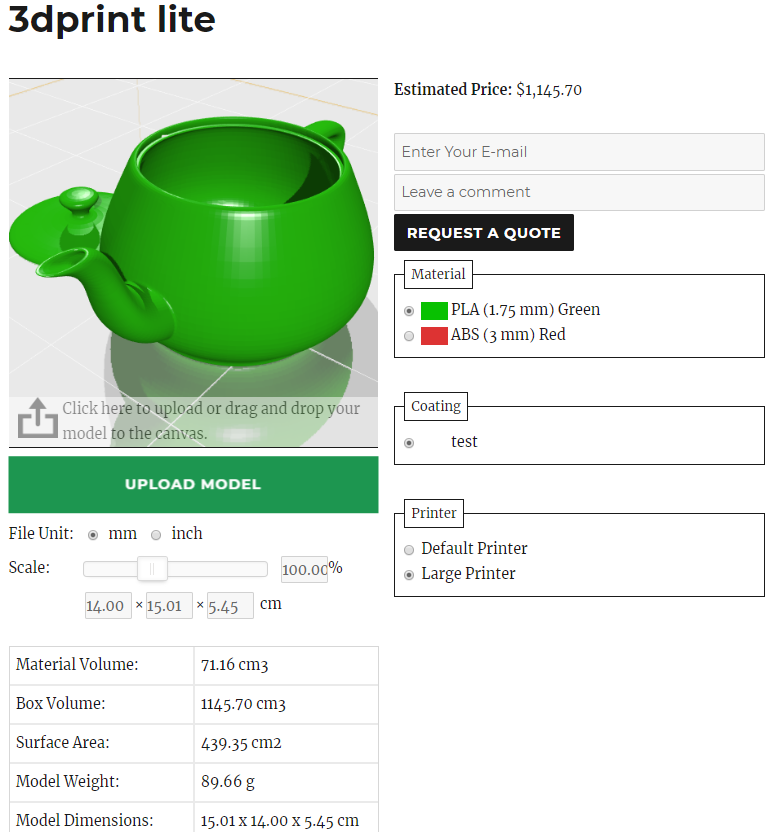
Site administrator configures printers, materials and pricing in the admin. Customers upload their models, choose printer and material, see the estimated price, input their email address and comments and press the “Request a Quote” button.
The admin receives the request notification by email and sends the quotes through the Price Request Manager or discards the quote requests.
Features:
- Desteklenen dosya türleri: STL (bin, ascii), OBJ (+.mtl), ZIP.
- Yapılandırılabilir yazıcılar, filamentler ve kaplamalar.
- Baskı tablası şekli (dikdörtgen, daire).
- Materyal/kaplama parlaklığı (plastik, ahşap, metal).
- Şeffaf ve parlayan materyaller.
- Özelleştirilebilir fiyatlandırma: model ağırlığına, filament hacmine veya sınırlayıcı kutu hacmine göre ücretlendirme yapılandırılabilir.
- Büyük dosya yükleme desteği (parçalı yükleme).
- Model ölçeklendirme.
- Sürükle ve bırak.
- Filament fiyatı hesaplayıcı.
- E-posta bildirimi.
- E-posta şablonları.
- Fiyat teklifi yöneticisi.
- Çeviri için hazır.
- Responsive layout.
Demo: http://www.wp3dprinting.com/3d-print-lite-demo/
Premium version of the plugin has all features of the lite version plus:
- WooCommerce entegrasyonu.
- Laser cutting support.
- Bulk Upload Mode.
- Form oluşturucu (NinjaForms entegrasyonu)
- File Manager
- Desteklenen ek dosya türü: STP, IGS, DXF
- Görsel baskısı: JPG, PNG, GIF, BMP dosyaları STL’e dönüştürülür.
- Bir ZIP dosyasındaki birden fazla STL modelini düzenleyebilir.
- Model ölçekleme (eksenler bağımsız olarak ölçeklenebilir).
- Ek yerleşim seçenekleri.
- Model repair & optimization (auto rotation for optimized 3D printing process)
- Elle model döndürme.
- Dolgu hesaplaması.
- Saatlik fiyatlandırma.
- Destek malzemesi hesaplaması.
- Önceden tanımlanmış modelleri ürünlere ekleme yeteneği.
- E-posta şablonu yöneticisi.
- İndirim sistemi.
- Tam ekran modu.
- Ayarlanabilir fiyatlı özel nitelikler.
- Farklı ürünlere farklı yazıcılar ve malzemeler atayabilme özelliği.
- Ücretsiz destek.
- Yeni muhteşem özellikler gelecek.
Ekran Görüntüleri
Yükleme
- Make sure you have WordPress installed properly (wp-content/uploads/ directory should be writable).
- Copy 3dprint-lite folder to wp-content/plugins.
- Activate the plugin from the Plugins menu within the WordPress admin.
- On the settings page configure the main settings, printers and materials.
- Create a new page, give it a name and paste shortcode [3dprint-lite] into the page body.
- “Yayımla” düğmesine tıklayın.
- Tamamlandı!
SSS
-
Eklenti WooCommerce entegrasyonu sunuyor mu?
-
Yalnızca premium sürüm – http://www.wp3dprinting.com/
-
Baskı fiyatı nasıl hesaplanır?
-
Generally the formula is: printing price = printer cost + material cost . Printer and material cost are calculated depending on the settings on the 3D Printing page. The cost can be calculated through filament volume, weight or bounding box.
-
Eklenti modellerin yazdırılabilirliğini kontrol eder mi?
-
The current version only checks if the model is larger than the selected printer size.
-
How do I set up different price rates for different amounts of material and volume?
-
For example you want to charge 0.5$ for < 200cm3, 0.4$ for >200cm3, 0.3$ for >400cm3. Instead of regular numeric price enter this formula: 0:0.5;200:0.4;400:0.3
The price and amount are delimted by “:” symbol and price-amount pairs are delimited by “;”. This works on printer, material and coating prices.
-
Eklentiyi nasıl çevirebilirim?
-
En kolay yol şu eklentiyi kullanmaktır: https://wordpress.org/plugins/loco-translate/
-
E-posta işlevi çalışmıyor, ne yapmalıyım?
-
Easy WP SMTP eklentisini kullanın: https://wordpress.org/plugins/easy-wp-smtp/
İncelemeler


Katkıda Bulunanlar ve Geliştiriciler
“3DPrint Lite” açık kaynaklı yazılımdır. Aşağıdaki kişiler bu eklentiye katkıda bulunmuşlardır.
Katkıda bulunanlar
“3DPrint Lite” 9 dile çevrildi. Katkıda bulundukları için çevirmenlere teşekkürler.
“3DPrint Lite” eklentisini dilinize çevirin.
Geliştirmeyle ilgilenir misiniz?
Kodu görüntüleyin, SVN deposuna göz atın ya da RSS ile geliştirme günlüğüne abone olun.
Değişiklik Kaydı
2.1.9
Hata düzeltmeleri
2.1.8
Added a textarea description field for printers, materials, coating and infills.
Security hardening
2.1.4
WordPress 7.0
2.1.3.9
array_multisort bugfix
Price debug mode bugfix
WordPress 6.9
2.1.3.8
Locale fix
WordPress 6.8
2.1.3.7
Security fix
2.1.3.6
Security fix
2.1.3.5
Price requests: material, printer, coating, infill fields are editable
Price requests: admin file attachment field
Price requests: admin delivery date field
Email templates: [infill_name], [admin_delivery] shortcodes
3dprint-lite_filename hook
2.1
Security update
WordPress 6.7
2.0.9.9
Coatings bugfix
2.0.9.8
Printers, materials, coatings have “Enabled” switch and sort order field.
default_infill bugfix
2.0.8.7
Price debug bugfix
2.0.8.6
Dropdown (New) is collapsible on item selection
If a model is not found an error message is shown
2.0.6.6
Price Debug Mode option
Price decimals bugfix
2.0.5.5
Material edit page – added coating, printer and post-processing dropdowns
2.0.3.4
WordPress 6.4 tested
2.0.3.4
Android upload bugfix
WordPress 6.3 tested
2.0.3.3
Mobile bugfixes
WordPress 6.2 tested
2.0.3.1
Infills section
Infills can be assigned per printer
Rotation speed setting
Rotation direction setting
Filter files by extensions
Decimals bugfix
WordPress 6.1 tested
1.9.9.3
Settings: Tooltip Engine
Settings: Tooltip Theme
WordPress 6.0 tested
1.9.9.1
Hata düzeltmeleri
1.9.9
Responsive view fix
CSS adjustments
Automatically select a fitting printer if “auto scale” option is disabled
Translation fix
WordPress 5.9 tested
1.9.3
New layout “Dropdown New”
Bugfixes
1.9.1.9
Code cleanup
1.9.1.8
Code cleanup
1.9.1.7
Code cleanup
1.9.1.6
Code cleanup
1.9.1.5
Security fixes
1.9.1.4
Renamed window.wp.hooks to window.wp.event_manager, please adjust your JS hooks accordingly
1.9.1.3
WordPress 5.8
1.9.1.2
Can be used together with the paid version
1.9.1.1
New option in general settings: Auto Scale
WC compatibility fix
Renamed THREE to THREEP3DL
1.8.9.6
“Load On” setting in the admin.
Added the shortcode field for copying on the settings page
1.8.9.3
Preserve HTML checkbox in Email Templates
1.8.8.3
Option to change the order of printer and material selection in Settings -> Product Viewer
Backend: [weight] shortcode in e-mail to client template
DB primary key bugfix
Ajax loader image centering bugfix
1.8.6
Bugfix: Incomplete price request list
Bugfix: Wrong quantity in price request e-mail
1.8.5.8
New admin area
Moved printers, coatings, materials and price requests to DB tables
Added quantity field
Loading Image is configurable
Better line break handling in e-mail templates
Multiple bugfixes and layout adjustments
WordPress 5.6 tested
1.7.8.2
WordPress 5.5 tested
1.7.8.1
Shows error code on failed upload
1.7.8
Printers, materials and coatings have new fields: description and photo.
Description and photo are displayed in a tooltip on the frontend.
1.7.6.1
Mail From field bugfix
Minor bugfixes (PHP notices)
1.7.6
E-posta şablonları\nKüçük hata düzeltmeleri
1.7.5.2
Mobil tarayıcılardaki OBJ modelleri düzeltildi
1.7.5.1
Use MeshLambertMaterial instead of MeshPhongMaterial on mobile devices
1.7.5
Updated Three.js to the latest version (r101)
Automatically select a fitting compatible printer if a model is too large
Mobile view bugfix
1.7.2.7
Email quotes bugfix
1.7.2.6
JS hata düzeltmesi
1.7.2.5
Readme.txt güncellemesi
1.7.2.4
Minimum scale set to 0.01%
Initial file chunk size matches max_upload_size
Bugfixes
1.7.1.2
Hata düzeltmeleri
1.7.1.1
Email quotes bugfix
1.7.1
Ek fiyat alanları
1.7.0.7
Inch conversion fix
1.7.0.6
Bugfix
1.7.0.5
Bugfix
1.7.0.4
Hata düzeltmeleri
1.7.0.3
“Request price” bugfix
1.7
Switched to three.js library
File chunk size is configurable
Yazıcıların tam renk seçeneği vardır
Printers have minimum model side option
Otomatik döndürme tercihi
Gölge tercihini göster
Ground mirror option
Materials and coatings have shininess/transparency/glow options
Some bugfixes
1.6.2.4
Bugfix
1.6.2.2
Bugfix
1.6.2.1
Bugfix
1.6.2
E-posta yapılandırılabilir.
A few bugfixes
1.6.1.2
Fiyat hata düzeltmesi.
1.6.1
Ölçekleme özelliği eklendi.
Kaldırma isteği düzeltildi.
CSS düzeltmesi.
1.6
Sürükle ve bırak özelliği.
“Show printer box” and “show grid” options.
CSS ayarlamaları.
1.5.9
Added layout templates for printers, materials and coatings (check settings page).
Yönetim alanı hata düzeltmesi.
1.5.8.2
Backend improvement: accordion tabs, clone and remove buttons.
Frontend css adjustments.
Some bugfixes and security updates.
1.5.6
Printers, materials and coatings can have a fixed price.
Model stats configuration.
Minimum price/starting price option.
CSS and JS versioning.
Küçük hata düzeltmeleri.
1.5.1
bug fixes
1.5
Minor js fix.
1.4.9
Cookie lifetime is configurable.
Fixed install script.
1.4.8
Materials can be assigned to coatings.
Can be loaded everywhere.
Uppercase extension fix.
Added gzip instructions to .htaccess
Fixed zip archives with utf8 files inside.
File size is checked for extracted files.
Added uninstall script.
Minor css fix.
1.4.3
Materials can be assigned to printers.
Can hide model stats.
If a printer/plane color is empty they get invisible.
1.4
Filament adı Malzeme olarak değiştirildi, filament olmayan malzemeler için Yoğunluk alanı etkinleştirildi.
UTF-8 adlı dosyaların yüklenmesi düzeltildi.
Yazıcılar, malzemeler ve kaplamalar artık çevrilebilir.
Düğme rengi yapılandırılabilir.
Tuval istatistikleri ve yazıcı/malzeme/kaplama kutuları gizlenebilir.
Küçük yerleşim düzeltmeleri.
1.3
Zip dosyası desteği. Modeller bir zip arşivinde yüklenebilir (her arşivde bir model).
Obj models with .mtl files and textures can be uploaded in a zip archive.
Daha iyi obj dosya desteği.
Bir bakım özelliği eklendi.
Küçük yerleşim düzeltmesi.
1.1.3
Bir hata düzeltmesi
1.1.2
Hata düzeltmeleri
1.1.1
Bir hata düzeltmesi
1.1
Kaplama malzemesi eklendi.
Fiyat biçimlendirme seçenekleri eklendi
Bazı hata düzeltmeleri ve yerleşim ayarlamaları
1.0.4
Yükleyici düzeltmesi
1.0.3
Minor layout fix
1.0.2
Minor layout fix
1.0
- İlk sürüm.