

Açıklama
WordPress ve arama motorları tarafından belirlenen yönerge ve kurallara uyan en hızlı ve tüm özelliklere sahip tek SEO eklentisi.
Preview The SEO Framework in WordPress Playground.
Web sitenizin sıralamasını iyileştirmek için kanıtlanmış SEO taktiklerini kullanmaya başlayın. Temiz, amaca yönelik, genişletilebilir, kısıtlamasız, reklamsız ve hiçbir koşula bağlı olmadan.
To top it off, this is the fastest full-featured SEO plugin, and it blends right into your WordPress website, without leaving you in the dark.
Kullanması kolaydır. Eklentiyi etkinleştirin, siteniz zaten belirgin SEO saldırılarına karşı korunacaktır. SEO Framework aynı zamanda sizin için tüm kritik meta etiketlerini hazırlayacaktır. Gerçek bir zaman tasarrufu. Dahice.
Taşıma | Kurulum | Geliştir | Uzantılar | API | Destek | Gizlilik
Bu eklentiye 30.000 saatten fazla sevgi kattık.
İşte sonuçlar:
-
Mükemmel.
SEO Framework, SEO için uzman bir sistemdir. WordPress ortamınızı okuyarak herhangi bir dilde akıllıca kritik SEO meta etiketleri oluşturabilen tek çözüm budur. Bu otomasyon size daha fazla içerik yazmanız veya diğer görevlere odaklanmanız için kullanabileceğiniz önemli miktarda zaman kazandırır. Aynı zamanda ileri SEO bilgisi ihtiyacını ortadan kaldırır. -
Önceden yapılandırılmış olarak gelir.
SEO Framework ile, tüm sayfalarınızı rasyonel bir şekilde optimize ederek web siteniz için mükemmel bir başlangıç noktası sunuyoruz. Doğal olarak, istediğiniz şekilde ince ayar yapabilirsiniz. Bir SEO uzmanı değilseniz, Kurulum kılavuzumuz‘da neyi optimize etmek isteyebileceğinizi öğrenin. -
Meta verilerinizi optimize etmenize yardımcı olur.
Google’ın web yöneticisi yönergelerini izleyen bir SEO eklentisini yaptık. Bunu, WordPress arayüzünüz için iyi bir şekilde uyarlamak yıllar süren araştırma ve ince ayarlardan geçti. Son olarak, kritik hatalar hakkında endişelenmenize gerek kalmadan sayfalarınızı özgürce optimize edebilirsiniz. -
Güzel bir genel bakış oluşturur.
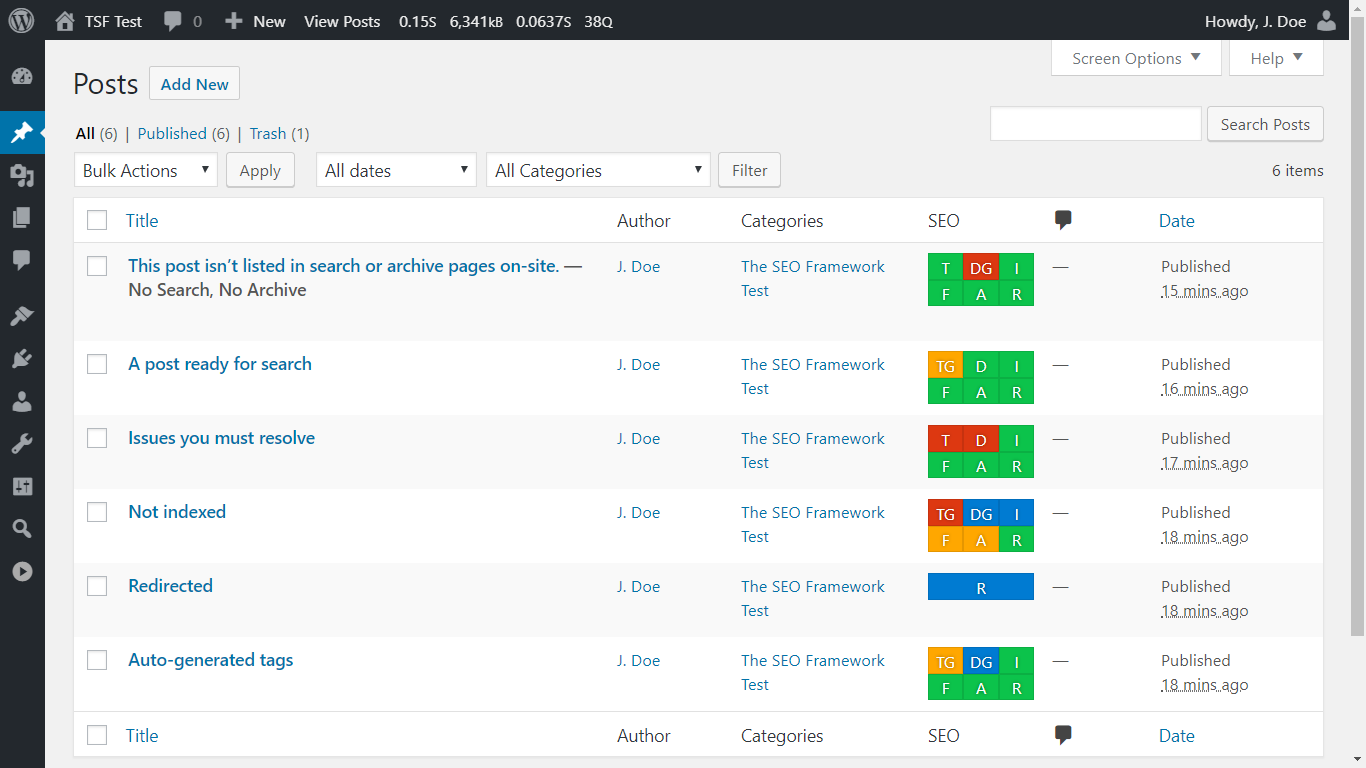
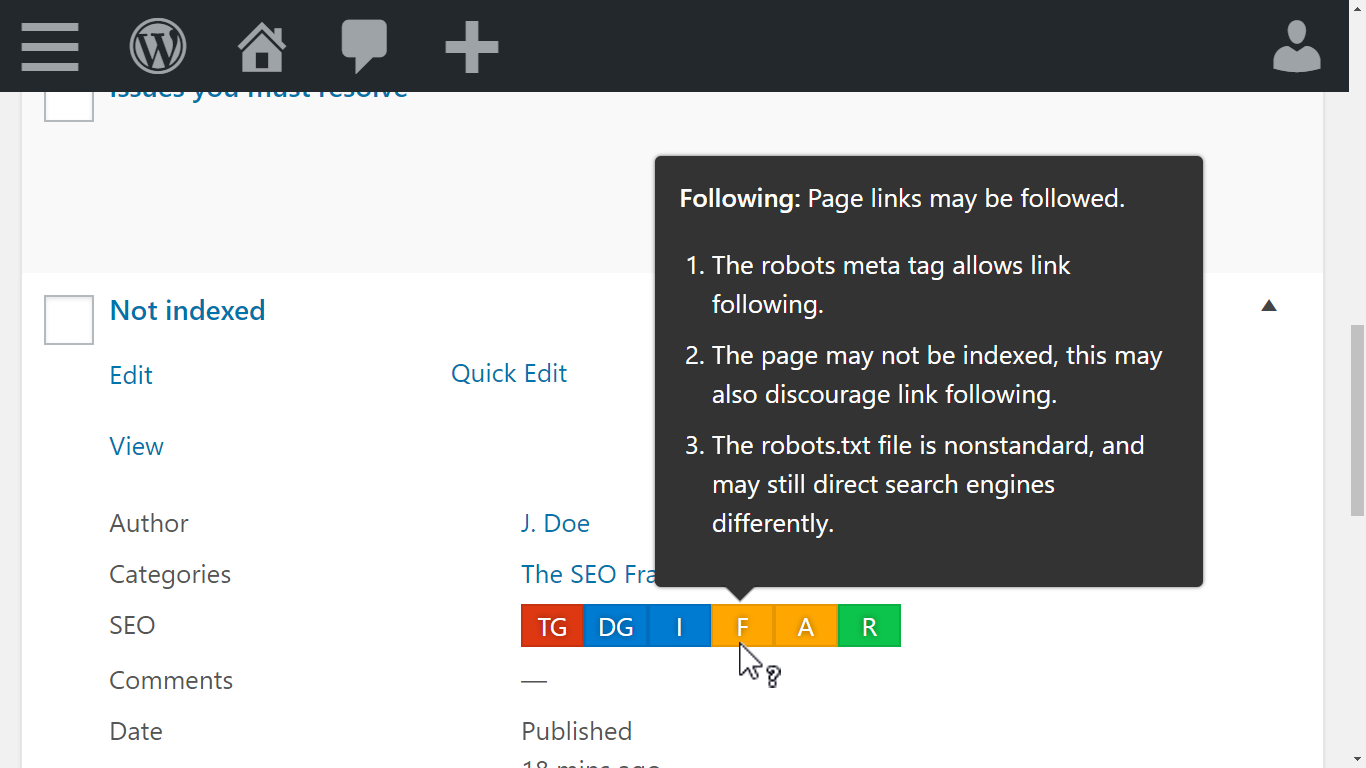
Yazı genel bakış sayfalarınızda renk kodlu kurallar bulacaksınız. Bunlar sayfalarınızı farenizle üzerlerine getirdiğinizde nasıl iyileştirebileceğinizi önerirler. Örneğin, başlıklarınız markasız olduğunda veya WordPress indislemeyi engellediğinde. İçgüdüsel olarak, dokunmatik ve klavye gezinmesi de desteklenir. -
It includes exceptional support.
We don’t outsource our support. We’re here for you. Feel free to drop by our support channels at any time to ask a question. More than 5000 inquiries have been answered personally in the past nine years, typically within 72 hours. -
Hatalara yer bırakmaz.
İhtiyacınız olmayan özelliklerin kalitesine odaklanmıyoruz. Bu özellik, bu eklentiyi benzersiz, daha hızlı, daha doğru, neredeyse hatasız ve daha sürdürülebilir hale getiriyor. Eklenen yarar, sitenizin arama motorları tarafından cezalandırılmasının mümkün olmamasıdır. Sizi doğal olmayan içerik yazmaya yönlendirmez veya arama motorlarını kandırmanıza izin vermeyiz. -
Orijinal ve sade kalır.
Küçük ve büyük şirketler ve girişimler için SEO Framework eklentisini oluşturduk. Arayüz tamamen erişilebilir durumda ve panonuzla sorunsuz bir şekilde bütünleşiyor. Böylelikle, eklenti ile etkileşime girmek doğal hissettiriyor. Sıkıcı gelebilir, ancak WordPress panonuz, markamız için bir ilan panosu olmamalıdır. Bunu asla değiştirmeyeceğiz. -
It improves search presence.
The SEO Framework ranks your website distinctively by enabling breadcrumbs for Google Search via structured data. It also automatically generates titles and descriptions according to Google’s guidelines and quickly helps search engines find the website’s latest changes via the built-in optimized sitemap. -
Sosyal paylaşımı kolaylaştırır.
SEO Framework otomatik olarak desteklenir ve Open Graph, Facebook ve Twitter Kartları protokollerini daha da özelleştirmenize olanak tanır. Pinterest, Discord ve Whatsapp gibi çeşitli sosyal ağlarda paylaşıldıklarında yayınlarınızın öne çıkmasına yardımcı olur. -
Erişilebilirlikten daha fazlası.
Renk düzenimizi seçtik, böylece tıbbi olarak tanınan herhangi bir renk görme yetmezliği olan kişilerin arama motorları tarafından belirlenen yönergeleri ayırt edebilmelerini sağladık. Ayrıca tam tuş takımı-gezinme ve ekran okuyucu desteği uyguladık. -
Sizi hatalardan korur.
SEO Framework, sizi önemli ve yaygın SEO hatalardan kaçınmanızı sağlar. Eklenti zaten sizin için her şeyi yapıyor ve karışıklık için çok az yer bırakıyor. Örneğin, katı kanonik kuralları uygulayarak kopya içerik hatalarını otomatik olarak önler. -
En iyi uygulamaları ve fazlasını takip eder.
WordPress eklentileri ile ilgili en büyük problem güvenlik ve uyumluluktur. Yarı zamanlı güvenlik araştırmacıları olarak, bu eklentiyi geçilemez hale getirmeye odaklanıyoruz. SEO Framework ayrıca, mümkün olduğunda WordPress API’sini kullanır ve bu eklentinin akılda tutulan diğer tüm eklentilerle düzgün bir şekilde bütünleşmesini sağlar. -
Kalbinde geliştiriciler var.
Diğer geliştiricileri bu eklentiye işlevsellik geliştirmeleri ve eklemelerini teşvik ediyoruz. Bunu zaten uzantılarımızla yaptık. API’mıza göz atın ve katkıda bulunmaktan çekinmeyin! -
Gizliliğinize saygı duyar.
SEO Framework bize bilgi göndermez ve çerez oluşturmaz. Yaptığımız şey hakkında gizlilik politikamızdan daha fazla bilgi edinin:
Başlarken
- Başka bir SEO eklentisi mi kullandınız? Üst verilerinizi kolayca taşıyın.
- Başlamak için yardım mı lazım? Hızlı Kurulum Kılavuzumuzu okuyun.
- Sayfalarınızı geliştirmek mi istiyorsunuz? Meta verilerinizi nasıl optimize edeceğinizi öğrenin.
Uzantılarla daha fazlasını yapın
Daha fazla işlevsellik için ücretsiz eklentimiz Extension Manager‘ı inceleyin. Aşağıdakiler gibi çok sayıda ücretsiz ve ücretli uzantı sağlar:
- Focus odak anahtar kelimeleri ve eşanlamlıları ile sıralanan hedefli içerik yazma sürecinde size yol gösterir.
- Önemli Yapısal Verileri otomatik olarak ekleyerek Articles yayınlanan yayınlarınızı geliştirir.
- Transport migrates and transforms metadata from Rank Math, Yoast SEO, and SEOPress to this plugin.
- Honeypot, hafif ama güçlü beş yöntemle istenmeyen yorum yapanları yakalar.
- Cord web sitenizi Google Analytics and Meta Pixel‘e bağlamanıza yardımcı olur.
- Local, arama motorlarının kullanması için önemli yerel işletme bilgilerini ayarlamanıza olanak sağlar.
- AMP destekli makaleler ve sayfalar için AMP, SEO Framework AMP eklentisine bağlar.
- Monitor web sitenizin SEO optimizasyonlarını ve istatistiklerini takip eder.
- Incognito tüm geliştirme yorumlarını, SEO Framework’den gizler.
- Origin ek sayfa ziyaretçileriniana gönderiye yeniden yönlendirir.
- Title Fix başlık çıktınızın yapılandırılmış olduğundan emin olmanızı sağlar. Temanız yanlış olsa bile.
Daha fazla bilgi için Uzantılar sayfamıza göz atın.
Markasız, Ücretsiz ve Profesyonel
SEO Framework, WordPress kontrol panelinize sorunsuz bir şekilde uyum sağlayan benzersiz bir beyaz etiket eklentisidir. Bu, WordPress arayüzünüzün herhangi bir yerine “SEO Framework” adını bile koymadığımız anlamına gelir. Reklam yok, söylenmek yok. Kimse web sitenizi oluşturmak için kullandığınız araçları bilmek zorunda değildir. Kaynak kodundaki eklenti çıktısını ayırt eden standartlaştırılmış geliştirme yorumları yaptığımızı unutmayın. Bunları ücretsiz Incognito ile kaldırabilirsiniz.
Kamera arkası
SEO Framework size haber vermeden birçok şey üzerinde çalışır, çünkü en iyi yazılım size zaman kazandırır. İşte kamera arkasında yaptığı birkaç şey.
- Kategoriler, sayfalar, alt alan adları ve çoklu site alan adı eşlemesiyle kurallı hataları önler.
- Arama motoruna bunun yerine mevcut son sayfaya bakmasını söyleyerek WordPress’teki sayfalama istismarlarının yol açtığı SEO saldırılarını durdurur.
- 404 yanıtı göndermeseler bile, 404 sayfa ve boş kategorilerin dizine alınmasını engeller.
- Arama motorlarını, yazıları ve site haritasını endekslemekten alıkoyuyor. Bu, onları kullanmayacakları anlamına gelmez, yalnızca arama sonuçlarında göstermezler.
- Arama motorlarını yorum sayfalarından bu yorumları tutan yazılara yönlendirir.
Compatibility and accessibility
The SEO Framework destekliyor:
- Internationalization through WordPress.org. You can contribute here.
- Emoji ve CJKV (Çince, Japonca, Korece, Vietnamca) dahil Unicode (UTF-8) karakter tanıma ve oluşturma.
- Arayüzü ve üst veri kod imi oluşturması yoluyla Sağdan Sola (RTL) diller (Arapça, İbranice, Farsça vb.).
- Özenle seçilmiş bir renk şeması sayesinde eksiksiz renk körü erişilebilirliği.
- Tam klavye gezintisi, böylece farenize ulaşmak zorunda kalmadan araç ipuçlarını hızlı bir şekilde inceleyebilirsiniz.
- Alan bağlantıları, ARIA etiketleri ve başlık özellikleri aracılığıyla tam ekran okuyucu erişilebilirliği.
- Çoklu site kurulumları, bu eklenti aslında bir tanesi için inşa edilmiştir.
- Robots.txt ve sitemap.xml dosyalarının algılanması ve çıktısı.
- Full integration with WordPress Core sitemaps.
- SEO controls for posts, pages, custom post types, terms, post type archives, and author archives.
- Primary term (category) selection to influence breadcrumbs and links.
- Schema.org JSON-LD scriptleri ile yapılandırılmış verilerin çıktısı.
- Discord’da daha iyileştirilmiş paylaşım için oEmbed öğesini değiştirme.
- Zarif bir şekilde geçiş yapmanıza yardımcı olmak için diğer çeşitli SEO eklentilerinin tespiti.
- WPML, Polylang, TranslatePress, WPGlobus ve MultilingualPress gibi çeviri eklentileri.
- Page builders like Elementor and Bricks, including generated descriptions from Bricks Text and Section elements.
- WooCommerce ve Easy Digital Downloads gibi e-ticaret eklentileri.
- Blocking of SEO analysis and AI crawlers for Moz, OpenAI, Apple, and others, via robots.txt.
- Forum plugins like bbPress and wpForo.
- WordPress’in yerel toplu ve hızlı düzenleme arayüzleri aracılığıyla gönderileri ve terimleri düzenleme.
- Headless mode via a single constant definition.
Ekran Görüntüleri

Yükleme
Bu eklenti şunları gerektirir:
- PHP 7.4 veya üstü.
- WordPress 7.0 veya üstü.
- Yönetim için herhangi bir modern tarayıcı.
Yükleme Talimatları:
- SEO Framework eklentisini WordPress.org eklenti dizini aracılığıyla veya dosyaları sunucunuza karşıya yükleyerek kurun.
- İsterseniz ağ genelinde etkinleştirin, isterseniz tek bir sitede.
- Bu kadar! Eklenti şimdi web sitenizi SEO için optimize eder. Ayrıca web sitenizi SEO saldırılarına karşı korur.
Bu eklenti, global ayarlarını otomatik olarak yapılandırır, ancak:
Ancak, SEO Framework eklentisinden en iyi şekilde yararlanmak için eklenti kurulum kılavuzumuzu okuyun.
Bu eklenti, SEO meta ayarlarını otomatik olarak yapılandırır ve:
Ancak, sayfalarınızı nasıl optimize edebileceğinizi öğrenmek için sayfa geliştirme kılavuzumuzu okumak isteyebilirsiniz.
Daha fazla SEO gücüne sahip olun
İsteğe bağlı olarak, ek SEO çözümleri için Extension Manager‘ı de yükleyin.
SSS
-
SEO Framework ücretsiz mi?
-
Kesinlikle! Reklamlar, izleme veya uyarılar olmadan da ücretsiz kalacak! ↵
Bu eklenti hafif ama her şey dahildir. %100 ücretsiz bir yazılımdır, crippleware değildir. -
Hayır. Bu eklentiye zaten premium bir eklenti olarak davranıyoruz.
Ancak, bu ücretsiz eklentiyi desteklemeye yardımcı olan birçok ücretsiz ve ücretli uzantı sunuyoruz. Bunları ücretsiz Extension Manager eklentisi aracılığıyla sağlıyoruz.
-
Neden analitik, izleme veya 404 izleme yok?
-
Ahrefs, SEMrush, Screaming Frog ve Google Analytics gibi gelişmiş araçları kullanan SEO uzmanları, işlerini gelişigüzel yapmaya çalışmadığı için SEO Framework kullanmayı tercih ediyor.
Web sitenizi doğru şekilde analiz etmek için dışarıdan yapılmalıdır. Bu özellikleri sitenize yüklersek, kötü robotlar, veritabanınızı arama motorları için geçerli olmayan gereksiz bilgilerle dolduran binlerce yanlış pozitif sonuca neden olur. Size hiçbir zaman yardımcı olmayacağı için bundan kaçınıyoruz.
-
Bir özellik isteğim, bir sorum var veya bir hata buldum.
-
Lütfen destek forumlarını ziyaret edin ve bizi bilgilendirin.
Bir hafta içinde size geri dönmeye çalışacağız. Genellikle üç gün içinde yanıt veririz.
-
Ben bir geliştiriciyim; nasıl yardımcı olabilirim?
-
Tüm yorumlar değerlendirilmekte ve her şey dikkate alınmaktadır.
Sorunları paylaşmak veya istekte bulunmak için lütfen GitHub proje sayfasını ziyaret edin.Katkılar hakkında daha fazla bilgi edinin.
-
Renkler bana ne anlatıyor?
-
Mesajları iletmek için farklı renkler kullanıyoruz. Kırmızı, çözmeniz gereken bir hatadır. Sarı, ele almak isteyebileceğiniz kritik olmayan bir uyarıdır. Yeşil iyidir. Mavi bilgi verici ve durumsaldır.
-
Site haritası kategoriler, görseller vb. içermez.
-
Her bir sayfanın listelenmemesi bir sorun değildir. Arama motorları, WordPress’i taramaya bayılır, çünkü yapısı tutarlı ve iyi bilinmektedir.
Bir ziyaretçi bir sayfa bulamazsa, neden bir arama motoru bulabilsin? Site haritanıza güvenmeyin, içeriğinize ve web sitenizin kullanılabilirliğine güvenin.
Extension Manager ’a göz atın. Modern ve daha güçlü yollarla boşlukları dolduran Makaleler gibi uzantıları içeriyor.
-
Site haritası istenmeyen bağlantılar içeriyor.
-
SEO Framework tüm herkese açık sunulan yazıları, sayfaları ve CPT’yi alır ve bunları site haritasına yerleştirir.
Site haritasında bir sayfa istemiyorsanız,
noindexseçeneğini etkinleştirmeyi düşünün. Bu, sayfayı arama motoru sonuç sayfalarından da kaldıracaktır.Bağlantı site haritalarında olmaması gerekiyorsa fakat bu yapısal nedenlerden kaynaklanıyorsa, bunları oluşturan eklentiyi veya tema geliştiricisini bilgilendirin.
Geliştiriciye “public‘i kontrol etmesini ve yazı tipi argümanlarınırewrite(yeniden yazmasını) söylemelisiniz. ”Eklenti veya tema geliştiricisi bunun ne anlama geldiğini bilmelidir.Bu arada, “Dışlamalar” altındaki “Genel Ayarlar” yoluyla istenmeyen kayıtlar için SEO’yu etkisizleştirebilirsiniz.
-
Odak anahtar kelimeleri neden dahil edilmiyor?
-
Google, diğer bazı SEO eklentileri tarafından uygulanan anahtar sözcük doldurma yaklaşımı konusunda uyarır. Kullanıcıları doğal olmayan içerik yazmaya zorlar ve sitenizin sıralaması üzerinde olumsuz etkileri olabilir.
Modern arama motorları, makalelerinizin içeriğini anlamak için AI kullanır. Bu, alakalı içerik yazdığınız sürece, anahtar kelimeler için endişelenmenize gerek olmadığı anlamına gelir.
Ancak, anahtar kelimeleriniz için uygun eş anlamlıları ve çekimleri bulmanıza yardımcı olmak için Google’ın kullandığı API’nin aynısını uyguladık. Bu işlevsellik, premium uzantı paketimizin bir parçasıdır.
-
Uygulama /ld+json komut dosyaları ne işe yarar?
-
JSON-LD komut dosyaları, arama motorlarına siteye nasıl bağlanacaklarını ve dizine ekleneceklerini söyleyen arama motoru yardımcılarıdır. Bunu Schema.org standardı ile yapıyoruz.
Sitenizde dahili bir arama motoru, hangi sosyal sitelere bağlandığınız ve hangi sayfa yapısını kullanıyorsanız, arama motoruna söyleyebilirler. Buna aynı zamanda yapılandırılmış veri denir.
-
The SEO Framework outputs hidden breadcrumbs for search engines to find via its Schema.org settings.
You can also output these breadcrumbs visually in your theme by using a shortcode.
İncelemeler


Katkıda Bulunanlar ve Geliştiriciler
“The SEO Framework – Fast, Automated, Effortless.” açık kaynaklı yazılımdır. Aşağıdaki kişiler bu eklentiye katkıda bulunmuşlardır.
Katkıda bulunanlar
“The SEO Framework – Fast, Automated, Effortless.” 28 dile çevrildi. Katkıda bulundukları için çevirmenlere teşekkürler.
“The SEO Framework – Fast, Automated, Effortless.” eklentisini dilinize çevirin.
Geliştirmeyle ilgilenir misiniz?
Kodu görüntüleyin, SVN deposuna göz atın ya da RSS ile geliştirme günlüğüne abone olun.
Değişiklik Kaydı
5.2.1
This update reduces the time TSF spends building the SEO Bar, preparing Quick Edit data, and cleaning up titles and descriptions. The character counter now responds to Space as well as Enter. We also fixed a PHP warning when determining the Twitter Card type for archives without editable SEO settings.
In our benchmark, TSF adds 21% less time to the All Pages screen and 11.7% less to a static homepage. The estimated time TSF 5.2.1 adds to the median response time is under 1 ms on every public route we tested.
- 0.7 ms for a single page.
- 0.9 ms for a single post.
- 0.6 ms for search results.
- 0.6 ms for a blog homepage.
- 0.7 ms for a static homepage.
- 0.6 ms for a 404 page.
- 0.4 ms for the site’s main posts RSS feed.
TSF is the first full-featured sub-millisecond SEO plugin.
5.2.0 – Complete
Pray take care, Glaucon, that your daring ambition doesn’t lead to a fall! Don’t you see how risky it is to say or do what you don’t understand? – Xenophon
Öne çıkan özellikler:
- Authors now have complete SEO controls: a meta title and description, social tags, a canonical URL, robots directives, and a redirect.
- You can now click a generated title or description and edit it directly, instead of retyping it from scratch.
- We added Fediverse support, so Mastodon can credit the author when someone shares your page.
- Breadcrumb settings now let you pick the taxonomy for each post type and omit the post type archive.
- The breadcrumb shortcode can now omit the Home crumb and collapse long trails with its new
maxattribute. - The optimized sitemap now has a CSS stylesheet, so it stays readable when browsers stop applying XSLT.
- TranslatePress sites now get a sitemap for each language, and Polylang and WPML now advertise working sitemap URLs in robots.txt.
- You can now add a TikTok profile in the Schema.org settings.
- You can now enter a Facebook domain verification code in the Webmaster settings.
- Pages built with Bricks now get a generated description from their text.
- We fixed many edge-case issues and corrected inaccurate or outdated PHP and JavaScript documentation throughout the plugin.
Complete
After the “Profound” v5.1 update, we’re proud to present TSF v5.2 “Complete.” Posts, pages, custom post types, terms, and post type archives each had their own SEO controls for years. Authors never did: they only got Facebook and X profile fields, and everything else came from your global settings.
That ends now. Every kind of content you edit in the WordPress dashboard now carries its own SEO settings: posts, pages, terms, and users. Every author archive can be tuned, indexed, redirected, and inspected like any other page. We named this update “Complete” because it closes the last gap in the way TSF handles your content.
We didn’t stop there. This update also brings a long-requested way to edit generated values, Mastodon support, and a sitemap that survives the end of XSLT.
SEO for every author
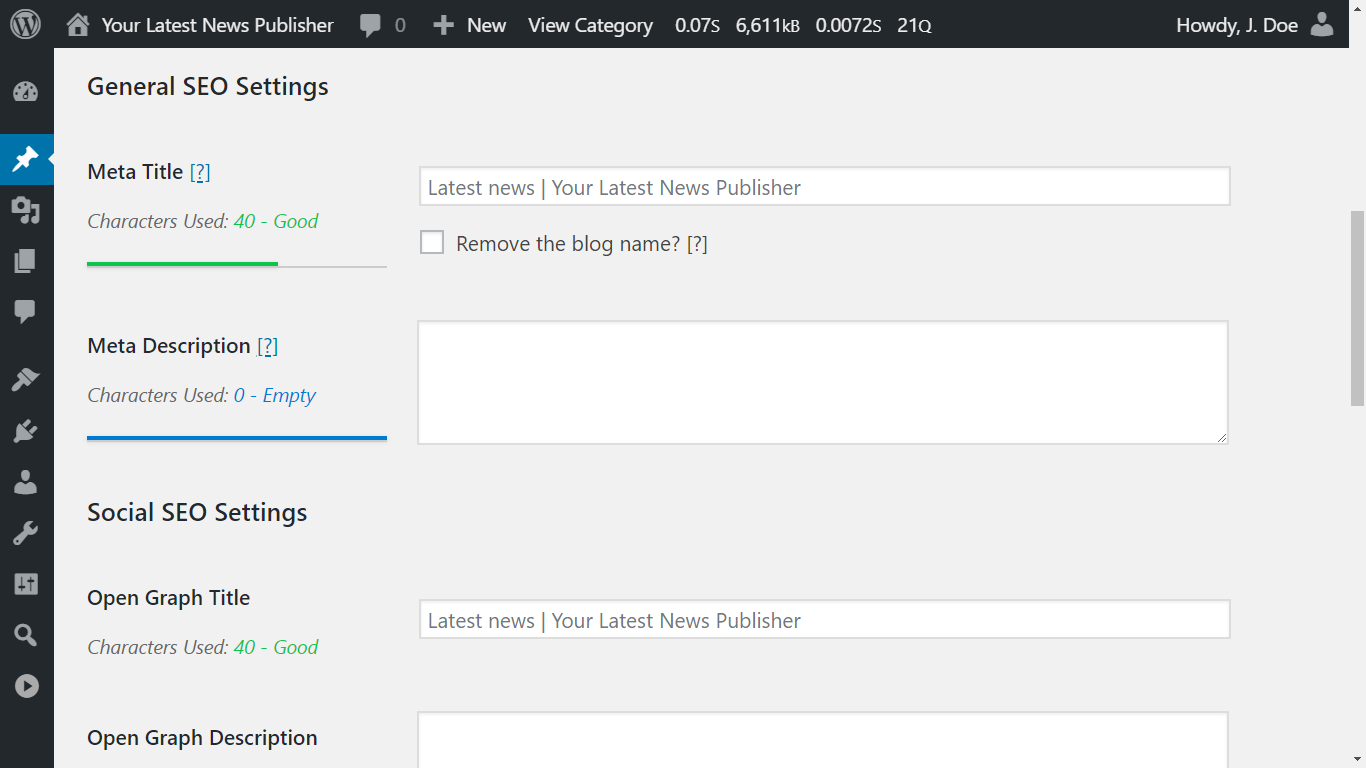
Each user’s profile page now has General, Social, and Visibility settings for their author archive, next to the existing Authorial Info fields:
- General: meta title and meta description fields, and a “Remove the site title?” checkbox.
- Social: Open Graph title and description fields, Twitter Card title, description, and card type fields, and a social image field.
- Authorial Info: Facebook, Fediverse (new), and X profile fields.
- Visibility: canonical URL, robots indexing, link following, archiving, and 301 redirect fields.
Those values apply to that author’s archive. On an author archive, twitter:creator and fediverse:creator use the author’s X handle and Fediverse profile when you’ve set them. We store these fields once per user, including on Multisite, the same way we already stored Authorial Info.
The WordPress users sitemap listens to these settings. An author you set to noindex or to redirect leaves the sitemap, and an author you set to index stays listed, even when you set all author archives to noindex. The sitemap still lists only authors who have published posts. It also returns a 404 error when no author is indexable.
The SEO Bar comes along. The users list now shows it, and profile pages show it, too. A user who can’t edit posts isn’t a public author, so the SEO Bar shows only the indexing item for them.
Edit generated values directly
TSF fills empty title and description fields with a blurred placeholder showing what it generates. Until now, you had to retype that text from scratch to change a word. Now, click the empty field and the placeholder stays, with your cursor where you clicked. Start typing and the text becomes normal text you can edit. Clear the field and the placeholder returns.
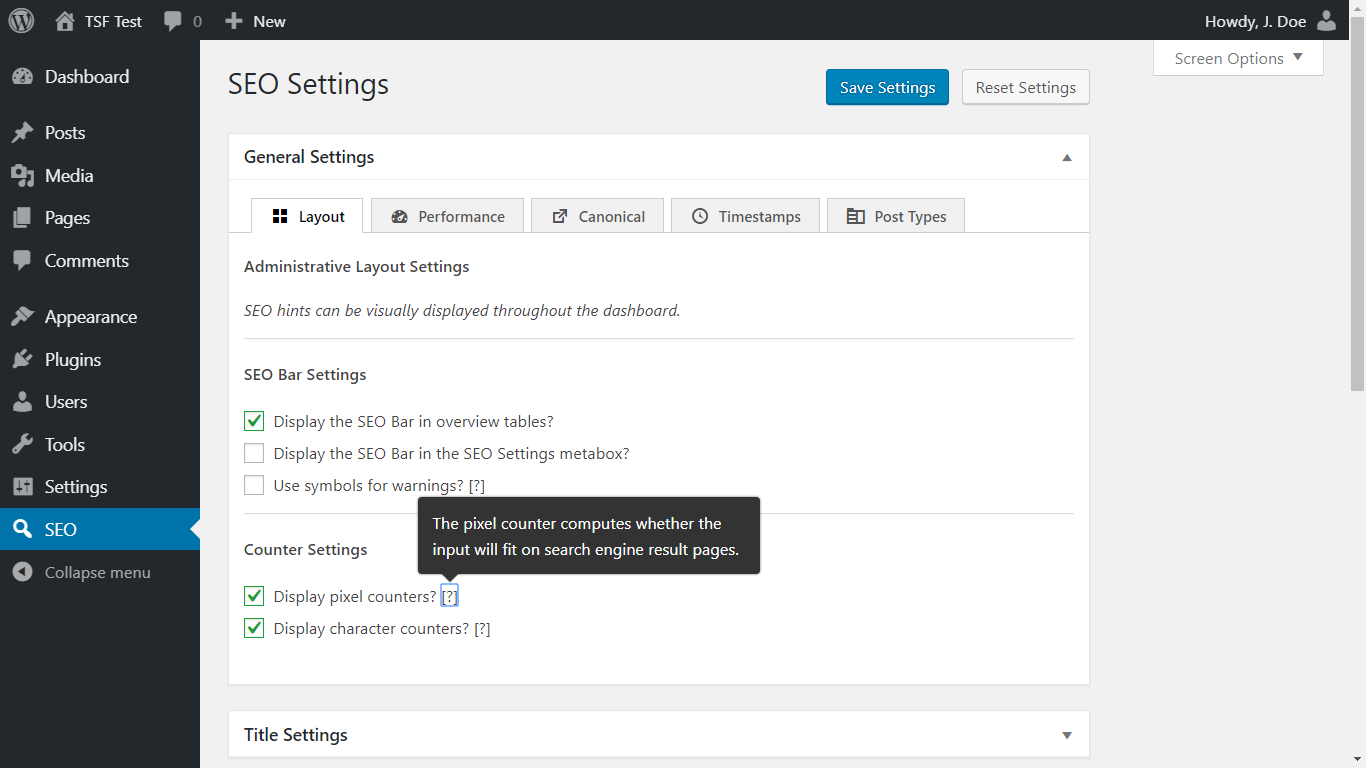
New sites have this enabled by default. Existing sites keep the previous behavior until you enable “Edit generated values directly?” at SEO Settings > General Settings > Layout, under Editing Settings.
Fediverse support
Mastodon can credit an author when someone shares your page, provided your page says who wrote it. We added the fediverse:creator meta tag and rel=me profile links for that, so Mastodon and other Fediverse platforms can credit and verify the profile.
You set a site profile and an author fallback at SEO Settings > Social Meta Settings, and each author can override that fallback on their own profile page. Each profile has a handle and a profile URL. Enter the @username@domain handle from Mastodon’s Author attribution, or paste a profile URL to fill both fields. TSF also adds the author’s Fediverse profile to the Schema.org sameAs links.
Our Fediverse creator and Mastodon article walks through setting up the credit and the green checkmark.
Breadcrumb settings
Two new settings at SEO Settings > Schema.org Settings change your breadcrumbs, and one cleanup applies automatically:
- Choose the taxonomy: singular breadcrumbs can use a chosen taxonomy for each post type. The default keeps the current trail, so products keep using Brands until you select Product categories. “Exclude taxonomy crumb” removes the term trail.
- Omit the archive: singular breadcrumbs can omit the post type archive. For products, that archive is the shop page.
- Cleaner names: breadcrumbs no longer prefix archive names, such as “Category:”, “Archives:”, or “Author:”. This affects structured data and the shortcode alike, and the trail skips parent pages that visitors can’t view.
Until you change the new settings, singular trails keep following the previous taxonomy and archive crumbs.
Breadcrumb shortcode
The breadcrumb shortcode changed, too:
- Shorter trails: the new
maxattribute collapses a longer trail. Amaxbelow 3 is treated as 3. - No Home crumb: the shortcode now omits the Home crumb when its
homeattribute is empty. - Whole crumbs: crumbs now wrap as a whole instead of breaking mid-word.
Read the breadcrumb shortcode article for the details.
A sitemap that survives XSLT
Major browsers will soon no longer apply XSLT by default. That means the styled, readable version of your optimized sitemap would turn into plain, unstyled XML. We ported the styling to CSS, so browsers that no longer apply XSLT still show a styled sitemap. As long as browsers still apply XSLT, the XSL view stays the preferred way to display it.
The CSS view has presentation and usability differences, but none of them affect the XML output. URLs aren’t clickable, the title and logo don’t link to the homepage, and the browser tab has no document title. Our sitemap styling article lists them all.
Sitemaps for every language
Multilingual sites got a lot of attention:
- TranslatePress: each published language that has a language directory now gets its own sitemap, and robots.txt lists every language except the one served without a directory.
- Polylang and WPML: robots.txt now advertises sitemap URLs that work. Before, the URLs could include the language directory twice, or the static front-page slug, so they returned a 404 error or redirected to WordPress’s sitemap.
- Cache clearing: clearing the sitemap cache now clears every language, including when your site uses a persistent object cache.
- Translated sitemap links: SEO Settings now lists the language sitemaps under “View translated sitemaps,” using the language name as the link text.
Our translation plugin compatibility article has the URL formats.
Facebook’s real language list
Facebook doesn’t document which languages it supports for Open Graph. So, we scraped their network and tested all 46500 possible locale combinations. TSF now drops 39 locales that Facebook doesn’t support, and adds three that it does: Haitian Creole, Inupiaq, and Inuktitut. For example, Spanish (Mexico) now falls back to Spanish (Spain). This affects only the Open Graph locale output, not your site’s language.
Even more
- TikTok: you can now add a TikTok profile at SEO Settings > Schema.org Settings. TSF includes it in your site’s Schema.org
sameAslinks. - Facebook verification: you can now enter a Facebook domain verification code at SEO Settings > Webmaster Meta Settings, under Webmaster Integration Settings. Thanks, Contributolo!
- Bricks: a page edited with Bricks now gets a generated description from the text in its Text and Section elements.
- Twitter Card labels: “Twitter Title” is now “Twitter Card Title,” and “Twitter Description” is now “Twitter Card Description.”
- Feeds: posts you exclude from on-site archive listings are now also omitted from the feed.
Edge cases, hunted down
We fixed many edge-case issues. For example, a backslash in a post or term SEO field no longer disappears on every save. Saving a post through the REST API or WP-CLI now refreshes the sitemap. A homepage title or description of 0 is no longer treated as empty. The detailed log linked below lists the rest.
We also corrected inaccurate or outdated PHP and JavaScript documentation throughout the plugin.
It has been a slow year for releases: over 10 months without an update. Behind the scenes, we spent months experimenting with and refining our development workflow. AI-assisted review helped us uncover issues, but Sybre personally verified every single letter written for this update.
We also built and published open-source tools:
- wp-plugin-regression runs WordPress Playground sites and compares plugin output before and after changes.
- makepot-tsf generates translation templates using WP-CLI’s internationalization tools, without requiring a WordPress installation.
We published the accompanying AI workflows for regression testing and translation template generation, too. Our expanded coding instructions guide AI assistants toward the conventions we use throughout TSF.
We can now build features we previously considered too costly to maintain. Bricks description generation and TranslatePress sitemap support are two results. There’s a lot more to come.
Clear your cache
We’ve updated the plugin’s CSS and JavaScript files. If you find issues with the interface, you may need to flush your browser caches. Check out our updated KB article to learn more.
If your cache plugin has no exclusion rules for sitemap endpoints, it could serve an empty sitemap or sitemap stylesheet on later visits. TSF now tells cache plugins that honor DONOTCACHEPAGE not to store those responses. That can’t remove an empty response your cache already stored, so run your cache plugin’s “Purge All,” “Clear all cache,” or equivalent action after updating.
Geliştirmeyi destekleyin
Bu güncellemeyi bizim kadar seveceğinizi umuyoruz. Lütfen harika bir inceleme yazarak, bir lisans alarak veya arkadaşlarınıza ve meslektaşlarınıza TSF’yi kurarak bir iyilik yapmayı düşünün.
If this update saved you time, you can also sponsor our work on GitHub. Sponsorship helps fund development without adding nags or upsells.
Ayrıntılı günlük:
To hit on something right by luck without search I call good luck, to do something well after study and practice I call doing well; and those who pursue this seem to me to do well.
Full changelog
- You can find the full changelog here.