
Açıklama
This plugin adds a custom File Upload Field to WPForms, enabling users to:
– Upload files (e.g., PDF, images, documents) via frontend forms.
– Restrict file types and sizes.
– Securely store uploaded files in the WordPress uploads directory.
– Attach files to email notifications (optional).
Usage
-
Add the File Upload Field to a Form:
- Edit or create a WPForm.
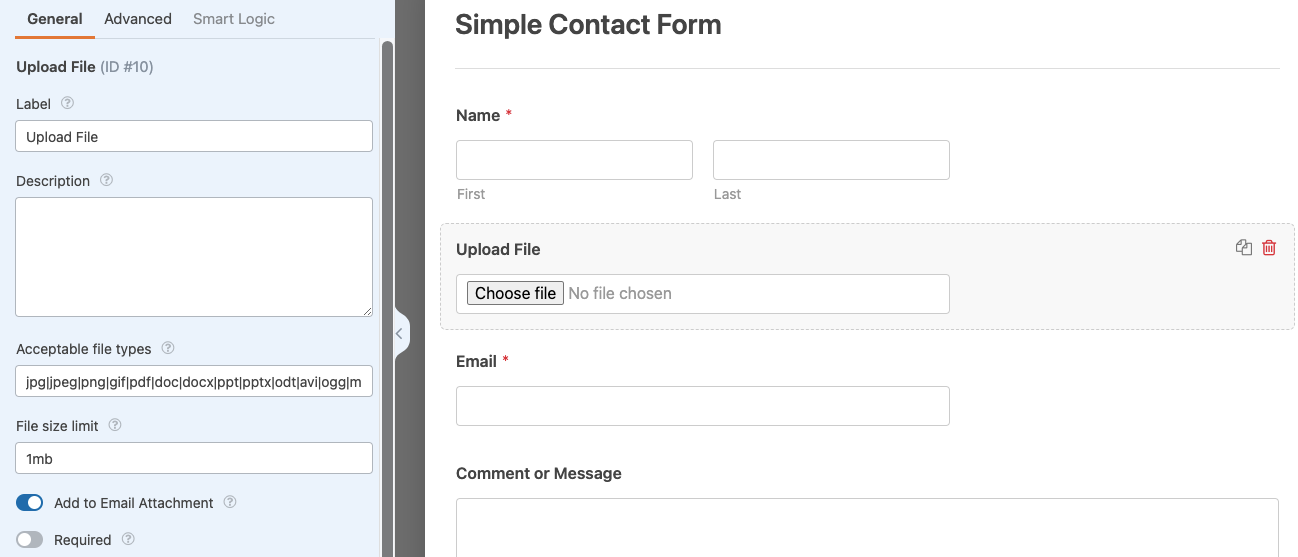
- Drag and drop the “File Upload” field into your form.
-
Configure Field Settings:
- Allowed File Types: Specify extensions (e.g.,
pdf, jpg, png). - Max File Size: Set a limit (e.g., 10MB).
- Storage Location: Files are saved to
/wp-content/uploads/wpxform-uploads/.
- Allowed File Types: Specify extensions (e.g.,
-
Attach Files to Email Notifications (Optional):
- Enable the “Attach Files to Email” option in the form’s Notifications settings.
Features
- Drag-and-drop file upload support.
- Server-side validation for file types and sizes.
- Unique filenames to prevent conflicts.
- Compatible with WPForms Lite/Pro.
Pro Addons
- Advanced Filedrop For WPForms
Add Drag and Drop File Uploads to WPForms
Ekran Görüntüleri


Yükleme
-
Upload the Plugin:
- Go to Plugins > Add New > Upload Plugin.
- Upload the
[plugin-name].zipfile. - Click Install Now and Activate.
-
Manual Installation:
- Unzip the plugin folder.
- Upload the
[plugin-name]directory to/wp-content/plugins/. - Activate the plugin via Plugins > Installed Plugins.
İncelemeler

27 Nisan 2026
So far, this looks like a great addition to WPForms. I can’t wait for my customers to use it. Thanks!

24 Nisan 2026
So good to have a free plugin to add file uploads. Instead of paying wpforms loads of money.

18 Mart 2026
If you are using the free version of WPForms and need to collect resumes, photos, or PDFs from your users, Filenzo is a lifesaver. It effectively unlocks a “Pro-only” feature without the $199/year price tag of the WPForms Pro plan.The Pros
Cost-Effective: It provides a functional file upload field for free, which is usually locked behind a premium paywall in the core WPForms plugin.
Simple Integration: It uses the native WPForms drag-and-drop interface. Once installed, a new “File Upload” field appears in your builder.
Customization: You can restrict specific file extensions (e.g., only allowing .jpg or .pdf) and set maximum file size limits to protect your server storage.
Email Attachments: It includes an option to attach the uploaded files directly to the admin notification email, making it easy to view submissions without logging into WordPress.
The Cons
Dependency: It cannot work alone; it requires the base WPForms plugin to be installed.
Limited Storage Options: Unlike the official WPForms Pro version (which integrates with Zapier or Google Drive), Filenzo primarily saves files to your WordPress uploads directory (/wp-content/uploads/wpxform-uploads/).
Third-Party Risk: Since it is not developed by the official WPForms team (Awesome Motive), there is always a slight risk of compatibility issues during major WPForms updates.

25 Şubat 2026
The WPForms lacks the possibility to upload files for free. This free addon is great for such purpose

3 Şubat 2026
permet d’uploader des fichiers image

23 Ocak 2026
Enjoyed the upload file function.
Katkıda Bulunanlar ve Geliştiriciler
“File Upload For WPForms – Filenzo” açık kaynaklı yazılımdır. Aşağıdaki kişiler bu eklentiye katkıda bulunmuşlardır.
Katkıda bulunanlar
“File Upload For WPForms – Filenzo” eklentisini dilinize çevirin.
Geliştirmeyle ilgilenir misiniz?
Kodu görüntüleyin, SVN deposuna göz atın ya da RSS ile geliştirme günlüğüne abone olun.