

Açıklama
SnapAura Menu Manager gives you granular control over when and where your menu items appear. Perfect for creating dynamic navigation that adapts to your visitors’ context.
Features:
- Login State Control – Show menu items only to logged-in or logged-out users
- User Role Visibility – Show menu items only to specific user roles (Administrator, Editor, Author, Contributor, Subscriber)
- Device-Based Hiding – Hide items on mobile, tablet, or desktop devices
- Current Page Hiding – Automatically hide menu items when viewing that page
- Works with Any Theme – Compatible with all WordPress themes
- No Configuration Required – Simple checkboxes in the menu editor
Use Cases:
- Show “Login” only to logged-out users and “Dashboard” only to logged-in users
- Show “Edit Posts” only to Editors and Administrators
- Show “Submit Article” only to Authors and Contributors
- Hide contact links on mobile to save space
- Create different navigation experiences for different devices
- Remove redundant navigation when already on a page
How It Works:
- Go to Appearance > Menus
- Expand any menu item
- Check the visibility options you want
- Save your menu
No complicated settings or configuration files. Just simple checkboxes that do exactly what they say.
Ekran Görüntüleri
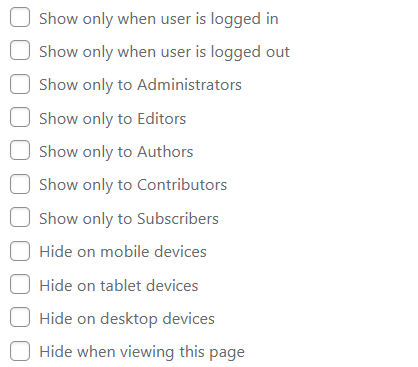
Menu editor showing visibility checkboxes for each menu item
Yükleme
- Upload the plugin files to
/wp-content/plugins/menu-visibility-control/, or install through the WordPress plugins screen - Activate the plugin through the ‘Plugins’ screen in WordPress
- Go to Appearance > Menus to configure visibility for your menu items
SSS
-
Does this work with my theme?
-
Yes! SnapAura Menu Manager works with any WordPress theme that uses standard WordPress menus.
-
Will this slow down my site?
-
No. The plugin adds minimal CSS and uses efficient WordPress filters. There’s no JavaScript and no external resources.
-
Can I hide items based on user roles?
-
Currently, the plugin supports logged-in vs logged-out visibility. Role-based visibility may be added in a future version.
-
What are the device breakpoints?
-
- Mobile: 767px and below
- Tablet: 768px to 980px
- Desktop: 981px and above
-
It works with any system that uses WordPress’s
wp_nav_menufunction. Custom menu builders that bypass WordPress’s menu system may not be compatible.
İncelemeler
Bu eklenti için herhangi bir değerlendirme bulunmuyor.
Katkıda Bulunanlar ve Geliştiriciler
“SnapAura Menu Manager” açık kaynaklı yazılımdır. Aşağıdaki kişiler bu eklentiye katkıda bulunmuşlardır.
Katkıda bulunanlar
“SnapAura Menu Manager” eklentisini dilinize çevirin.
Geliştirmeyle ilgilenir misiniz?
Kodu görüntüleyin, SVN deposuna göz atın ya da RSS ile geliştirme günlüğüne abone olun.
Değişiklik Kaydı
1.1.0
- Added user role visibility (show menu items only to specific roles)
- Support for Administrator, Editor, Author, Contributor, and Subscriber roles
- Role restrictions work with OR logic (show to any checked role)
- Improved menu organization with role-based access control
1.0.0
- Initial release
- Login state visibility (logged in / logged out)
- Device-based hiding (mobile / tablet / desktop)
- Current page hiding
- Full internationalization support