
Açıklama
WordPress Anket eklentisi
Survey Maker by AYS is a WordPress plug-in for creating surveys, questionnaires, and survey forms on your website. The plugin enables you to create your survey through the built-in survey builder with various question types and publishing through a shortcode.
It includes features like multi-page forms, conditional logic, survey analytics, and popup surveys, so you can collect feedback, gather insights, and analyze results without external survey tools.
- Survey Maker Fiyatlandırma
- Survey Maker Ücretsiz Demo
- Survey Maker Pro Demo
- Survey Maker Dökümantasyonu
Create a survey in 3 simple steps:
Create a survey within minutes with the help of our survey builder.
There is no need to know anything about coding; you can simply integrate the survey on your website with just a few clicks.
- Add questions / sections
- Customize settings / design
- Add shortcode to any post or page
Survey shortcode
[ays_survey id=’your survey id’]
Survey Builder Features
You can create surveys of any size with unlimited questions, sections, and surveys.
This means that you will be able to split your survey into multiple pages by simply dragging and dropping questions to different pages. So you can easily arrange questions and sections without any technical knowledge. You will be able to make the questions required, redirect visitors after form submission, and restrict survey submissions based on IP addresses, user roles, and the number of submissions.
Free Features
Survey Creation & Design
- Sınırsız Anketler
- Sınırsız Bölümler
- Sınırsız Soru
- 14 question types
- Soru Resmi
- Uyumlu tasarım
- Anket stili seçenekleri (20+)
- Farklı sayıda soru içeren bölümler
Survey Behavior & Control
- Soruları rastgele sıralayın
- Cevapları rastgele seç
- Sonuç mesajı
- Gönderdikten sonra yönlendirme
- Popup Anket
- IP ve Kullanıcı IDsine göre kısıtlama
- Yalnızca oturum açmış kullanıcılar için
Responses & Results
- Bireysel gönderi
- Gönderiler özeti
Pro Features
Advanced Surveys & Logic
- All advanced question types (NPS, Matrix, Ranking, Slider, etc.)
- Mantıksal atlama
- Koşullu Sonuçlar
- Koşullu Posta
- URL parameters
- Hesaplama
- Diyalog anketler
- Multilingual Forms
- Metinden konuşmaya
- ChatGPT Entegrasyonu
Integrations & Automation
- Email notifications & configuration
- Mailchimp, Slack, Zapier, Google Sheets, etc.
- WooCommerce integration
- Payment integrations (Stripe, PayPal)
Analytics, Control & Export
- Grafiklerle sonuçlar
- Export (CSV, PDF, etc.)
- Submission exports
- Anket planlayın
- Limit attempts
- User roles & permissions
- Password protection
- User history
Survey Maker eklentisinde aradığınız özelliği bulamadınız mı? yeni bir özellik önerebilirsiniz.
Anket Demoları (Ücretsiz)
Anket Demoları (Pro)
- Conditional Logic Survey (Skip Logic Form)
- Survey with Personalized Results
- Conversational Survey Form (Chat Style Survey)
- Survey with Multiple Question Types
- Net Tavsiye Skoru (NPS) Anketi
- Simple Contact Form Template
- Popup Anket
- Social Media Survey Template (Modern theme)
- Sağlık Anketi (Elegant tema)
- Demographic Survey (Business theme)
- Password-Protected Form
Design & Customization
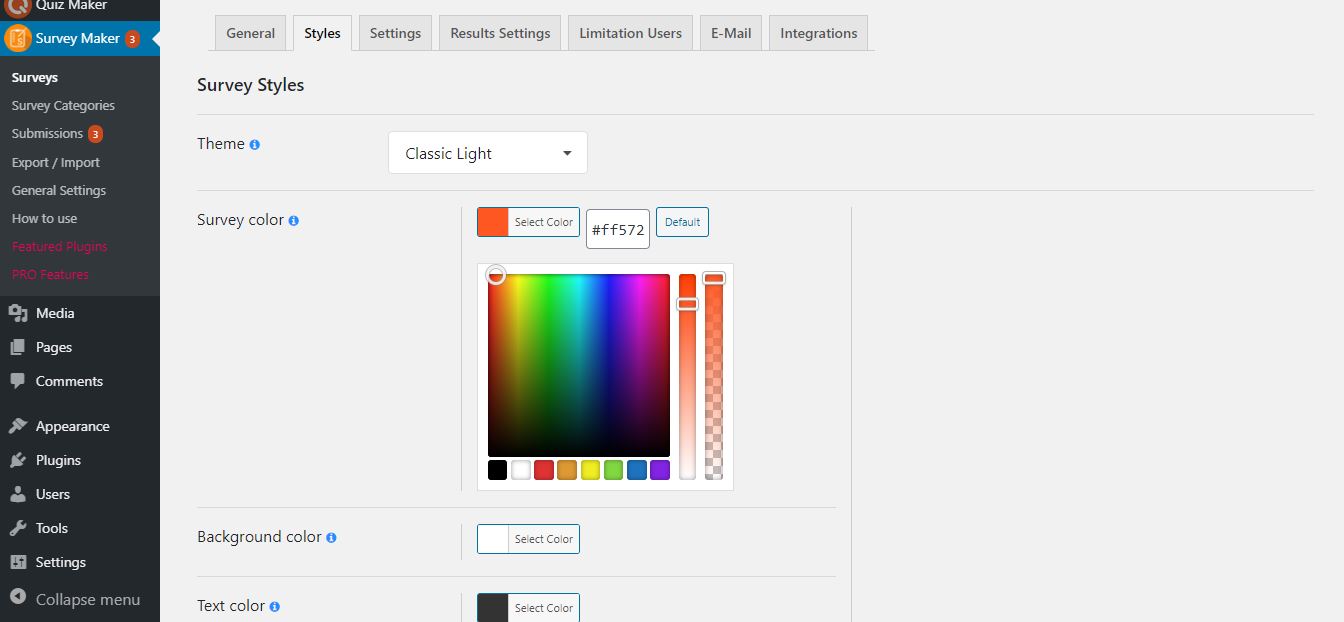
There are more than 30 options for customizing the look of your survey to fit the theme of your website. The plugin has a number of built-in templates, and you have options to modify the colors, fonts, buttons, and other layout choices to ensure that the survey fits in with your website theme.
You can also control how questions and answers are displayed, which helps improve readability and makes the survey easier to complete.
20’DEN FAZLA ANKET SORUSU TÜRÜ
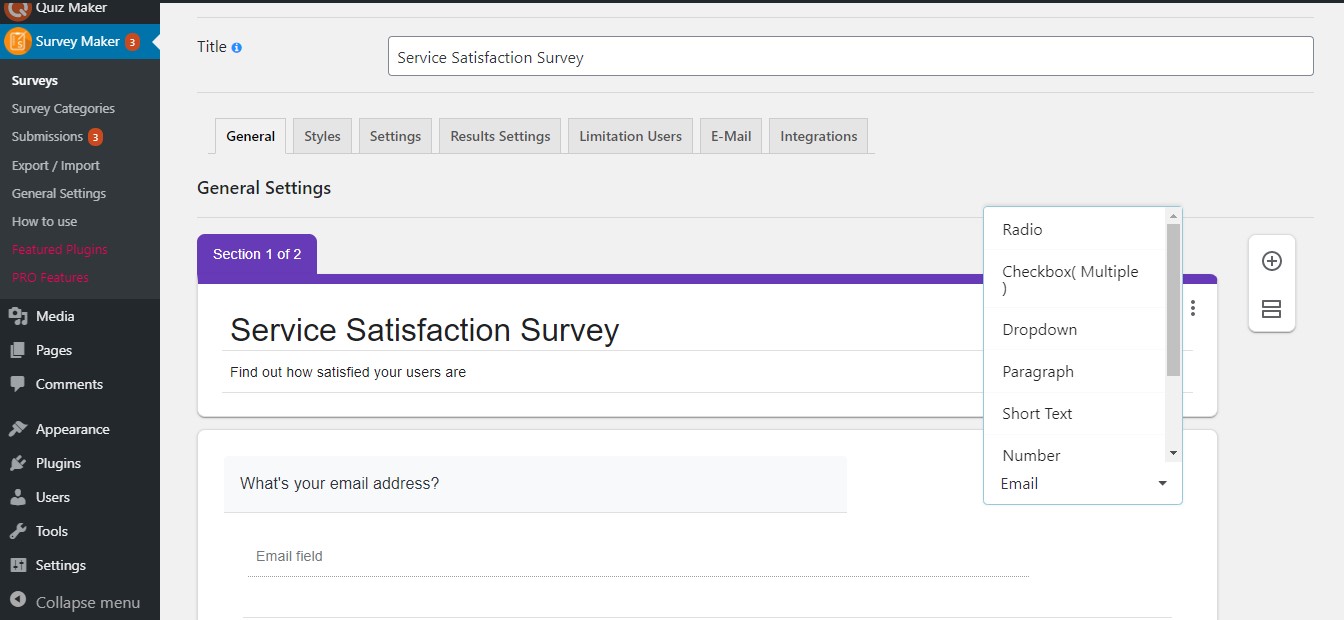
Anket Aracı, başarılı anketler oluşturmak için en ünlü soru türlerini sunar:
- Radyo
- Onay kutusu
- Dropdown
- Paragraf
- Short Text
- Sayı
- Evet veya Hayır
- Date (Pro)
- Time (Pro)
- Date and Time (Pro)
- Star Rating (Pro)
- Ranking (Pro)
- Linear Scale (Pro)
- Matrix Scale (Pro)
- Matrix Scale Checkbox (Pro)
- Slider (Pro)
- File Upload (Pro)
- Star List (Pro)
- Slider List (Pro)
- Hidden (Pro)
- HTML (Pro)
- Phone (Pro)
- Net Promoter Score (Pro)
- Name field
- E-posta alanı
ve çok daha fazlası geliyor!
Farklı soru türleriyle anket – Demo
Survey Results & Analytics
You can view all survey submissions directly from your WordPress dashboard. The survey plugin gives you survey results along with their stats and charts so that you don’t have to analyze the surveys by looking at each and every response.
All data is stored in one place (in your database). The Pro version of the WordPress Survey plugin allows exporting of results so that you can utilize the data outside your website as well.
Conditional Logic (Pro)
You can have your surveys become much more flexible when using the features of Logic Jump and Koşullu Sonuçlar.
Logic Jump allows you to dictate the following question based on the respondents’ answers; this way, you can avoid unnecessary questions from popping up in your survey.
Koşullu Sonuçlar enable you to specify different results pages, email recipients, and redirects based on AND/OR conditions, giving you the ability to customize the results for each respondent.
The plugin also includes a Calculation feature, which allows you to create formulas based on user answers and display calculated results such as scores or estimated values.
Examples:
- Price / quote calculator
- Score-based surveys
- Result calculation forms
- Simple cost estimation
- Service pricing survey
PRO | DEMO | DÖKÜMANTASYON
Popup Anket
You can display your survey as a popup survey to increase visibility and collect more responses. The popup can be triggered on page load, on click, or on exit intent, determining when the user will get to see the popup.
You will have the ability to show the popup only once upon its response, as well as go for full-screen mode.
Anonymous Survey
Create an anonymous survey and allow users to submit responses without sharing personal information. This ensures that more accurate feedback especially for customer feedback, employee feedback, and internal surveys.
NPS Anketleri (Pro)
Use Net Promoter Score (NPS) surveys for evaluating customer satisfaction and loyalty. These kinds of surveys are used to see how likely your product or service will be recommended by your clients.
Based on the responses, users are grouped into promoters, passives, and detractors, giving you a clear overview of your customer satisfaction.
Email Notifications & Integrations (Pro)
Set up email notifications to send survey responses to both the user and the admin. The email content can be customized, and you can include response data in a table format. Also, the administrator can create email summaries with results of surveys sent after predefined time intervals.
In addition, Survey Maker integrates with popular tools such as Mailchimp, Zapier, Google Sheets, Stripe, and PayPal, making it easier to manage data and connect your survey with other services.
Easy-To-Use | User-Friendly |
Not a tech person? No problem. The plugin is 100% beginner-friendly and no coding skills are required. You can easily create engaging and at the same time advanced forms that will fulfill all your needs. Also, this WordPress survey plugin is mobile-friendly, so your responders can take the quiz with all types of screens such as mobile devices or tablets. And, most importantly, our support care specialists are easily accessible and always happy to help you and answer any questions you might have!
Daha ayrıntılı bilgi için lütfen Dokümantasyon bölümüne bakın.
Unutmayın, herhangi bir sorun veya gelecek soru durumunda aşağıdaki ÜCRETSİZ DESTEK FORUMU üzerinden bizimle iletişime geçmekten çekinmeyin.
Ekran Görüntüleri


Bloklar
Bu eklenti 1 blok sağlar.
- Survey Maker
Yükleme
Survey maker’ı yüklemenin iki yolu vardır: WordPress panonuzdan Survey maker’ı yüklediğinizde kolay yol ve WordPress.org’dan yüklediğinizde o kadar da kolay olmayan yol.
- 1.1 Survey Maker’ın keyfini çıkarmanın en kolay yolu:
- 1.1.1 WordPress kontrol panelinize giriş yapın
- 1.1.2 Eklentilere Git
- 1.1.3 Yeni Ekle
- 1.1.4 Survey maker’ı arayın
- 1.1.5 Yüklemek için tıklayın
- 1.2 İkinci yol:
- 1.2.1Zip dosyasını https://wordpress.org/plugins/survey-maker/ adresinden indirin
- 1.2.2 Eklentilere Git
- 1.2.3 Yeni Ekle
- 1.2.4 Eklenti yükle
- 1.2.5 survey_maker.zip dosyasını seçin
1.2.6 Yüklemek için tıklayın
1.3 Anket oluşturucuyu WordPress.org’dan yüklemek için arşivi açmalı ve anket oluşturucu klasörünü eklentiler klasörünüze kopyalamalısınız (\wp-content\plugins). Bu adımlardan sonra Eklentiler menüsünden eklentiyi etkinleştirebilirsiniz. Etkinleştirdikten sonra istediğiniz seçenekleri yapılandırın ve Survey Maker’ın keyfini çıkarabilirsiniz.
SSS
-
1. Bir yazıya veya sayfaya anket nasıl eklenir?
-
There are two ways of inserting the form – via shortcode or via block.
In the first case, you should copy the shortcode of your own wp survey, go to the All Posts/All Pages section, click Add New(or go to existing post), and paste the shortcode there. Afterward, you should publish it and go to the generated link. The link will lead you directly to your test, and you will be able to view and take it.In the second case, you should click on the Add Block(+) button and type in a survey in the block search field. Then, click on the Survey Maker block, select your preferred test from the dropdown list and that’s all!
Survey Maker allows you to insert your surveys inside any post, page, or widget area in WordPress. It is one of the best survey plugins 2021. It allows to create free online questionnaire, create a quiz with images and no technical background is required. Start your experience right now and see how quickly and easily you will create your survey! This video is a quick guide on doing a feedback form and inserting it into a post.
-
2. Kaç çeşit soru vardır?
-
7 different types of questions are available in the free version. Those include Radyo type with requires to choose only one correct answer, Onay kutusu allows to have more than one right answer choice, Dropdown, Paragraph, Short text, Number, Yes or No, plus E-Mail and Name fields. The Pro version provides extra 4 types such as Date, Star Rating, Linear Scale, Matrix Scale. You can create one-page or multi-page advanced questionnaires, gain data and measure customer satisfaction by adding the various types of questions offered by our plugin.
Different types allow creating any kind of tests that you have in your mind. It is one of the most advanced WordPress survey plugins on the market. It has never been so easy to create, send, and analyze data! This free, easy form creator allows you to use a survey maker with unlimited questions, sections and create tests with images. You can create custom forms like Survey Monkey (without the high costs), online petition form, feedback contact form, market research questionnaire, etc. After collecting survey reports, you can make necessary changes to your product or service and boost engagement and traffic.
-
3. Kaç tane anket oluşturabilirim?
-
You can make unlimited surveys and include as many questions as you want! Both Free and Premium users have the opportunity to create unlimited surveys with unlimited questions! Isn’t it amazing? Furthermore, no limitation exists on the number of participants of the questionnaires. Don’t lose your chance to try!
Generate an unlimited number of forms for your website and analyze the information from your users with the help of pie charts and bar graphs. Did you know that you can also add photos both to the main questions and answer choices? With Survey Maker, you can make your questions required. Moreover, you can send emails after completion of the test to thank users or redirect them to any page on your WordPress website.
-
4. Ücretsiz sürüm ile çok adımlı bir anket oluşturabilir miyim?
-
You can! With the help of the plugin, you can create unlimited online tests with multi sections. Quick, easy, and reliable for creating surveys interesting and engaging to take. A drastic increase in conversion rate is guaranteed.
-
5. Survey Maker’da sayfa başına bir soruyu nasıl oluşturabilirim?
-
Bunu başarmak için anketinizi ayrı bölümlere ayırmanız ve her bölüm için bir soru yazmanız gerekir.
Daha fazla trafik çekmek ve bunu bir müşteri getirici olarak kullanmak istiyorsanız, eklenti ihtiyaçlarınız için mükemmeldir. Anketlerinizi oluşturmak için herhangi bir kodlama gerektirmez, ancak özelleştirmesi kolaydır. -
6. WordPress’te anket formu nasıl oluşturulur?
-
This question is already an easy answerable one, thanks to the user guide. This WordPress free form plugin is a cheaper alternative to survey monkey. I am happy to inform you that you can easily create surveys forms and analyze the data with interactive reports. The best survey forms are waiting for you! So do not miss your chance to use the best free survey maker plugin!
-
7. Pro sürümüne yükselttikten sonra verileri kaybedecek miyim?
-
Hayır, yapmayacaksınız! Eklentinin tüm verileri (anketler, ayarlar ve gönderimler) Pro sürümüne geçtikten sonra bile değişmeden kalacaktır. Ücretsiz sürümle oluşturduklarınızı yeniden yapmanıza gerek yoktur. Daha ayrıntılı talimatlar için lütfen eklentinin yükseltme kılavuzuna göz atın.
-
8. Anket istatistiklerini nerede bulabilirim?
-
Survey statistics are available on the Submissions page. It consists of 4 different sections; Summary, Individual, Submissions, and Analytics. In the Summary section, you can observe finalized answers. Meanwhile, you can interpret results with graphs and charts. The Submissions section demonstrates all the submissions. In the Analytics section, you can see a graph displaying the submissions count per page and a chart illustrating the passed users by user role. Furthermore, you can export submissions.
Survey Maker is a flexible WordPress plugin for questionnaire surveys. This free online questionnaire survey plugin allows you to create the best anonymous surveys and receive real-time feedback. While using this free tool for online surveys you can create sophisticated surveys and include different types of questions.
-
9. Başvurularımın özet raporunu nerede bulabilirim?
-
To do that, please go to the Submissions page of the plugin. There you will find plenty of analysis tools. Want to analyze data from a test? The plugin is just what you needed. Collect user feedback and interpret them via reports, charts, and statistics.
-
10. Tüm anketler bir siteden diğerine nasıl aktarılır?
-
Şaşırtıcı ve esnek bir eklenti mi arıyorsunuz? Doğru yerdesiniz! Müşterilerimizin zamanını daha yönetilebilir hale getirmek için elimizden gelenin en iyisini yaptık. Önceden oluşturulmuş anketlerinizi JSON formatı aracılığıyla bir web sitesinden diğerine aktarabilir ve dışa aktarabilirsiniz. Harika bir eklenti, değil mi?
-
11. Herhangi bir dokümantasyon veya kullanım kılavuzu var mı?
-
Elbette var. Resmi web sitesinde bir hızlı kullanıcı kılavuzu dökümanı bulabilirsiniz. Detaylı bir kullanım kılavuzu ve nasıl anket oluşturulacağına dair bir açıklama içerir. Survey Maker tarafından sunulan özellikler hakkında gerekli bilgileri bulabilirsiniz; soru türleri, stil seçenekleri, mantık atlama, açılır anketler vb.
Survey Maker Free Demo and Pro Demo are available! You can test the samples to make sure of high quality and flexible design. Below the demo versions of surveys, you can find all the features listed for both the Pro and Free versions. By the way, subscribe to our YouTube channel if you want to learn more about the plugin’s details.
-
12. Survey Maker Ücretsiz sürümü için destek alabilir miyim?
-
Topluluğumuzu memnuniyetle destekliyoruz. Destek uzmanlarımız, ürünü daha verimli kullanmanıza yardımcı olmak için her zaman hazırdır. Eklentinin kurulumu ve kullanımı kolay ve basit bir arayüze sahip olsa da, herhangi bir endişeniz olduğunda lütfen istediğiniz zaman bize ulaşmaktan çekinmeyin. Ekip sorularınıza 24 saat içinde yanıt verebilir. Ücretsiz eklenti ile ilgili sorularınızı lütfen WordPress Destek Forumu‘na gönderin, aksi takdirde (satış öncesi soru / destek), lütfen bu form aracılığıyla bizimle iletişime geçin. Mükemmel hizmet garantilidir!
-
13. Sınırsız sayıda soru nasıl eklenir?
-
Eklentimizin sınırsız olduğunu bilmelisiniz Survey Maker sınırsız sayıda bölüm, soru ve cevap sunar. Ancak, böyle bir sorunla karşılaştıysanız, sunucunuzla bağlantılıdır. Bu sorunu çözmek için cPanel’inize erişmeli, PHP değerlerinizi bulmalı ve sayıyı artırmalısınız ve bunu kendiniz yapamıyorsanız, Hosting sağlayıcınızla iletişime geçin, böylece sizin için belirtilenleri yapsınlar.
max_input_vars 10000
max_execution_time 600
max_input_time 600
post_max_size 256M
İncelemeler


Katkıda Bulunanlar ve Geliştiriciler
“Survey Maker by AYS” açık kaynaklı yazılımdır. Aşağıdaki kişiler bu eklentiye katkıda bulunmuşlardır.
Katkıda bulunanlar
“Survey Maker by AYS” 10 dile çevrildi. Katkıda bulundukları için çevirmenlere teşekkürler.
“Survey Maker by AYS” eklentisini dilinize çevirin.
Geliştirmeyle ilgilenir misiniz?
Kodu görüntüleyin, SVN deposuna göz atın ya da RSS ile geliştirme günlüğüne abone olun.
Değişiklik Kaydı
5.2.4.1 ( Sep 29, 2026 )
- Improved: Made some changes to the admin dashboard
- Tested: Compatible up to WordPress 7.1.2
- Fixed: Improved validation of the User IP Address message variable
5.2.4.0 ( Sep 22, 2026 )
- Added: Current Survey Page Title message variable on the general settings
- Improved: Made some changes to the front-end
- Tested: Compatible up to WordPress 7.1.1
5.2.3.9 ( Sep 15, 2026 )
- Added: Survey Category Title message variable on the general settings
- Improved: Made some changes to the admin dashboard
5.2.3.8 ( Sep 3, 2026 )
- Added: Popup animation option for popup surveys
- Improved: Made some changes to the admin dashboard
- Güncellendi: POT dosyası
5.2.3.7 ( Aug 25, 2026 )
- Added: Percentage option for popup survey height
- Güncellendi: POT dosyası
- Tested: Compatible up to WordPress 7.1
5.2.3.6 ( Aug 19, 2026 )
- Added: Percentage option for popup survey width
5.2.3.5 ( Aug 06, 2026 )
- Added: Menu badge style option in the General Settings page
5.2.3.4 ( Jul 22, 2026 )
- Improved: Sanitization and response handling for survey submissions
- Tested: Compatible up to WordPress 7.0.2
5.2.3.3 ( Jul 17, 2026 )
- Added: Current Survey Author Registered message variable on the general settings
- Tested: Compatible up to WordPress 7.0.1
5.2.3.2 ( Jul 08, 2026 )
- Geliştirildi: Yönetici kontrol panelinde bazı değişiklikler
5.2.3.1 ( Jun 25, 2026 )
- Improved: Some style and content changes on the admin dashboard
- Güncellendi: POT dosyası
5.2.3.0 ( Jun 18, 2026 )
- Improved: Some style and content changes on the admin dashboard
5.2.2.9 ( Jun 09, 2026 )
- Added: Password for passing survey options for surveys
5.2.2.8 ( Jun 01, 2026 )
- Added: Value prefix and suffix options for surveys
- Added: Preview button to the admin dashboard
5.2.2.7 ( May 26, 2026 )
- Added: Terms and Conditions option for surveys
- Added: Custom required message text for Terms and Conditions confirmation
5.2.2.6 ( May 21, 2026 )
- Improved: Popup Survey status filters visibility for empty list tables
- Improved: Popup Survey page help content and video guide placement
- Improved: Sanitization and display handling for submitted survey answers
- Improved: Extra shortcode descriptions in the General Settings Shortcodes tab
- Improved: User information request handling for survey autofill
- Tested: Compatible up to WP 7.0
5.2.2.5 ( May 19, 2026 )
- Added: Delete button for Admin note in the survey builder
- Fixed: Option image tooltip initialization after applying survey templates
- Improved: Preview notice shortcode visibility
- Improved: Admin note toggle behavior in the survey builder
5.2.2.4 ( May 15, 2026 )
- Added: New Publish page to the Surveys Edit page
- Added: FAQ section on the dashboard page
- Improved: The Survey Maker admin top banner and improved its responsive layout
- Güncellendi: POT dosyası
5.2.2.3 ( May 12, 2026 )
- Added: Hide popup on desktop option for Survey popup
- Added: Notice for draft preview pages with a copy shortcode button
- Added: Hide popup on mobile option for Survey Popup
- Added: Close by clicking outside the box option for Survey Popup
- Added: Hide popup on tablets option for Survey Popup
5.2.2.2 ( May 11, 2026 )
- Added: Descriptive help texts for Conditional Results and Email settings
- Changed: Survey status controls to toggle-style switches
- Improved: Survey builder UI and button styling
- Improved: Redesigned the survey theme selection cards on the Styles tab
- Improved: Survey admin page layout and navigation elements
- Improved: Video guide placement and help content across survey settings
- Improved: Survey filters and navigation usability
5.2.2.1 ( May 07, 2026 )
- Improved: Survey admin interface and button styling
- Improved: Survey builder layout and navigation elements
- Improved: Survey list table actions and menu organization
- Improved: Promotional banner and Features section in the admin dashboard
- Improved: General UI/UX refinements across the Survey plugin
5.2.2.0 ( May 05, 2026 )
- Added: Click to copy functionality for Surveys shortcode in list table
- Geliştirildi: Yönetici kontrol panelinde bazı değişiklikler
5.2.1.9 ( April 28, 2026 )
- Geliştirildi: Yönetici kontrol panelinde bazı değişiklikler
- Güncellendi: POT dosyası
5.2.1.8 ( April 21, 2026 )
- Added: User Registered message variable on the general settings
5.2.1.7 ( April 14, 2026 )
- Added: User Website URL message variable on the general settings
5.2.1.6 ( April 07, 2026 )
- Geliştirildi: Yönetici kontrol panelinde bazı değişiklikler
- Tested: Compatible up to WP 7.0
5.2.1.5 ( March 31, 2026 )
- Added: Current Survey author Website URL message variable on the general settings
5.2.1.4 ( March 24, 2026 )
- Improved: Enhanced HTML sanitization logic in survey editors
- Improved: Extended allowed HTML tags support (audio, video, etc.)
- Geliştirildi: Yönetici kontrol panelinde bazı değişiklikler
5.2.1.3 ( March 17, 2026 )
- Added: Current Survey author nickname message variable on the general settings
5.2.1.2 ( March 10, 2026 )
- Added: Current Survey author display name message variable on the general settings
5.2.1.1 ( March 03, 2026 )
- Added: Post author Roles message variable on the general settings
5.2.1.0 ( Feb 24, 2026 )
- Geliştirildi: Yönetici kontrol panelinde bazı değişiklikler
- Güncellendi: POT dosyası
5.2.0.9 ( Feb 17, 2026 )
- Added: Post author Website URL message variable on the general settings
5.2.0.8 ( Feb 11, 2026 )
- Added: Post author Display name message variable on the general settings
5.2.0.7 ( Feb 03, 2026 )
- Added: Post author last name message variable on the general settings
5.2.0.6 ( Jan 27, 2026 )
- Added: Post author first name message variable on the general settings
5.2.0.5 ( Jan 20, 2026 )
- Added: Site Description message variable on the general settings
5.2.0.4 ( Jan 14, 2026 )
- Geliştirildi: Yönetici kontrol panelinde bazı değişiklikler
5.2.0.3 ( Jan 08, 2026 )
- Added: Admin note option on the admin dashboard
5.2.0.2 ( Dec 24, 2025 )
- Geliştirildi: Yönetici kontrol panelinde bazı değişiklikler
5.2.0.1 ( Dec 09, 2025 )
- Added: Current Month message variable on the general settings
5.2.0.0 ( Dec 05, 2025 )
- Geliştirildi: Yönetici kontrol panelinde bazı değişiklikler
- Güncellendi: POT dosyası
5.1.9.9 ( Dec 02, 2025 )
- Added: Current Day message variable on the general settings
- Geliştirildi: Yönetici kontrol panelinde bazı değişiklikler
- Tested: Compatible up to WP 6.9
5.1.9.8 ( Nov 25, 2025 )
- Geliştirildi: Yönetici kontrol panelinde bazı değişiklikler
5.1.9.7 ( Nov 20, 2025 )
- Added: “Black Friday Deal” Banner
5.1.9.6 ( Nov 18, 2025 )
- Geliştirildi: Yönetici kontrol panelinde bazı değişiklikler
- Güncellendi: POT dosyası
5.1.9.5 ( Nov 12, 2025 )
- Geliştirildi: Yönetici kontrol panelinde bazı değişiklikler
- Fixed: Code correction on the admin dashboard
- Fixed: Capability check in Display survey summary shortcode
5.1.9.4 ( Nov 04, 2025 )
- Added: Change the author of the current survey option
- Geliştirildi: Yönetici kontrol panelinde bazı değişiklikler
5.1.9.3 ( Oct 28, 2025 )
- Geliştirildi: Yönetici kontrol panelinde bazı değişiklikler
5.1.9.2 ( Oct 21, 2025 )
- Geliştirildi: Yönetici kontrol panelinde bazı değişiklikler
5.1.9.1 ( Oct 14, 2025 )
- Added: Survey Maker Welcome page
5.1.9.0 ( Oct 8, 2025 )
- Geliştirildi: Yönetici kontrol panelinde bazı değişiklikler
5.1.8.9 ( Oct 3, 2025 )
- Güncellendi: POT dosyası
- Fixed: Code correction on the front-end and admin dashboard
5.1.8.8 ( Sep 23, 2025 )
- Geliştirildi: Yönetici kontrol panelinde bazı değişiklikler
- Improved: The banner style on the admin dashboard
- Tested: Compatible up to 6.8.2
5.1.8.7 ( Sep 16, 2025 )
- Geliştirildi: Yönetici kontrol panelinde bazı değişiklikler
5.1.8.6 ( Sep 9, 2025 )
- Fixed: Related data now deleted with survey
5.1.8.5 ( Sep 2, 2025 )
- Added: Question border radius option
5.1.8.4 ( Aug 25, 2025 )
- Fixed: Vulnerability issue in survey categories page
5.1.8.3 ( Aug 19, 2025 )
- Geliştirildi: Yönetici kontrol panelinde bazı değişiklikler
5.1.8.2 ( Aug 12, 2025 )
- Güncellendi: POT dosyası
- Geliştirildi: Yönetici kontrol panelinde bazı değişiklikler
5.1.8.1 ( Aug 5, 2025 )
- Geliştirildi: Yönetici kontrol panelinde bazı değişiklikler
5.1.8.0 ( Jul 29, 2025 )
- Fixed: Limitation of the number of characters in numeric types
- Fixed: Date type question width issue
5.1.7.9 ( Jul 14, 2025 )
- Added: Auto-scroll in drag and drop question on admin page
- Improved: Notice functionality behavior
- Fixed: User local language issue
5.1.7.8 ( Jul 8, 2025 )
- Improved: Our products page
- Fixed: Stored XSS vulnerability in survey category description field
5.1.7.7 ( Jun 30, 2025 )
- Added: Question caption text color mobile option
- Geliştirildi: Yönetici kontrol panelinde bazı değişiklikler
- Fixed: Some styles issue on the admin dashboard
5.1.7.6 ( Jun 26, 2025 )
- Geliştirildi: Yönetici kontrol panelindeki stiller
- Güncellendi: POT dosyası
5.1.7.5 ( Jun 23, 2025 )
- Added: Start page title position option for mobile devices
5.1.7.4 ( Jun 19, 2025 )
- Added: Start page title position option
5.1.7.3 ( Jun 16, 2025 )
- Geliştirildi: Yönetici kontrol panelinde bazı değişiklikler
5.1.7.2 ( Jun 12, 2025 )
- Fixed: Summary shortcode issue with the Modern/Minimal theme
- Fixed: Language translation problem
5.1.7.1 ( Jun 9, 2025 )
- Added: Schedule the Survey functionality
5.1.7.0 ( Jun 5, 2025 )
- Added: Feedback popup after deactivating plugin
- Geliştirildi: Yönetici kontrol panelinde bazı değişiklikler
5.1.6.9 ( Jun 2, 2025 )
- Added: Popup Title text color option for mobile devices
5.1.6.8 ( May 29, 2025 )
- Fixed: Conflict with Pixel Ebook Store theme
- Fixed: Conflict with Interactive Education theme
- Güncellendi: POT dosyası
5.1.6.7 ( May 26, 2025 )
- Added: Login button text option for each survey
- Geliştirildi: Yönetici kontrol panelindeki stiller
5.1.6.6 ( May 22, 2025 )
- Added: Start button text option for each survey
5.1.6.5 ( May 19, 2025 )
- Fixed: CSS conflict with the WP Social Login and Register plugin
- Fixed: Edit question with the wp editor issue
5.1.6.4 ( May 14, 2025 )
- Added: Clear selection button text option for each survey
- Fixed: Code correction on the front-end
5.1.6.3
- Added: Exit button text option for each survey
5.1.6.2
- Added: Restart button text option for each survey
5.1.6.1
- Added: Previous button text option for each survey
5.1.6.0
- Added: Next button text option for each survey
5.1.5.9
- Added: Fox LMS Plugin to the Our Products page
- Added: Finish button text option for each survey
5.1.5.8
- Improved: Styles on the surveys page
5.1.5.7
- Added: Show detailed report popup on the submissions page
- Tested: Compatible up to 6.8
5.1.5.6
- Fixed: CSS conflict with the HTML5 Video Player plugin
5.1.5.5
- Improved: Code correction on the admin dashboard
5.1.5.4
- Fixed: Style issue on the surveys page
5.1.5.3
- Improved: Styles on the surveys page
5.1.5.2
- Added: Date and time question type
5.1.5.1
- Geliştirildi: Yönetici kontrol panelindeki stiller
5.1.5.0
- Added: Start button position option for mobile devices
5.1.4.9
- Added: Change Start page button text functionality on the General settings
5.1.4.8
- Added: Time question type
5.1.4.7
- Added: Start page for surveys
5.1.4.6
- Added: Popup title background color option for mobile devices
5.1.4.5
- Improved: Security performance on the submissions page
- Güncellendi: POT dosyası
5.1.4.4
- Added: Pagination items positioning on mobile option
5.1.4.3
- Fixed: Select user filter issue on the submissions page
- Fixed: Style tab style issue on the surveys page
5.1.4.2
- Improved: Security performance on the admin dashboard
5.1.4.1
- Improved: Code correction on the admin dashboard
- Güncellendi: POT dosyası
- Tested: Compatible up to 6.7.2
5.1.4.0
- Added: Customization option for the Redirection Message text
- Fixed: PHP problem on the front-end
5.1.3.9
- Added: Popup Background On Mobile option
5.1.3.8
- Added: Progress bar text color for mobile devices
5.1.3.7
- Fixed: Mobile style issue on the Surveys page
- Güncellendi: POT dosyası
5.1.3.6
- Fixed: Show trashed survey submissions count issue
- Fixed: Email validation error text security issue
5.1.3.5
- Added: Survey logo position option for mobile devices
5.1.3.4
- Fixed: Question title security issue
5.1.3.3
- Added: Global Collapse/Expand functionality on the surveys page
5.1.3.2
- Added: New design for the Surveys page
5.1.3.1
- Added: Progress bar text transform option for mobile devices
5.1.3.0
- Fixed: Styles issue on the settings tab of the Surveys page
5.1.2.9
- Improved: Top banner styles on the admin dashboard
5.1.2.8
- Fixed: Style issue on the surveys page
5.1.2.7
- Added: Button border-radius on mobile option
5.1.2.6
- Added: New style for Survey cover photo image Position
5.1.2.5
- Added: Top save button on the Popup Survey page
5.1.2.4
- Added: Popup title Border radius option for mobile devices
5.1.2.3
- Added: Answer image sizing mobile option
5.1.2.2
- Improved: Styles issue on the surveys page
5.1.2.1
- Fixed: Style issue on the surveys styles page
5.1.2.0
- Added: Question image sizing on mobile option
5.1.1.9
- Improved: Styles on the Surveys page
5.1.1.8
- Added: Question image height on mobile option
5.1.1.7
- Improved: Admin dashboard styles
5.1.1.6
- Added: Question image width on mobile option
- Tested: Compatible up to 6.7.1
5.1.1.5
- Added: Answer image size on mobile option
5.1.1.4
- Added: Date question type
5.1.1.3
- Geliştirildi: Yönetici kontrol panelinde bazı değişiklikler
5.1.1.2
- Added: Popup height mobile option for Popup Survey
5.1.1.1
- Added: Popup width mobile option for Popup Survey
5.1.1.0
- Added: Confirmation box for unsaved changes on the admin dashboard
5.1.0.9
- Fixed: Survey style issue on Elementor block
5.1.0.8
- Fixed: Styling problem on the Surveys list table page
- Güncellendi: POT dosyası
- Tested: Compatible up to 6.7
5.1.0.7
- Improved: Styles on the Survey style page
5.1.0.6
- Added: Text transform on mobile option for Popup Survey
5.1.0.5
- Added: Minimal theme
5.1.0.4
- Improved: Styles on the Popup Survey page
5.1.0.3
- Added: Question caption text transform on mobile option
5.1.0.2
- Improved: Styles on the Survey page
5.1.0.1
- Added: Buttons top distance on mobile option
5.1.0
- Fixed: Save buttons style issue on the surveys page
5.0.9
- Added: Button alignment on mobile option
5.0.8
- Fixed: Number question type limitation issue on the front page
5.0.7
- Added: Survey section description alignment on mobile option
5.0.6
- Added: Survey section title alignment on mobile option
5.0.5
- Fixed: Styling problem on the Gutenberg page
- Güncellendi: POT dosyası
5.0.4
- Geliştirildi: Yönetici kontrol panelindeki stiller
5.0.3
- Improved: Security on the survey categories page
5.0.2
- Added: Answer gap on mobile option
5.0.1
- Added: Star rating question type
5.0.0
- Added: Question padding on mobile option
1.0.1
- Düzeltildi: Bazı stil sorunları