
Açıklama
Timeline Full Widget, hem Elementor hem de Gutenberg kullanarak zaman çizelgeleri oluşturmanıza olanak tanıyan hafif ve esnek bir WordPress zaman çizelgesi eklentisidir.
Eklenti, farklı düzenleyiciler arasında tutarlı bir düzenleme deneyimi sunar ve gereksiz karmaşıklık olmadan düzen, stil ve içerik üzerinde tam kontrol sağlar.
Temel avantajlar:
- Elementor ve Gutenberg ile çalışır
- Temiz ve basit düzenleme deneyimi
- Özelleştirilebilir stiller (renkler, tipografi, boşluklar)
- Görsel ve video desteği
- Duyarlı düzen
- Zaman çizelgesi öğeleri arasında yeniden kullanılabilir stiller
Şunlar için kullanabilirsiniz:
- Proje zaman çizelgeleri
- Yol haritaları
- Şirket geçmişi
- Etkinlik zaman çizelgeleri
- Kilometre taşları
Contribute
Would you like to help translate Timeline Full Widget into your language?
You can contribute translations here:
https://translate.wordpress.org/projects/wp-plugins/timeline-full-widget/
Ekran Görüntüleri

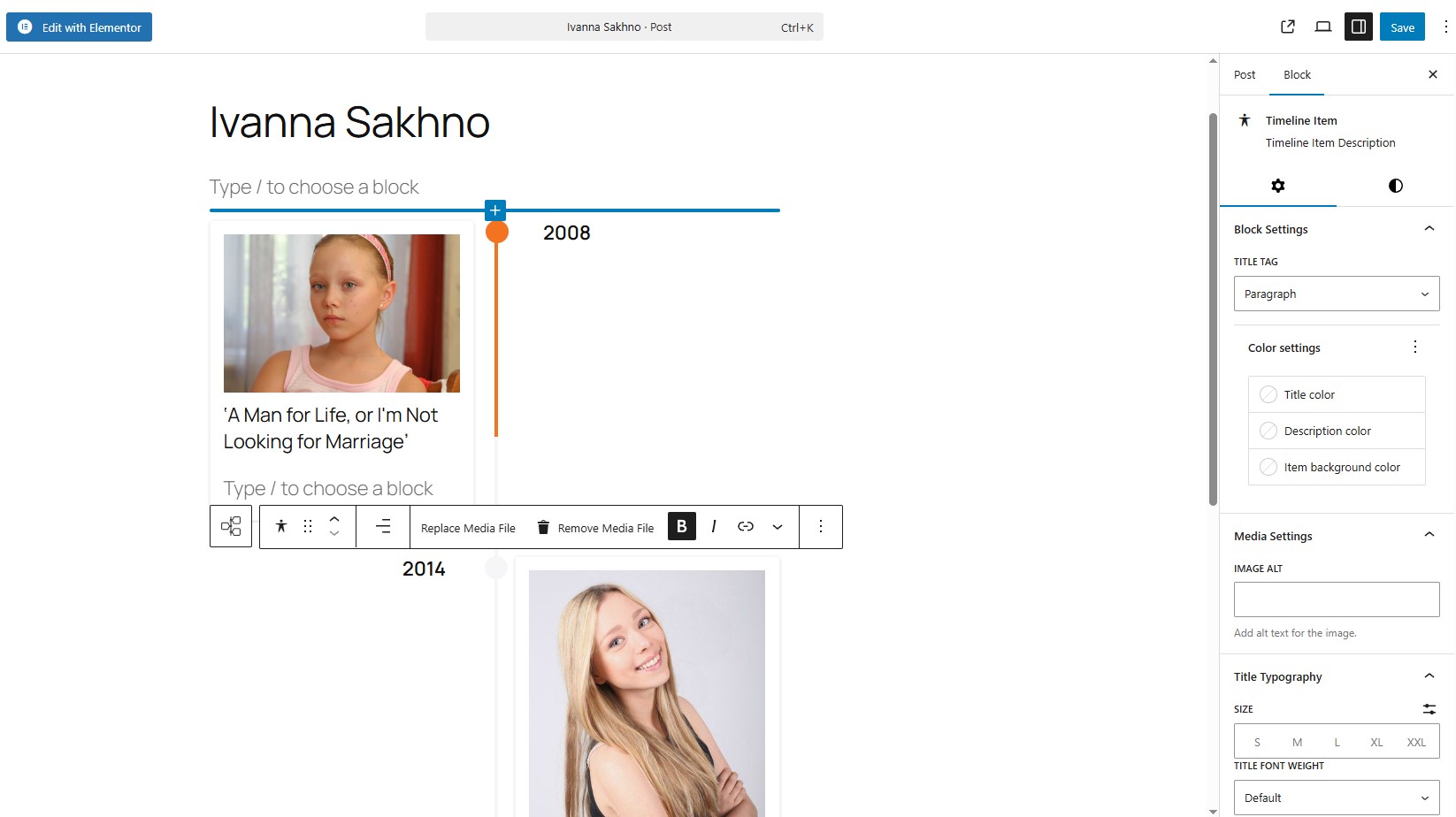
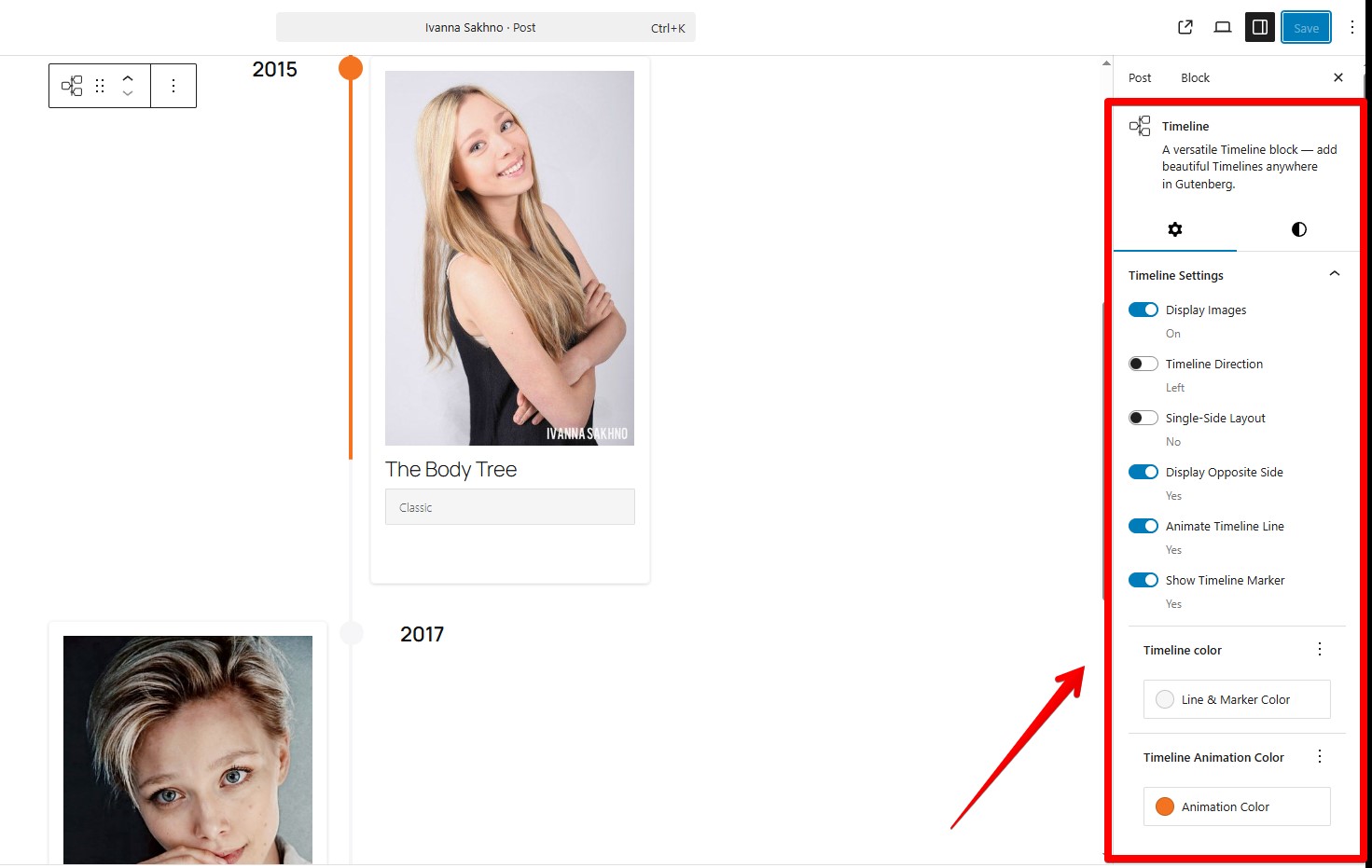

Bloklar
Bu eklenti 1 blok sağlar.
- Timeline Full Widget A versatile Timeline block — add beautiful Timelines anywhere in Gutenberg.
Yükleme
- Eklenti dosyalarını
/wp-content/plugins/timeline-full-widgetdizinine yükleyin veya doğrudan WordPress eklentiler ekranından kurun. - Eklentiyi WordPress’teki ‘Eklentiler’ ekranından etkinleştirin.
- Elementor düzenleyicisini veya Gutenberg düzenleyicisini kullanın.
SSS
-
En son Elementor sürümüyle çalışıyor mu?
-
Evet, Elementor 4.0.3 ve WordPress 6.9 ile test edilmiştir.
-
Gutenberg’i (blok düzenleyici) destekliyor mu?
-
Evet, eklenti yerel bir Gutenberg bloğu içerir. “/timeline” yazın
-
Zaman çizelgesi öğelerindeki işaretçiyi değiştirebilir miyim?
-
Evet, yapabilirsiniz. “İşaretçiyi düzenle” düğmesini kullanın. “İşaretçi Ayarları”nda “Benzersiz İşaretçi” seçeneğini seçmeniz gerekir, ardından görsel gibi kişisel bir işaretçi ayarlayabilirsiniz.
-
Zaman çizelgesi öğesi stillerini özelleştirebilir miyim?
-
Evet, her öğe için renkleri, tipografiyi, boşlukları ve hizalamayı kontrol edebilirsiniz.
-
Blok bileşeninde tüm Zaman Çizelgesi öğelerine aynı stiller nasıl uygulanır?
-
“Öğe stillerini diğer öğelere uygula” düğmesini kullanın. Geçerli öğedeki stilleri diğer tüm öğelere kopyalar.
-
30 px’den geniş (genişlik) benzersiz bir işaretçi ayarlayabilir miyim?
-
Evet, ancak zaman çizelgesi stilleri ayarlama gerektirebilir. Örnek:
@media (min-width: 701px) {
.tl-mark:has(img) {
max-width: 42px !important;
height: 30px;
left: calc(50% + 2px);
}
} -
Duyarlı mı?
-
Evet, zaman çizelgesi düzeni farklı ekran boyutlarına uyum sağlar.
-
Temamla çalışır mı?
-
Evet, blok ve klasik temalar dahil çoğu WordPress temasıyla çalışır.
İncelemeler
Bu eklenti için herhangi bir değerlendirme bulunmuyor.
Katkıda Bulunanlar ve Geliştiriciler
“Timeline Full Widget” açık kaynaklı yazılımdır. Aşağıdaki kişiler bu eklentiye katkıda bulunmuşlardır.
Katkıda bulunanlar
“Timeline Full Widget” 9 dile çevrildi. Katkıda bulundukları için çevirmenlere teşekkürler.
“Timeline Full Widget” eklentisini dilinize çevirin.
Geliştirmeyle ilgilenir misiniz?
Kodu görüntüleyin, SVN deposuna göz atın ya da RSS ile geliştirme günlüğüne abone olun.
Değişiklik Kaydı
2.2.1
- Fixed an issue with module script optimization.
- Improved Gutenberg block frontend script loading to ensure animations initialize correctly.
2.2.0
- Added showing step numbers of items.
2.1.1
- Hata düzeltmeleri.
2.1.0
- WordPress Playground desteği eklendi.
- Yatay ve dikey içerik düzenleri desteği eklendi.
- Medya ve içerik sırasını tersine çevirme seçeneği eklendi.
2.0.0
- Hata düzeltmeleri.
- Başlık Tipografi kontrolleri iyileştirildi.
- Medya öğeleri için bağlantı sarmalayıcı desteği eklendi.
- Zaman çizelgesi genişliği stil kontrolleri eklendi.
1.3.0
- Geçerli öğeden stilleri kopyalamak için bir düğme eklendi.
- Gutenberg blok zaman çizelgesi için duyarlı medya sorguları eklendi.
- Elementor bileşeni zaman çizelgesi için duyarlı medya sorguları eklendi.
- Zaman çizelgesi öğelerinin içindeki medya genişliği kontrolleri eklendi.
- Elementor’daki İçerik Tipografi stili sorunları düzeltildi.
- Çizgi ve işaretçi renk stilleri ayrıldı.
1.2.0
- Gutenberg bloğundaki zaman çizelgesi stilleri düzeltildi.
- Hata düzeltmeleri.
1.1.0
- Hata düzeltmeleri.
- Gutenberg bloğundaki Başlık öğeleri için yazı tipi ailesi seçimi eklendi.
1.0.1
- Zaman çizelgesinin karşı tarafı için sabit metin ayarları eklendi.
- İşaretçi animasyon davranışı düzeltildi.
1.0.0
- Yayın Tarihi – 25 Eylül 2025.
- İlk Sürüm.