İçeriğe geç
WordPress.org

WordPress Türkiye

  • Temalar
  • Eklentiler
  • Haberler
  • Hakkında
  • Facebook
  • Twitter
  • WordPress edinin
WordPress edinin
WordPress.org

Plugin Directory

Webknit Site Toolkit

  • Bir eklenti gönderin
  • Favorilerim
  • Giriş yap
  • Bir eklenti gönderin
  • Favorilerim
  • Giriş yap

Webknit Site Toolkit

Webknit Digital tarafından
İndir
  • Detaylar
  • Değerlendirmeler
  • Kurulum
  • Geliştirme
Destek

Açıklama

Webknit Site Toolkit lets a site administrator:

  • Recolor the wp-admin sidebar, links, buttons, and form inputs, entered as hex codes or picked visually.
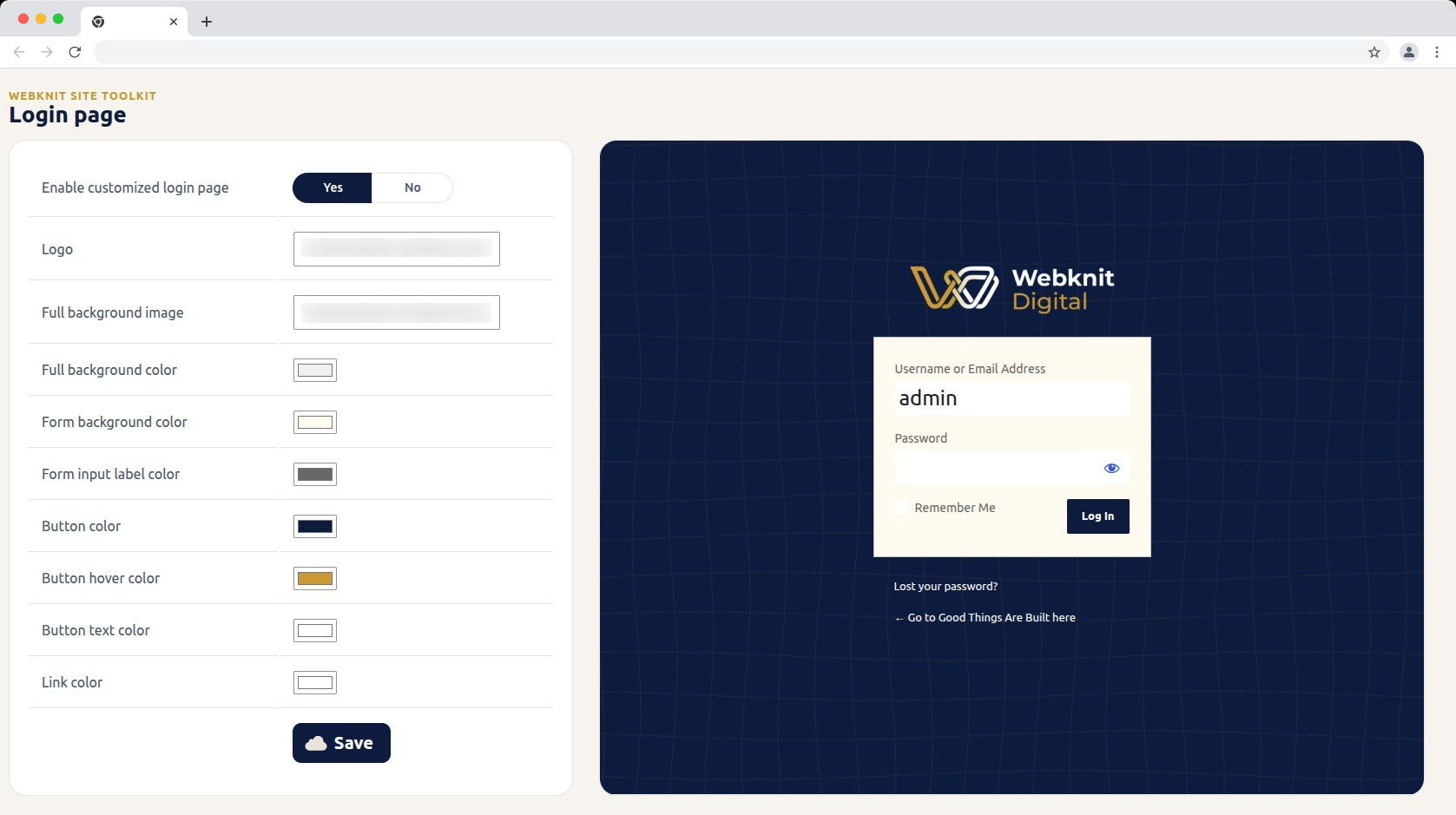
  • Customize the login screen: logo, full-page background image/color, form background/label colors, and button colors/text.
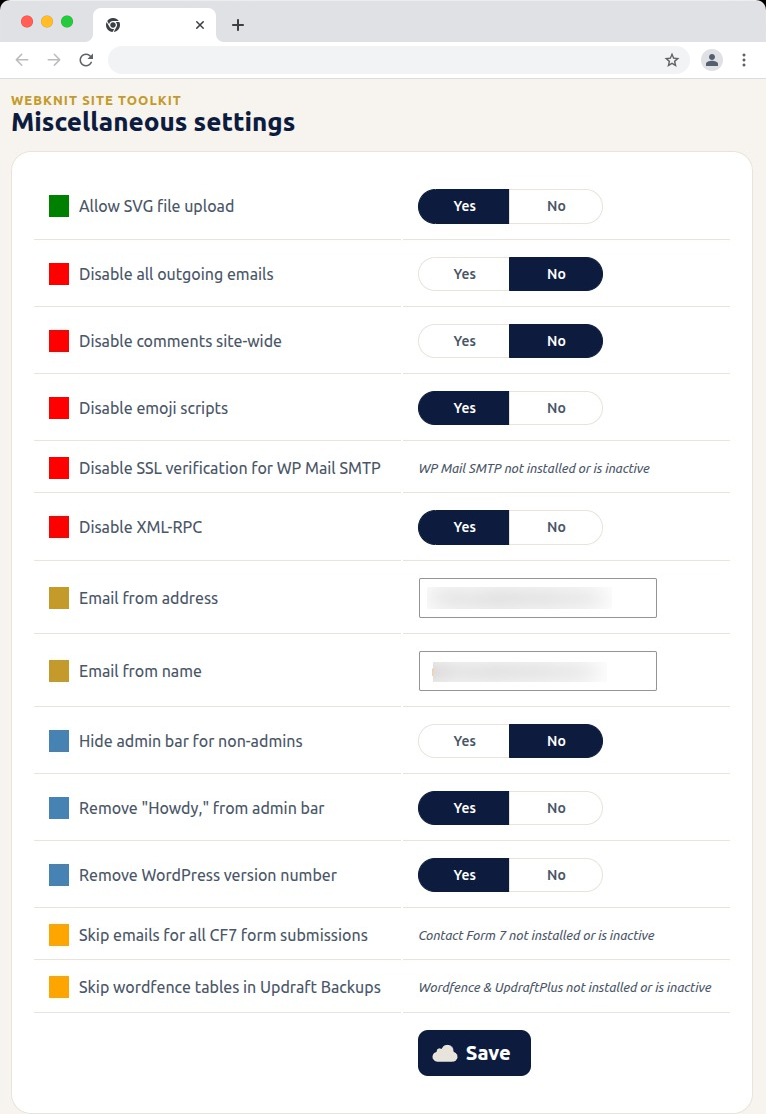
  • Toggle a set of miscellaneous settings: allow SVG uploads, disable SSL verification for WP Mail SMTP, disable outgoing emails, skip Wordfence tables during UpdraftPlus backups, skip Contact Form 7 submission emails, disable XML-RPC, remove the WordPress version number, disable emojis, hide the admin bar for non-admins, disable comments sitewide, remove “Howdy,” from the admin bar, and override the outgoing mail “from” name/address.

Ekran Görüntüleri
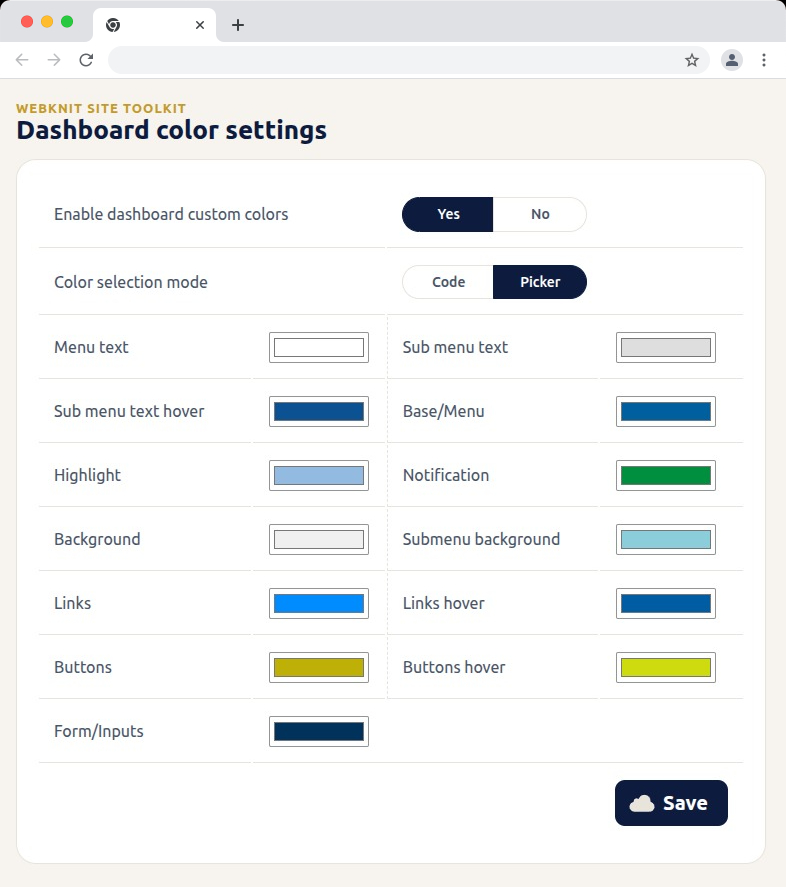
Dashboard color settings — recolor the wp-admin sidebar, links, buttons, and form inputs with hex codes or a visual picker.
Login page — customize the logo, background, form colors, and button styling, with a live preview alongside the settings.
Miscellaneous settings — toggle SVG uploads, outgoing email, comments, XML-RPC, and more; toggles for a plugin that isn't installed or active show a status message instead of a Yes/No choice.
Miscellaneous settings — toggle SVG uploads, outgoing email, comments, XML-RPC, and more; toggles for a plugin that isn’t installed or active show a status message instead of a Yes/No choice.

Yükleme

  1. Upload the plugin files to /wp-content/plugins/webknit-site-toolkit, or install through the WordPress plugins screen directly.
  2. Activate the plugin through the “Plugins” screen in WordPress.
  3. Use the “Site Toolkit” menu in wp-admin to configure dashboard colors, the login page, and miscellaneous settings.

SSS

Why does one of the Misc. settings toggles show a message instead of Yes/No?

That setting acts on another plugin (WP Mail SMTP, Contact Form 7, or Wordfence + UpdraftPlus) that isn’t currently installed or active, so the toggle would have no effect. The message replaces the toggle until that plugin is active; your previously saved choice is kept and reappears once it is.

I don’t see the “Site Toolkit” menu in wp-admin.

Access requires the manage_options capability, which by default only Administrators have.

I changed a color or setting and saved, but the site still looks the same.

Generated CSS is served with a cache-busting version, but browsers can still hold an old copy. Hard-refresh the page (Ctrl+Shift+R / Cmd+Shift+R) and confirm the save actually completed.

Where are the generated CSS files stored?

In wp-content/uploads/webknit-site-toolkit/. That directory must be writable by the web server, or dashboard/login color changes won’t apply.

İncelemeler

Bu eklenti için herhangi bir değerlendirme bulunmuyor.

Katkıda Bulunanlar ve Geliştiriciler

“Webknit Site Toolkit” açık kaynaklı yazılımdır. Aşağıdaki kişiler bu eklentiye katkıda bulunmuşlardır.

Katkıda bulunanlar
  • Webknit Digital

“Webknit Site Toolkit” eklentisini dilinize çevirin.

Geliştirmeyle ilgilenir misiniz?

Kodu görüntüleyin, SVN deposuna göz atın ya da RSS ile geliştirme günlüğüne abone olun.

Değişiklik Kaydı

1.0.0

  • Initial release.

Meta

  • Sürüm 1.0.0
  • Son güncelleme 1 hafta önce
  • Etkin kurulumlar 10dan fazla
  • WordPress sürümü 6.0 veya üstü
  • Test edilen sürüm 7.0.4
  • PHP sürümü 7.4 veya üstü
  • Dil
    English (US)
  • Etiketler
    admincolorsdashboardloginsettings
  • Gelişmiş görünüm

Puanlar

Henüz inceleme gönderilmedi.

Değerlendirmeniz

Tüm değerlendirmeleri gör

Katkıda bulunanlar

  • Webknit Digital

Destek

Söyleyeceğiniz bir şey mi var? Yardım mı lazım?

Destek forumunu görüntüle

  • Hakkında
  • Haberler
  • Barındırma
  • Gizlilik
  • Vitrin
  • Temalar
  • Eklentiler
  • Modeller
  • Öğren
  • Destek
  • Geliştiriciler
  • WordPress.tv ↗
  • Katılın
  • Etkinlikler
  • Bağış ↗
  • Swag ↗
  • WordPress.com ↗
  • Matt ↗
  • bbPress ↗
  • BuddyPress ↗
WordPress.org
WordPress.org

WordPress Türkiye

  • X (eski Twitter) hesabımıza bakın
  • Bluesky hesabımızı ziyaret edin
  • Mastodon hesabımızı ziyaret edin
  • Threads hesabımızı ziyaret edin
  • Facebook sayfamızı ziyaret edin
  • Instagram hesabımızı ziyaret edin
  • LinkedIn hesabımızı ziyaret edin
  • TikTok hesabımızı ziyaret edin
  • YouTube kanalımızı ziyaret edin
  • Tumblr hesabımızı ziyaret edin
Kod şiirdir.
The WordPress® trademark is the intellectual property of the WordPress Foundation.